Need for an oversampling block in Sigma Studio
Hi,
during my activity in this post,
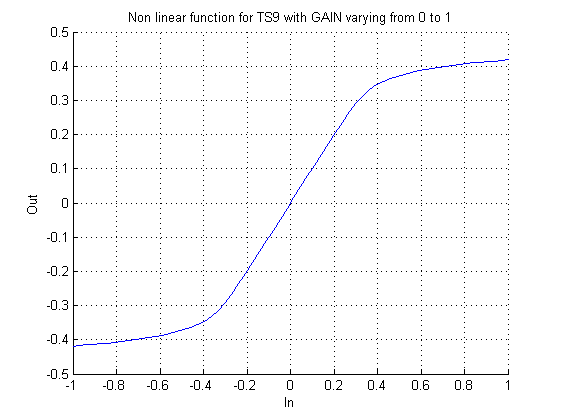
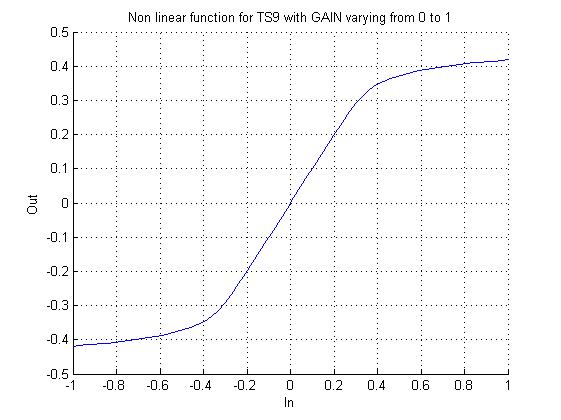
I experienced the need for an oversampling block in Sigma Studio. The problem arise when you model non-linear
static transfer functions inside the dsp for example with a LUT, something like that:
When you pass your audio signal through this LUT new harmonics are added to the signal and so the risk to fall into
aliasing problems. My solution is to limit the bandwith of the signal before the LUT, but I think this is not always possible.
A better solution would be to run this LUT at an oversampled period. This is commonly implemented in code with a for loop
which calculates the function iteratively N times at each sample. Obviously this requires more DSP instructions.
What do you think?
effect
aliasing
audio quality
oversampling
I would also love to see this feature, but I fear that it may not be practical with their existing architecture.
Of course, the brute-force way is to just run your whole system at a higher sampling rate.
HI:
What DSP are you using? we are working on implementing this feature on the 145x. IT would be more difficult in previous versions of the SigamDSP (but has been done on a block by block level).
Miguel
Hi Miguel,
I had assumed that an oversampling block would be impossible in a Sigma 100 (ADAU1701, etc.) since branches are unavailable -- these processors just run NOPs padded to their instruction space at the end of a user's project.
Best regards,
Bob
Hello Miguel,
what is the current status of oversampling block for 145x please?
Best regards,
Jan
Hello Miguel, some time has passed. Any news on this feature?
Miguel is no longer with ADI. However, multirate processing is available in SigmaStudio for the '5x and '6x SigmaDSPs. Since the algorithm runs completely once per sample, it is not possible to upsample, only to downsample, relative to the core rate. The answer is to run the core at the maximum rate that you need, and downsample everything that you want to be at the lower rate. Note that downsampled processes use the same resources that they would running the core at the lower rate. If you hover the mouse over a wire, you will see the sampling rate of that stream.
The downsample/upsample block do have an optional LPF, but it is an IIR filter. I would recommend not selecting that option and designing your own FIR using the normal FIR block, Also, not that you can right click the downsample/upsample blocks and select either sample-and-hold or zero padding. Lastly, you can right click input blocks and select their sample rate. This does not change the SPORT rate. It only changes the rate recognized by the software.
Ken
Please log in to reply.