ADAU1445 one output channel missing
Hi,
I've enclosed my project for somebody who can take a look and maybe help me:)
The problem is that I cannot get signal on output channel no 0,2,4,6. When I put a level indicator on one of this channel on the schematic it shows that there is signal but on phisical output is silence. I've made a test and swap left and right channel before T connection and it is still no signal on the number 0,2,4,6. Is it matter of some register settings maybe? Please help!
Best Regards,
Kuba
Audio Signal Processors
adau1445
SigmaDSP Audio Processors
Hi,
I've found out something new. When I download program to ADAU by Sigma Studio and work on-line it's working fine. It is getting started to lost one channel when I disconnect USBi programmer and try to work on self boot mode. Of course I'm downloading program to ADAU by "Write latest compilation..." In my system I'm setting ADAU by external microcontroler by I2C. I observe also some strange behaviour when I changing sample rate of input/outputs. Sometimes I can hear both channels (not so often), sometimes only one, and sometimes one channel is very quiet. Here is procedure:
1. set start pulse select =48kHz
2. wait 100us
3. set input pair1 to 48kHz
4. wait 100us
5. set output pair0 to 48kHz
6. wait 100us
7. etc. untill output pair 3
8 after that is procedure to setup AD1955 on the ADAU outputs
And the same procedure is to set sample rate for 96k, 192k...
Maybe this facts will help to find out a reason...
Hello Jakub,
Have you looked at the I2S outputs on a scope?
I did not see anything wrong with your project at first glance. I see you are slaving input serial port 0 and all other ports are masters.
So what mode is the serial port set to on the AD1955? Are you running the 1955 in stereo mode or mono?
I would be good to see a schematic so I can see what is connected to what port and how you are doing the clocking?
When you change the sample rate in the DSP are you also changing it in the DAC?
Dave T
Hello Dave,
I have looked on the scope and there is something but I cannot recognize if this is signal or silence. But I also connect eval board of ADAU1446 directly from I2S output from my DSP to I2S input of eval board and put a simple program into eval board and also I connect speakers to analog outputs. And the results was the same that one of the channel were quiet. So I know that my ADAU1445 is not putting stereo signal on the output.
I have connected several inputs into ADAU and on all is the same behaviour. Input pair 1 and 2 is coming from AD1974 in slave mode and input pair 0 is coming from CS8416 (SPDIF receiver) in master mode. That is why those input ports are in different mode.
AD1955 are configured to work in mono left and mono right mode in below order:
CH1 -left, CH2- right, CH3-left, ... CH7- left, CH8- right. And also I setup AD1955 to the same sample rate as ADAU, by changing register 0 "PCM Sample Rate".
Is it possible that I can send schematic to Your private e-mail? I don't want to put all my project for everybody on this forum:)
Kuba
Hello Kuba,
I studied your project further and I also loaded it onto an eval board here in the lab. I looked at the I2S outputs on a scope to verify that the signals were in fact going out. I did find they were fine. Since the eval board is setup slightly differently and I think my SPDIF in has an issue I changed your project around slightly by using an oscillator in the DSP to drive the outputs. Since you hade the volume controls set for only -15dB (it is difficult to see this on a scope) so I also added mutes to each channel so I could easily see which channel was which. Everything seems to be working good. Here is a scope plot I took of the LRCLK0 and SDATAOUT_0 and you can see there are two channels present.
When I would mute the appropriate channel it would see only the one channel drop out.
Here is the project if you want to use it for testing. Just keep in mind I did change some settings for the SPDIF input so I would not use this project for your application unless you look it over really well.
I will send you an email about your schematic.
So what are you using for the LRCLK and BCLK to drive the DACs? There are a few tricky things with this part with the clock domains and the serial ports. You should be using clock domains 4,5,6,7,8,9,10 or 11 for the DACs. You should NOT be using 0,1 or 2. I think you are probably fine since you should have the SPDIF IC on domain 0, and the ADCs on 1.
So if you still have not found the problem then send over the register settings for the DACs. I know you are setting every other one for the left or right channel but the rest of the register settings should be the same for each DAC.
Dave T
Hello Dave,
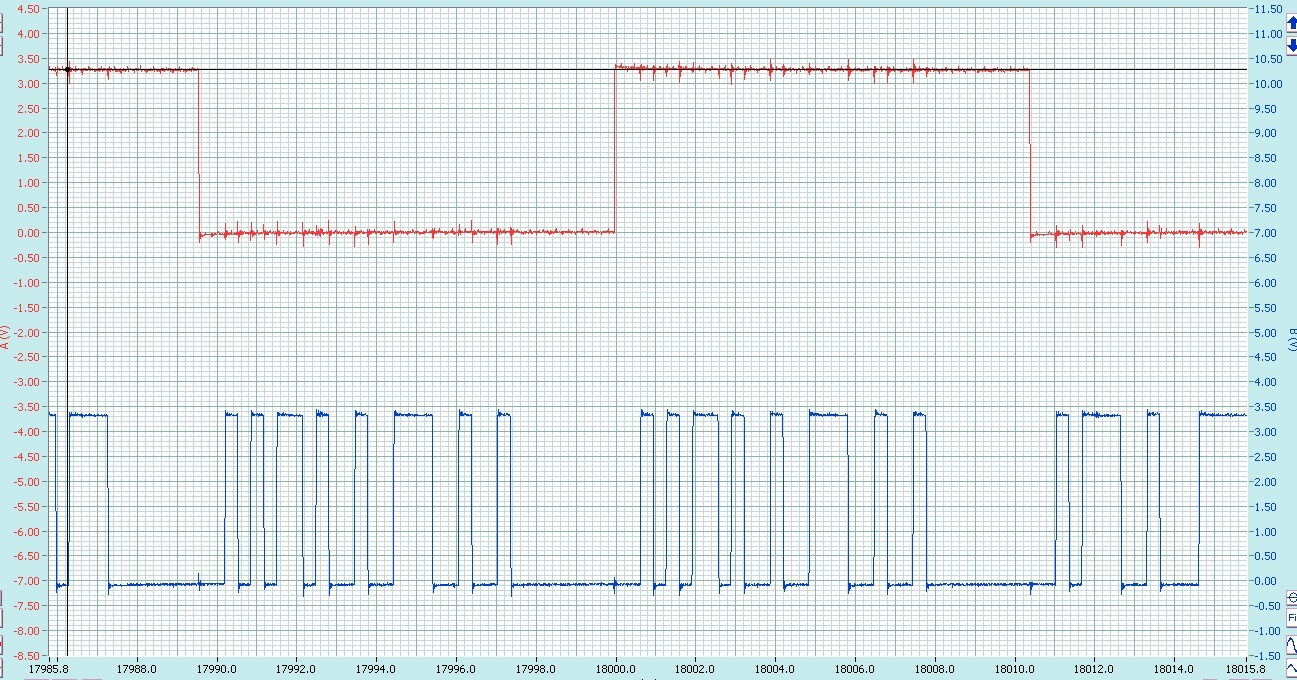
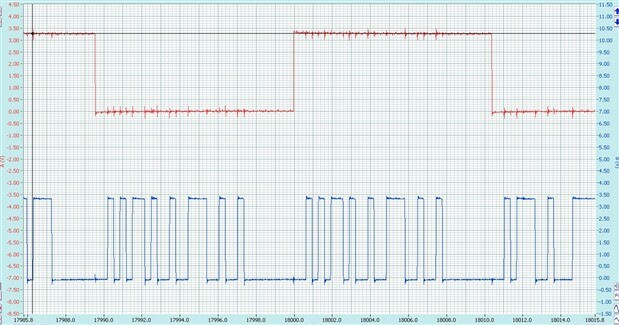
Thank You for small investigation, so if the ADAU program is ok then maybe there is an issue in schematic or register setting for DAC. All DAC's have LRCLK and BCLK drive from clock domain 11 through SN74LVC8T245 buffer. The setting which I only change in DAC register is Control Register 0 bit 9:8 (exact sample rate) and bit 11:10 (output format) to Mono left or mono right. All the rest setting are default. During a lot of test is still strange behaviour becasue sometimes I'm loosing left channel and sometimes right..
Regards,
Kuba
Hello Kuba,
Capture some signals on a scope and post them. I would like to see the LRCLK, BCLK and Data taken as close as you can to the DACs. Look at my screen shot, make it look like that with one LR-clock period on the screen and all three signals captured at the same time if possible.
Then I would like to see a capture of the MCLK signal as it look at the DACs.
Then send me a schematic. I sent you an email yesterday so you would have my email address.
Thanks,
Dave T
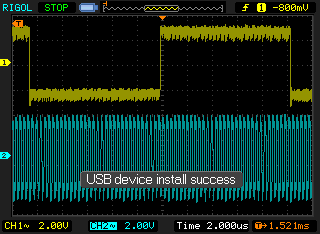
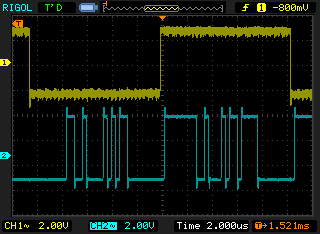
Hello, This what I get on my limited 2 channel oscilloscope: (measurement taken from the DAC pins from far end from ADAU)
RLCLK and BCLK:
RLCLK and DATA
MCLK
Please write if You need more precisly graphs.
Regards
Kuba
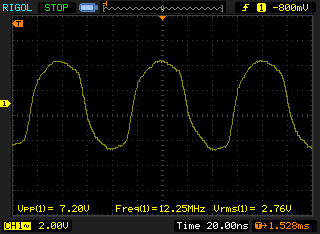
Hello Kuba,
I replied to your latest email but the message was bounced back and said it was rejected by your server. Strange... So I will paste in my response here:
Hello Kuba,
What are your PCB stack up details?
I am very concerned that your MCLK signal is over 7 volts!! Plus, it is going way below ground! What is your DVDD voltage on the 1955? You cannot go over DVDD more than 0.3V and you cannot go less than 0.3V under the ground potential. So this is why I see this distortion on the top and bottom of the waveform. You are probably forward biasing the ESD diodes on the pins which will be dumping this signal onto the power and ground for the parts. This can cause internal digital circuits to react to this and either trip early or late.
Initially I was concerned with the over/undershoot and the noise I saw on your waveforms, but now I see it may be worse. Your digital signals must be treated as transmission lines and cannot go over or under the power rails. The dampning resistors will help this but for the level converter to be sending out around a 7V MCLK signal then you need to look closely at the power on your board.
Also, send me your PCB details. I am mentioning it again so you can remember. J
Thanks,
Dave T
Hello Dave,
This system is made on 2-sided standard FR4 1,5mm thick board. I can send You a pcb project on priv if You want to look closer.
What I measure on the output pin of the MCLK on the level converter the level is max 5,3V and min -0,3V and is rising on the next DAC's which are more away from the level converter. And those which was almost 7V is placed on the edge of the board. Could You explain why it is increasing, and how I can avoid this?
Regards,
Kuba
Hello Kuba,
Best I could guess is that it is resonating?
You MUST use at least a four layer PCB. The interior layers must either be both ground or one be ground and one be power. Fun few if any traces on these internal layers. If you need to run more traces then go to six layers and have the two internal layers be signal layers with the ground and power layers between them. So from the top to bottom:
for 4 layer:
Signal
Ground
Power or ground
Signal
For six layer:
Signal
Ground
signal
Signal
Power or ground
Signal
If you have to use a via then go between layer 1 to 3 and between 4 to 6 as much as possible. Avoid going from 1 to 6 if possible.
The reason for the ground plane is to provide a stable impedance for signals running on the signal layers. You can go even further and control the trace impedance by trace widths and the distance between the layers. (plus the type of material used to insulate between layers). But for most applications it is not that important to be that controlled. This will help prevent the overshoot undershoot along with the series resistors on the clock lines. This is why I saw a lot of noise on your power and ground on the plots you sent over.
There are a lot of other PCB layout details to take care of to control noise. I will send you are private message to share the files.
Thanks,
Dave T
Hello Kuba and all others reading this,
Kuba and I have had an off-line conversation. He did add some series resistors but there was only marginal improvement. When he went to higher sampling rates it fell apart again. He also was distributing MCLK to many parts and really needed a distribution amp. But the major issue is that the PCB is only two layers. When transmitting high frequency digital signals the PCB must be at least four layers.
Have a look at the PCB Design Considerations section of the ADAU1452 datasheet. In there it explains how to route to bypass caps and how to connect to the power and ground planes. Then have a look here:
http://www.bethesignal.com/bogatin/
Within this web site there are on-line classes available. I do
not know the costs but I have taken similar courses and these principles apply
to what you are trying to do.
http://www.bethesignal.com/bogatin/product_info.php?cPath=88&products_id=833
We have no affiliation with this web site but they have done some really great research on Signal Integrity issues and Mr. Bogatin has written a good book on the subject.
Dave T
Hello Dave,
I'm back with new conclusions. I can see now that the problem with missing signal only appear on channel 5 and 7. I've already replace AD1955 and his dedicated power supplies chip on those channels and this not helped at all. But what I've also observe is that when signal dissapear on one of those 5/7 channel I can see that ZeroL and ZeroR flag is activated in AD1955 on this exact channel. Datasheet says that there was a silence detected on I2S input. How is possible that on the rest of channels where this signal is connected all AD1955 work fine? I don't want to believe that this is becasue of the poor pcb design and long transmission lines. Channel no 8 is on longest lines and it always works fine. Is this can be because of wrong peripherials part connected to AD1955 (like resistors, capacitors) on channel 5 and 7? And question to AD1955 - if it detect silence it is going into somehow in stop mode? If there is reset needed then or it should go back to life again in automatic way?
Kuba
Hello Kuba,
You really need to re-layout your board with four layers and power and ground planes. Then look at what you have. The transmission line signal can be reasonable at the end but then there is a reflection from the end zooming back along the line and it can cause cancellation of signals in the middle of the transmission line. I cannot even model this for you because without ground and power planes the impedance of the transmission line is undefined.
Dave T
Please log in to reply.