[Bug Report][Reload] Compiler Error SigmaStudio 3.11, 3.12.3 beta
Title: When use 2 types(ADAU1445 * 2 , ADAU1452 * 2) and use ADAU 1445's 'Mono Switch 1xN' Function, Occurs Compile Error
Description: Below file reference.
SigmaStudio Version: I tested Sigma Studio 3.11 and 3.12.3 beta
OS: Window 7 Professional K Service Pack 1
Audio Signal Processors
adau1452
SigmaDSP Audio Processors
Hello Choi Jin,
I think I found the problem. It looks like the first switch you used was not for IC4. All the rest of the inputs, mutes and outputs for that circuit was for IC4. So I deleted it and inserted a switch from the IC4 library and I was able to compile the project. I have placed my edited version in this post.
What may have happened was that you copied and pasted a switch from the IC 2 or 3 which is an ADAU1452 and tried to use it on IC4 which is an ADAU1442. Then it was not able to assign itself to IC4. It is important to take the cells from the library for the IC that you will want to use it on.
What I think may help to prevent this problem is to use Hierarchy blocks as a tool to organize all the functions of each IC on each board. If you end up needing a sub board then use the IC name in the board name.
You will not have to route any signals from the Main schematic page to the boards since you cannot do that anyway. Then you can easily tell which parts of the schematic is for which IC. Then when you send some audio via a serial port to another DSP, then you can label that port as to which IC it is going to. Using labels will also help you figure out what you did when you open this up four or five years from now when you need to make changes.
So I will attach your project with the ICs separated onto three boards so that you can click on the tab and easily move from IC to IC.
Thanks,
Dave T
Thanks Dave T!
your explain is good.
My problem is solved.
But I think that below youtube video is bug.
p.s I hope you would understand my poor English.
Thanks,
JG Choi
Thanks JG Choi,
Your video does help a lot. Don't worry about your English, it is much better than my Korean!
I understand how it happened much better now. A few months back I did mention to the team that it is difficult to see which IC is assigned to which cell. They were aware of the problem and they are going to make it easier to know what IC a cell is assigned to. I am not sure if this feature will make the next update of SigmaStudio but it is on the priority list for the programming team. I will also send them your video.
It is difficult to know which IC a cell belongs to. In my example using hierarchy blocks I am pretty sure I have IC 1 and 4 swapped and IC 2 and 3 swapped.
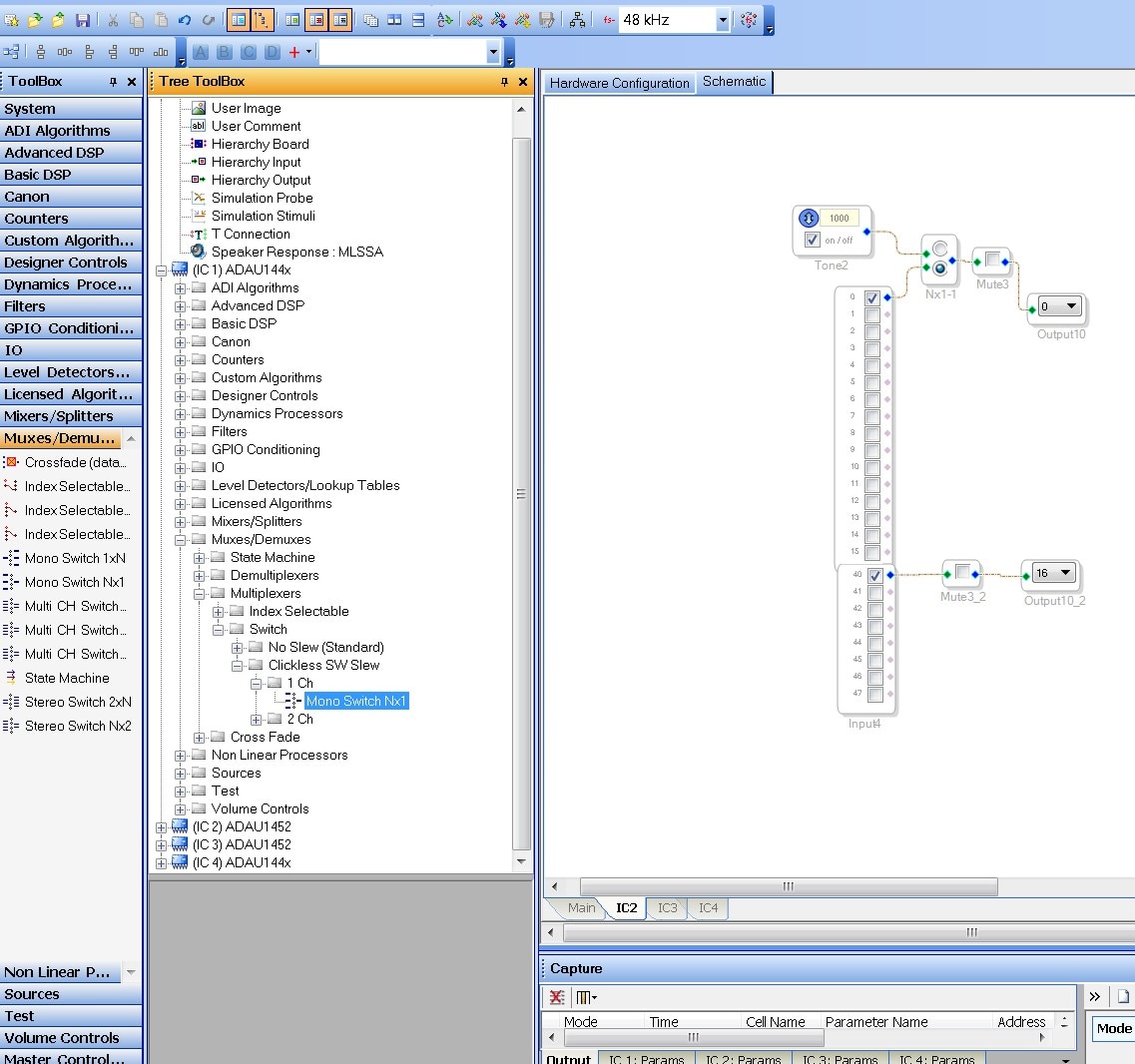
Now, I suggest you switch to using the Tree-Toolbox instead. Because it is organized by the IC so you can grab the cells that way and they will already be assigned to the proper IC. I have included a screenshot showing both the Toolbox open and the Tree Toolbox open. The icons are right next to each other on the toolbar.
This may help you for now with this project.
Thanks,
Dave T
Please log in to reply.