Wobbeltonegenerator with ADAU1701
Hallo Forum,
I´m searching for a solution to built a FM Wobbeltonegenerator to use in a Audiometer. Sigma Studio with a ADAU1701 Sigma DSP.
What the Generator Output should do: (FM Modulation)
A Generator with:
Sine Tone, with adjustable Center Frequency from 125Hz-20khz and
- adjustable depth from +/-5% up to +/-20% (depending from the Chosen Center Frequency
- adjustable Rate from 1-25Hz
The changes in Frequency (from the lowest to the highest and reverse) should be linear, or sinodial
Is there anyone in this Forum that can help me to built such a Oszillator in Sigma Studio?
Thanks.
Audio Signal Processors
SigmaDSP Audio Processors
adau1701
Hello,
With SigmaStudio there's nearly always more than one way to get something done, so the example shown below is just one possibility. Likely, though, you'll use a VCO to generate your main frequency, and either another VCO or a standard oscillator (shown) for the modulation. I wasn't sure if you needed both sine and linear (triangle wave) modulation:
Because your top frequency at its modulation peak is awfully close to the Nyquest frequency at the base 48K sample rate, I set up this one to run at 96K. For info on changing sample rate, see: FAQ: How do I change the sample rate of my SigmaStudio system?
This runs as-is on a -1701MINIZ eval board. As set, it sounds exactly like a descending Martian flying saucer in a low-budget 1950's sci-fi movie. They had a lot more trouble making such a sound back then!
How do you plan on controlling the various adjustments in your final product? Likely you'll have your system uC safeload these to the individual blocks in parameter memory. Just yell if you need help with this. If you were thinking of a self-boot system with control knobs, we can also work on that.
Best regards,
Bob
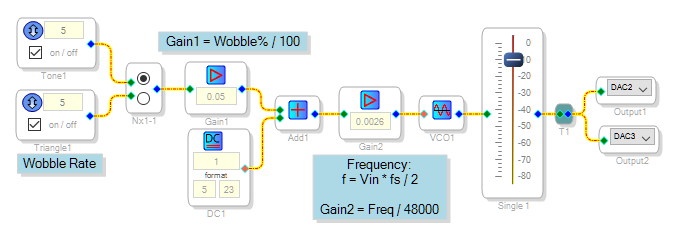
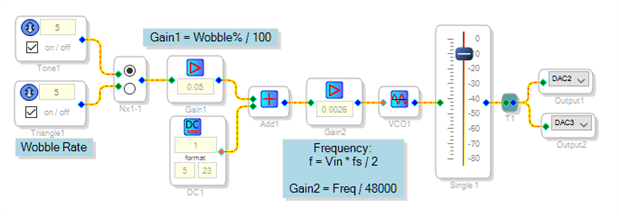
Hi Bob, at this point, thanks for the answers to my questions. The two signal generators I have so taken in my SigmaStudio DSP Design. The end application is a "audiometer" where these different signal generators are required as stimuli. I don't want to use self boot to apply the program into the DSP. For this purpose I use a microcontroller.
Hi Bob,
my Audiometer Hardware is ready now. For this Project I want to add a additional Generator Source. I Need a filtered White noise Stimulus. For testing I take the withe noise Generator and add a Bandpass Filter behind.
Bandpass filter with a Bandwith of 0,5 octaves, where I can vary the Center freuency from 125-16000Hz. My Problem is, that the Output Level of this "filtered" White noise Drops, depending on frequency. Do you have any idea to built a filtered White noise source with constant Level Output, that I get a Output Level, the same as without the Bandpass filter for all frequencies?
Another question is: how can I realise a meter readout in Sigma Studio for a Stereo source (like a VU-Meter) with data read out with my microcontroller?
Thanks in forecast.
Best regards
Rüdiger
Hello Rüdiger,
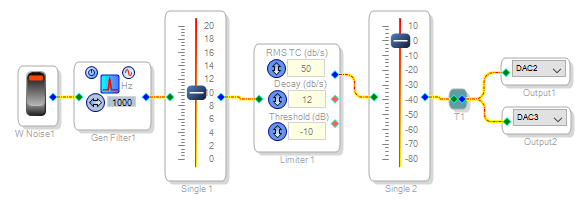
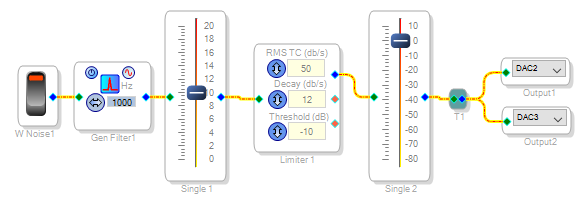
I'm happy to hear that your project is going along well. Perhaps you could level the output of your filtered noise generator by closing a feedback loop around its level. Placing a limiter in the path as shown below is the easiest way:
Increase the first volume control until the filtered noise "hits the limit" over the desired frequency range. Then adjust the output level with the second control. Place any output switching after the limiter, so its dynamics won't affect the output.
To provide a uC-readable level indication, try the idea shown at:
https://ez.analog.com/message/269848?commentID=269848#comment-269848
Best regards,
Bob
Hello,
I posted an answer earlier today but it's languishing in moderation.
Bob
Hello Bob,
Yes, I saw that and just approved it. I also reported it to the nice lady who oversees EZ. I looks like they are still working on the algorithm that detects possible spam.
Dave T
Thanks Dave. Also for your marking a slew of my previous answers as correct.
Bob
Hello Bob,
can you tell me how to build a closed feedback loop to get constant level output from the filtered white noise?
Thanks
Best regards
Rüdiger
Hello Rudiger,
I have not had a chance to build this and test it, and I will not have a chance to until tomorrow, so I will offer a suggestion to try.
The problem is that the filter is a constant 0,5 octave and White noise is equal energy of noise at each frequency. So as you go higher, an octave spans a larger and larger span of frequencies. So this will cause the level to rise as you go higher. So the answer is to use a pink noise source. We do not have that but we do have a pinking filter. This is located in with the miscellaneous filters. So run the white noise source into the pinking filter and then to your filter and I think you will see better results.
Like I said, I have not had a chance to try this today.
Dave T
Dave,
I had assumed from Rüdiger's description that the level was going down as frequency increased -- but if it's in fact the other way round, pink noise is indeed the best way to equalize the level.
Rüdiger,
The limiter is in fact a self-contained, closed loop algorithm. Try David's solution (pinking filter) first if suitable.
Best regards,
Bob
Hello Rudiger and Bob,
Today I hooked up an eval board and ran this experiment.
I did see the output level vary on the channel 1 with only the white noise as input when I varied the bandpass filter from 125Hz to 16KHz. On the channel 2 output it was much better. It was not perfect but maybe 3-dB-ish difference. So I think this may work for your application. If you need something even more controlled then employ the limiter/compressor that Bob suggested. Still use the pinking filter but then run it into a compressor and squash it down a bit more.
Also, Keep in mind that you will need to use the double precision filter for this since you are going down to 125 Hz.
Let us know how this works for you.
Dave T
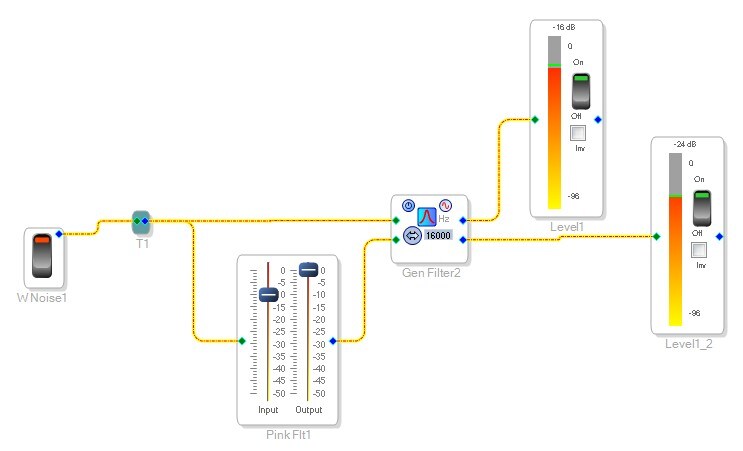
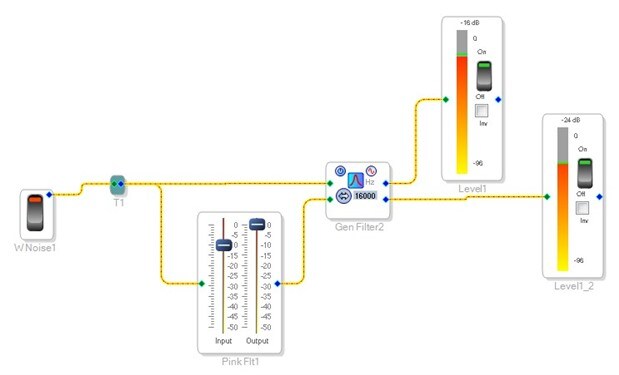
Hello Dave and Bob,
thank you for your answers. When I study my specification sheet´s there is the noise souce specified as a
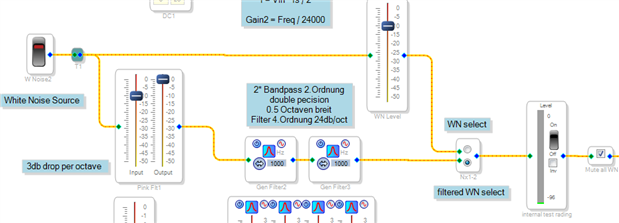
"narrow band noise, 24db/octave filtered noise". That is the specification of the noise source in all Datasheets for Audiometer use. I try for testing this:
With this I have the same problem to get the same output level at all frequencies. I used two crossover filters in series to get the 24db/octave Filter (HP / LP ) . Sweeping the frequency is difficult two, I have to Change the frequency 4 times for each point.
This seems to be a tricky noise source to realise. This is the last noise source I need to finalize my project.
Please let me know if you have the right idea to build this Generator in Sigma Studio.
Best regards
Rüdiger


Hallo Dave, Hallo Bob,
my filtered white noise source is now working. I added two bandpass filters in series to get a better stopband attenuation . The only disadvantage is, that I have to change the frequency twice for each working Point. And this should be done noiseless when sweeping.
I tested this with a realtime analyser and the frequency response looks pretty good for me.
Can you tell me, how I have to configure the DSP registers for SPI control with a microcontroller?
Thank´s for your help.
Best regards
Rüdiger
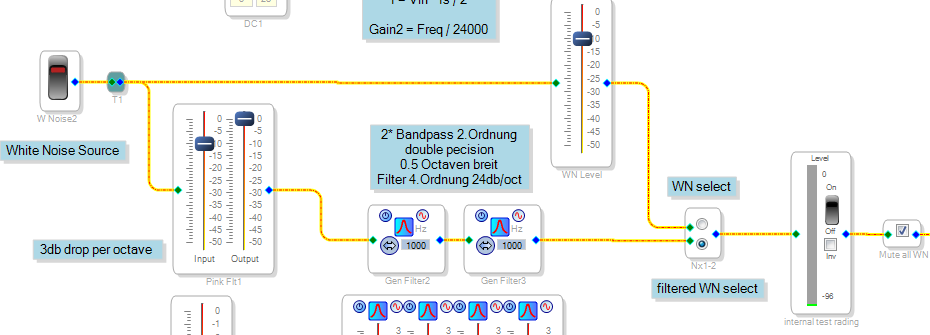
Hello,
You'll need to handle several details to have your uC operate your filters. I'll consider all of them below, just choose the ones you need help with.
Obtaining the filter coefficients -- Brett G's tutorial at Calculating Filter Coefficients to Store in a Microcontroller is a good place to start. He describes several ways to get your coefficients. Since you're using a microcontroller I suggest you put it to work and have it calculate or look-up the coefficients from the user's desired frequency. You could start by downloading the spreadsheet included in this link (you'll need to scroll down a ways): EQ Low- and High-Shelf filter coefficients comming back - Mysterious S factor. Click on the spreadsheet's cells to see the formulas, which you can easily convert to C code for your microcontroller. You can test calculated coefficients in SigmaStudio by typing them into the IIR Coefficient version of the General 2nd-Order Filter.
Safeloading the coefficients -- Safeloading is the only good way to change filter coefficients in a running DSP. The -1701 supports safeloading in a different way than other SigmaDSPs. Nando.One's tutorial Real Time Control TUTORIAL: SAFELOAD, Fixing and Breaking variables describes step-by-step how to handle safeloading.
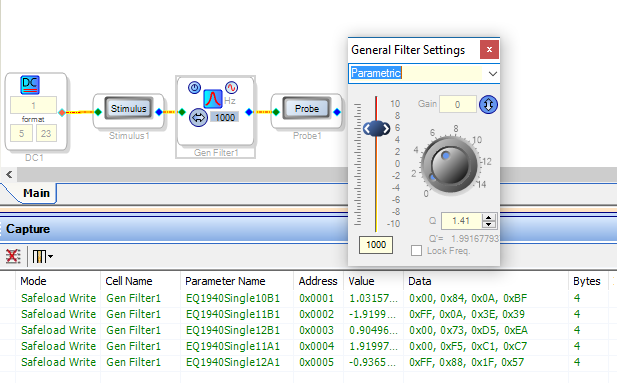
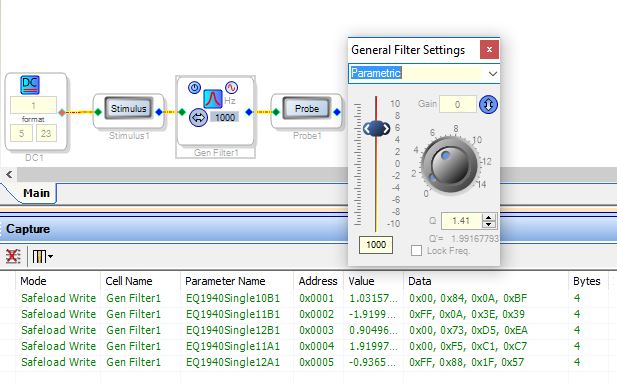
Finally, you need to know where (what range of addresses in the -1701's parameter memory) to safeload your coefficients. The easy way to find out is to Link-Compile-Download your project (with or without hardware connected), then manually change a filter while watching the result in the Capture Window:
Notice that if you add stuff to your SigmaStudio project, this may move the filter addresses. ADI has come up with a semi-automated method to handle this, using C header files and such -- but I could never figure it out so I just go into the C code and change the addresses manually when needed.
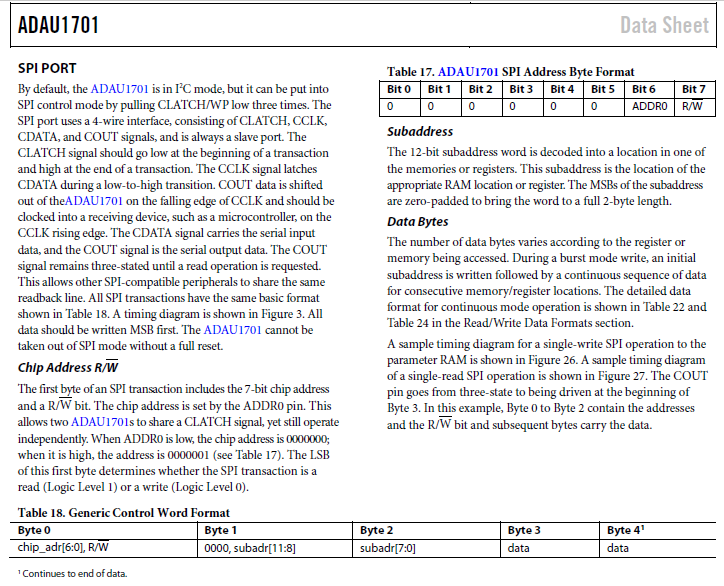
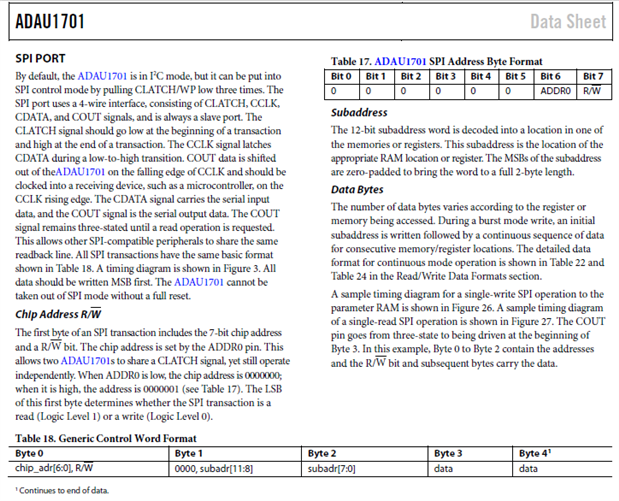
SPI Protocol -- The -1701 comes out of reset in I2C mode, its datasheet page 26 tells how to switch to SPI mode as well as what SPI data transfers look like:
Likely your C compiler comes with SPI routines to simplify this part of the coding. If not, or you're using assembly language, it's rather tougher. Perhaps searching the user's group for your microcontroller family would turn up something. Once you get your microcontroller to talk SPI with the -1701, the content to control the filters is the same as with I2C.
BTW -- you may need four bandpass ("peaking") filters to achieve a 24 dB/octave slope. Each filter has 2 poles, but they are split between low and high edges of the filter -- so you need twice as many filter stages as if you were merely doing lowpass or highpass. You can test filter responses right inside SigmaStudio using the Stimulus-Probe tool.
Best regards,
Bob
This question has been assumed as answered either offline via email or with a multi-part answer. This question has now been closed out. If you have an inquiry related to this topic please post a new question in the applicable product forum.
Thank you,
EZ Admin
Please log in to reply.