Query on Manufacturer Part No EVAL-ADUSB2EBZ
Manufacturer Part No: EVAL-ADUSB2EBZ
We have an Alpine Amplifier with built-in DSP, which has an Analog Devices chip.
In order to make real time adjustments via Sigma Studio program, we have acquired two pieces of EVAL-ADUSB2EBZ.
Unfortunately we were not able to see “Active Downloaded” message on the right bottom window after executing (Allow Realtime AB Testing) [Link Compile Connect] + [Link Compile Download].
Can you please help me how to resolve this?
Hello Mani,
I have several questions to understand what you are trying to do but for now let me start with a simple issue.
You cannot use two USBi boards at the same time.
So what are you trying to do with the AB testing?
I assume you were the people who developed the SigmaStudio program that is running in the Alpine amp? So you have the original program?
Once I know what you want to do then I can help you achieve it.
Dave T
What DSP does the amplifier contain?
Regards
Miguel
Hi Dave,
Thanks for the suggestions.
Please see my comments below:
During the time between our inquiry and your answer, we have checked, found a problem and repaired cable connections. We can now observe changes on equalizer settings.
However it takes more than once [link-compile-connect] + [link-compile-download] execution to see "Active Downloaded" message with the output of the dspproj file.
You cannot use two USBi boards at the same time. So what are you trying to do with the AB testing?
>It seemed the proper way - as the phrase included - "Real-time"
I assume you were the people who developed the SigmaStudio program that is running in the Alpine amp?
>If you mean the .dspproj file we are using now - it was created by Alpine, we will only to modify it for once.
As for the Sigma Studio (3.11) program - I have downloaded from Analog Devices website.
Thanks for your time and assistance on this matter.
Regards
Mani.S.
Element14
Hello Mani,
Thanks for the info.
[Link/Compile/connect] is used for the situation where the program is loaded into the DSP by the hardware, either an EEPROM or a system controller, and you want the hardware to boot up on its own but then be able to control parameters of the running program. To do this you must have the SigmaStudio project that created the program that is being loaded by the hardware. This way SigmaStudio knows the addresses of all the controls in the DSP. So you click on [Link/compile/connect] to compile the program but it DOES NOT actually load the program. That was done by the hardware.
[Link/Compile/Download] will do just that. Link, compile and then download the program to the DSP overwriting anything that was previously loaded. That is why you will see "active downloaded".
So I guess in your situation you can try to control the amp using the original program and just [link/compile/connect] to verify that it is the same program. However, I think you know that and it really will not prove much for you.
So to do AB testing, you will need to do the following:
Load in the original program and click on [link/compile/download].
Load in the modified program and click on [link/compile/download] and now the new program will be running.
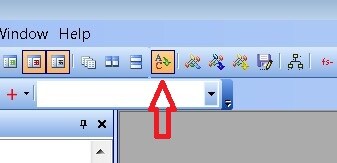
Click on the "AB Compare" icon to turn on the feature. (it is actually drawn with an "A" and a "C" for some reason)
Now you can switch between the two projects by switching the active window. When you switch the active window SigmaStudio will download the program to the DSP. It is much faster since it does not need to compile it. But, it does take a second or two to load in the program depending on the size of the program.
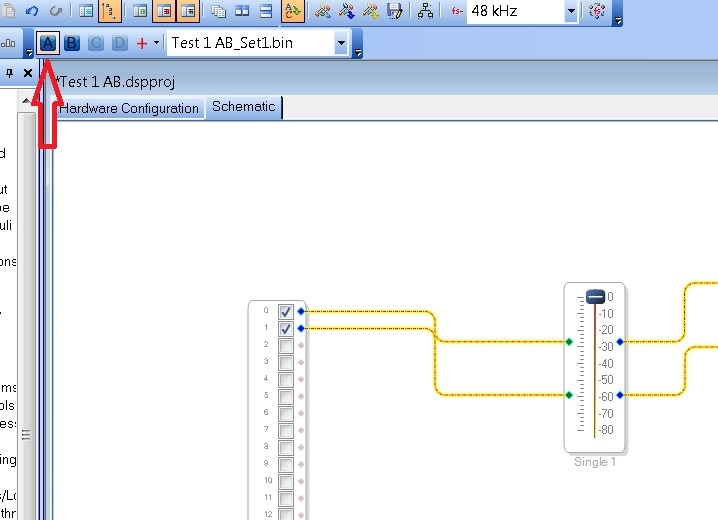
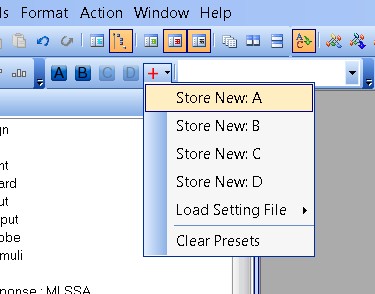
One other feature you may find handy is the project presets. This is where in a project you can store different settings for the controls/parameters. Then you can quickly switch between settings and listen to the difference. This is pretty fast since it only has to load the parameters and not the program as well. Here is where the Presets are located:
To set a new preset, you click on the red "+" sign and choose where it will be stored:
Then clicking on the "A", "B", "C" or "D" buttons will load in those settings. The settings also are stored in a file called Preset_A or Preset_B etc.
By the way, you can have both AB testing and presets active. The presets are stored with the projects so you can try to compare preset A on project Ver x.1 with preset B on project Ver x.2 by having the two projects loaded and each having different presets.
Once you get used to how this works you will like it. It is a great feature. It is not exactly real-time but it is close.
Oh, one other detail, you may want to try to run the newest version of SigmaStudio. 3.12 is the newest.
Dave T
Hi Dave,
Thanks so much for your time and detailed information.
Unfortunately we have one board with all leds lid - and the other one with D1,D2 & D4 lid.
Both interfaces are not seen on our computers
The first one with all leds lid got into that position when I used "detect hardware changes" via device manager of win10.
Regards
Mani.S.
Element14
Hello Mani,
I would like you to try to find a Windows 7 machine and try it on that operating system. Then let me know if it works.
Thanks,
Dave T
Hi Dave,
How are you. Thanks for the support till now on this case.
Have you tried on below case.
Unfortunately we have one board with all leds lid - and the other one with D1,D2 & D4 lid.
Both interfaces are not seen on our computers
The first one with all leds lid got into that position when I used "detect hardware changes" via device manager of win10.
Can you please send reply ASAP. Thanks..
Hello Mani,
Unfortunately, I cannot test this. We are running Windows 7 here at ADI. We do not have any Windows 10 machines. I do know that Microsoft made some changes regarding USB drivers so I think that is the problem.
Since you are having different symptoms from the two USBi interfaces you have then perhaps we should take the step of swapping out your USBi boards. I will send you an email with some details.
Dave T
Hello Dave & Mani,
I've successfully run the USBi after upgrading my laptop to Windows 10. One persistent problem (on both Windows 7 and 10, with no logical reason for it) is the USBi won't work with USB 3.0 ports, at least on my machine (an old Dell Inspiron N5510, which I have dropped so many times I named it Freefall).. I always use my laptop's lone USB 2.0 port.
Best regards,
Bob
Hello Bob,
Thanks for the input. Now I am NOT an expert on Windows but I heard that the more recent versions of Windows are a bit different where the drivers are not supplied by Microsoft but instead by the OEMs. So what would work on one platform may not work on another. Just lovely! This was in a discussion about USB3.0. So this is why I am suspecting a driver issue. However, it is strange that he gets different results with the two different USBi boards. So I hope he sends me his boards so we can test this further by swapping them out for known good boards.
So if anyone else on the forum is expert in USB drivers please chime in and educate us.
Thanks,
Dave T
This question has been assumed as answered either offline via email or with a multi-part answer. This question has now been closed out. If you have an inquiry related to this topic please post a new question in the applicable product forum.
Thank you,
EZ Admin
Please log in to reply.