ADAU1701 Param update
Hi,
I have setup a simple project that outputs mono audio + 19kHz sine tone on ADC1. I have correctly setup the systems samplerate to 192kHz. Audio and 19kHz outputs just fine untiI I try to change the output volume (Gain2) When I change the output volume the 19kHz output changes to 4.75kHz and also the audio sounds like a AM quality radio. It looks like the systems samplerate is set back to 48kHz. 19kHz / 4 = 4.75kHz.
I`m writing to RAM address 4. Data is send in 5.23 format.
Example:
float fParam = 1.0;
unsigned short usAddress = 0x0004;
long param223;
long param227;
param223 = fParam * 0x800000;
param227 = param223 + 0x8000000;
param_hex[3]=(unsigned char)param227; //get byte 3 (LSBs) of parameter value
param_hex[2]=(unsigned char)(param227>>8); //get byte 2 of parameter value
param_hex[1]=(unsigned char)(param227>>16); //get byte 1 of parameter value
param_hex[0]=(unsigned char)(param227>>24);
param_hex[0] = param_hex[0] ^ 0x08;
RegisterWrite(0x68, usAddress, 4, param_hex);
I find it very strange that the samplerate is set back to 48kHz. What could cause this problem?
Best regards,
Jan.
Audio Signal Processors
SigmaDSP Audio Processors
adau1701
Hello Jan,
Did you set the sample rate up at the top of the SigmaStudio Window to 19kHz?
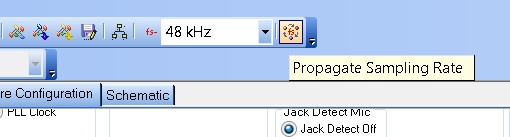
Then did you propagate the sample rate to all the cells in the project by using the button to the right of the sample rate box?
When you change the rate to 19kHz it asks if you want to set all the block to 19kHz. But if you drop in a new cell I think it will come in at the default 48kHz rate. So before you compile you should click on the propagate button.
See if this helps,
Dave T
Hello Dave,
I have set the samplerate to 192kHz. I also clicked on the propagate samplerate. I also set the core to 4x256 instructions.
All cels are set to 192kHz. Then I compile and export the files to my controller board. The ADAU gets loaded from my uController. All works fine until I change parameters. Then the samplerate is set back to 48kHz.
Hello Jan,
Can you send me your SigmaStudio project?
I will email you so you can send it directly to me.
Thanks,
Dave T
Hi Dave,
I have included the project in this thread (see above).
Hello Jan,
I think you are running into a headroom issue. If you are changing the gain of Gain2 linear gain cell above 1.1 then you are possibly clipping the signal. If you change the gain to anything over 2 then you are definitely clipping the signal even only with the 19kHz signal present.
The oscillator output is at digital zero. You are reducing the gain by 6dB (0.5 gain factor). Should you use anything over a factor of two at the second gain cell then you will be clipping the signal once it leaves the DSP. Inside the DSP you have plenty of headroom but when it leaves the DSP it will be clipped back to a 1.23 format.
Then also be aware that you are summing three signals together. You will have to reduce the gain after the summing stage to make up for the increased summed signal level.
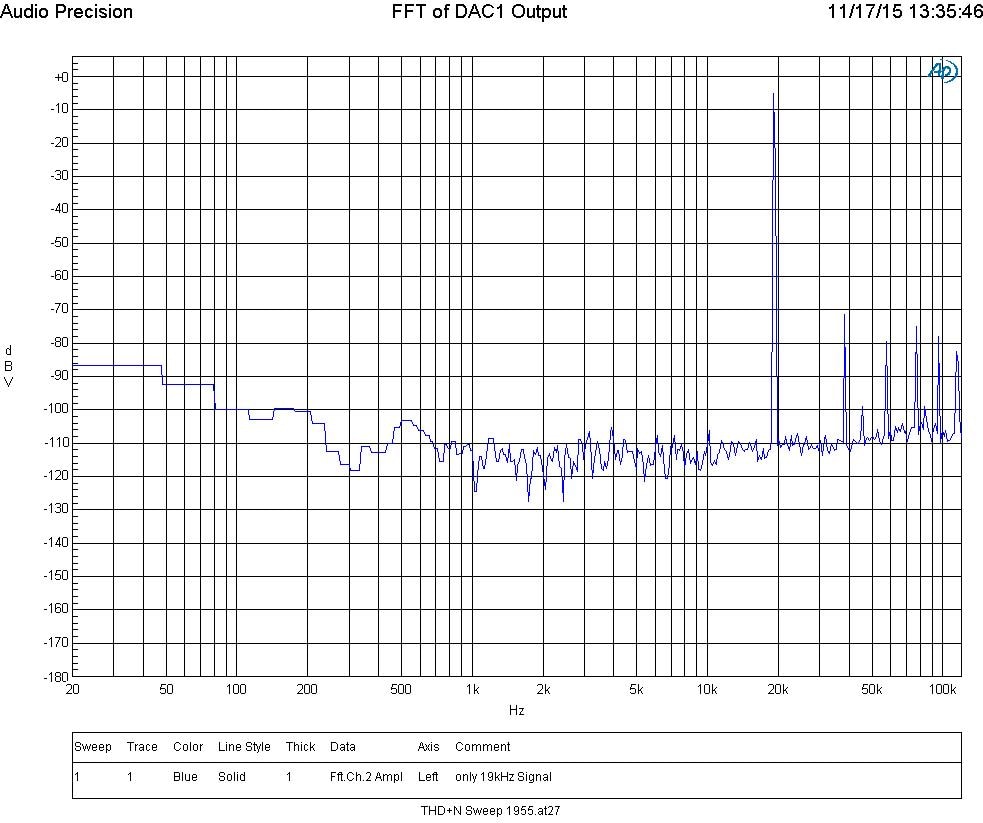
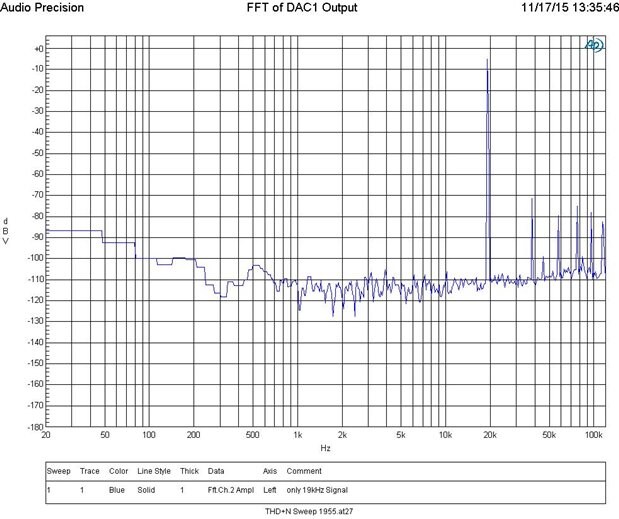
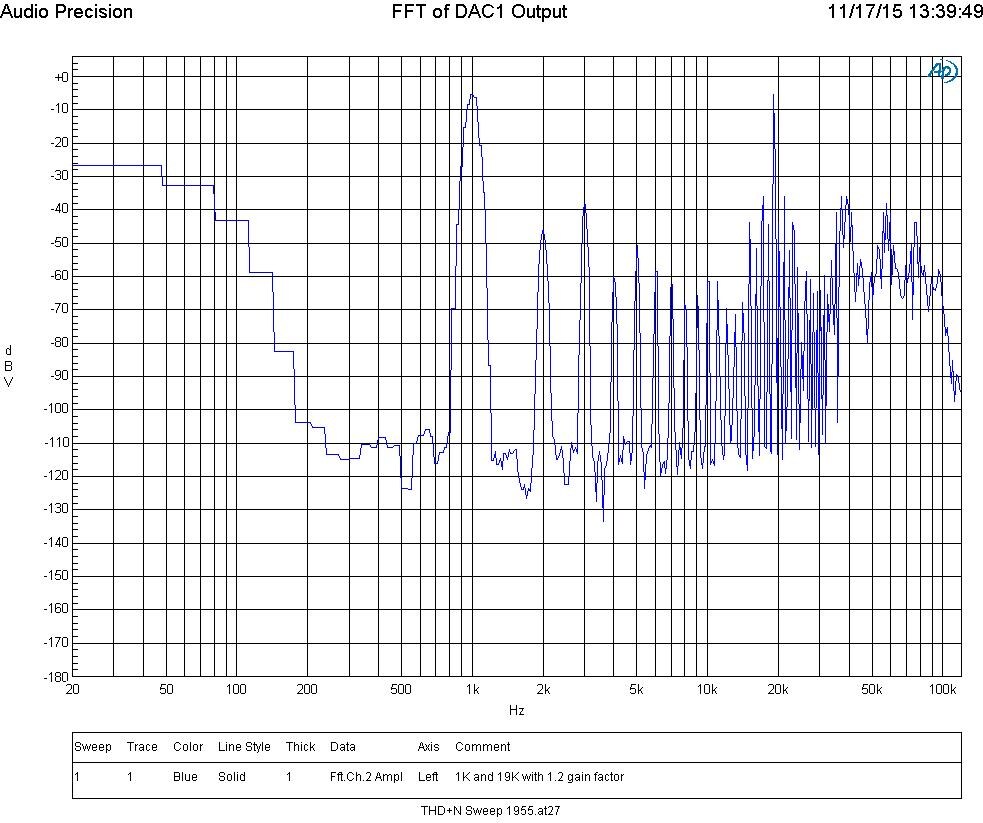
The reason it sounds like the sampling rate is going down is that you are hearing all the harmonics of the clipped signal being aliased down into the audio band. I will show some screenshots I took in the lab using your project.
The above graph is an FFT with only the 19kHz signal and gains not changed.
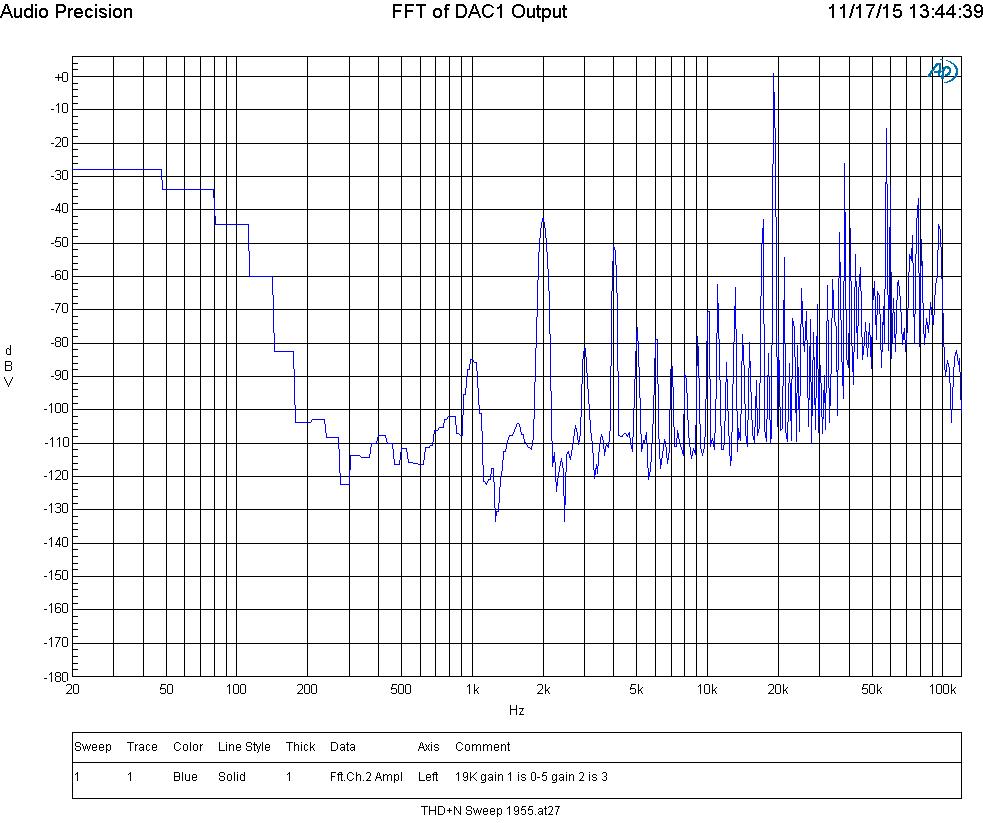
Above is an FFT with the gain1 block set to 0.5 and then gain 2 block set to a gain factor of 3.
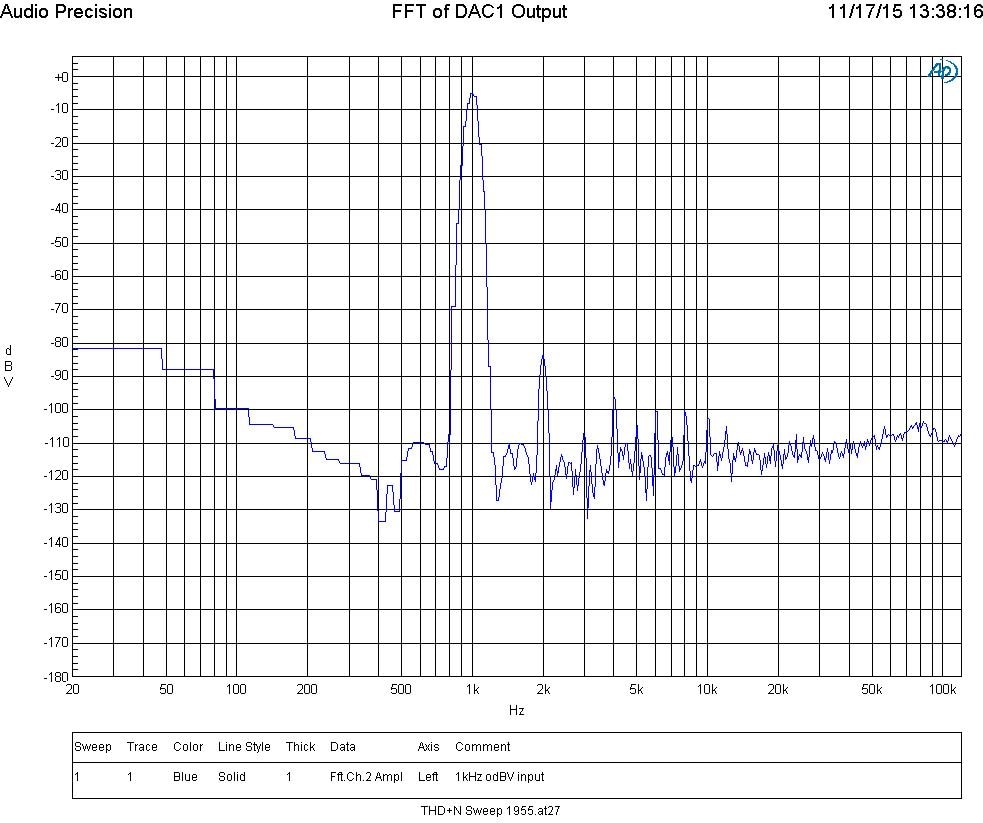
Above is a 1K output of the Audio Precision with no 19K signal. The level out of the AP was 0dBV.
Above is the 1K at 0dBV input with the 19kHz turned on and the gain2 block set to 1.2. Just a slight bit of gain.
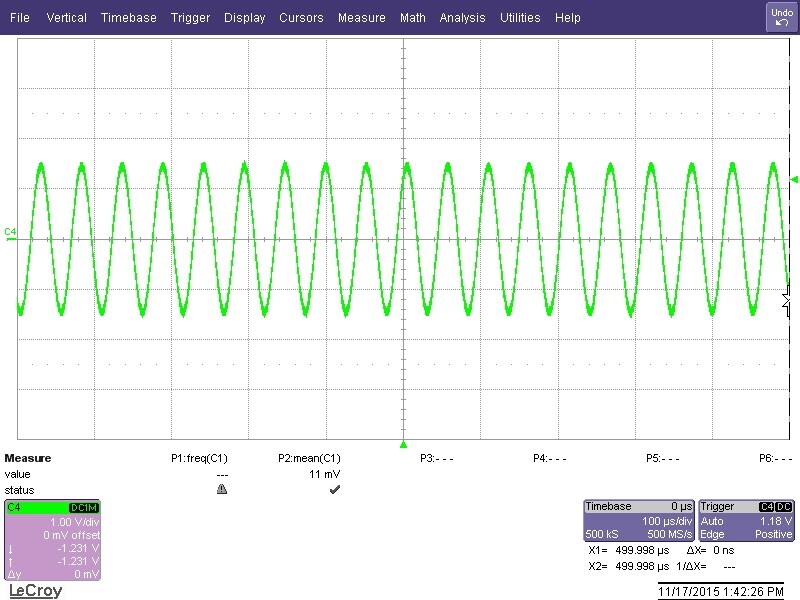
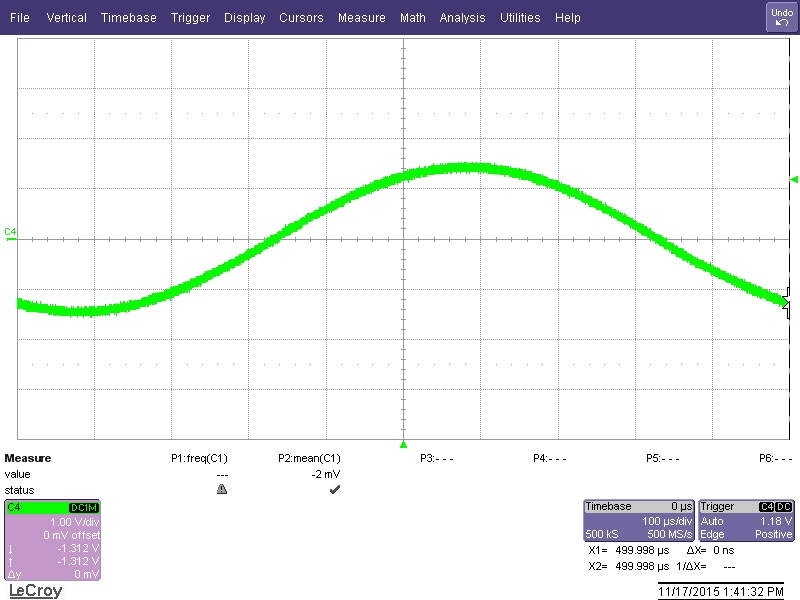
Now I will show what this looks like on a scope and it makes it easy to see what is happening.
This (above) is the 19kHz signal with the gain2 block set to 1.1
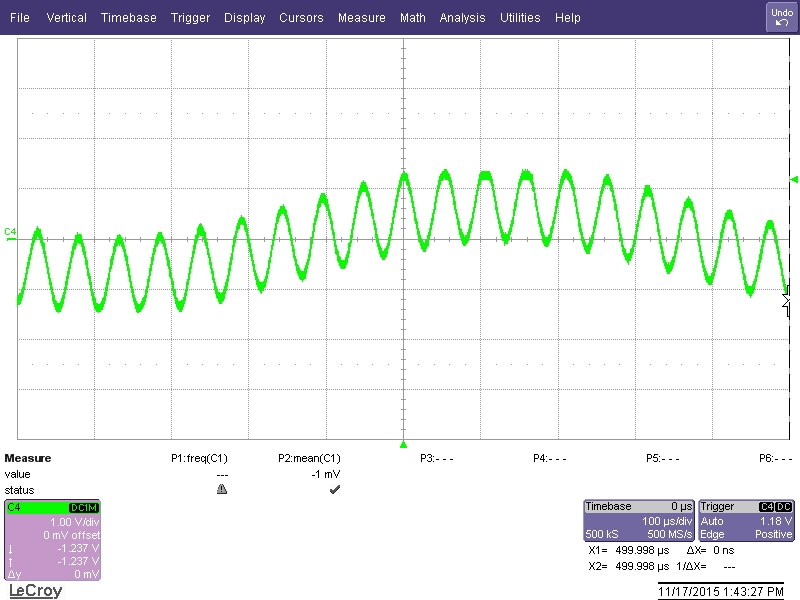
Above is the 1kHz signal with gain set to 1.1
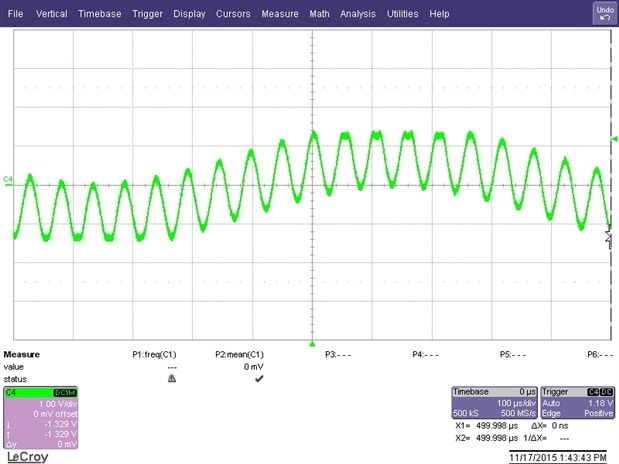
Above is both the 1K and the 19K and here you can see when the signal crests coincide you get clipping. Both on the top and bottom.
Above is with the gain set to 1.2 and you can clearly see the clipping.
So in short, I think you need to lower the gain after the summing stage. I think a factor of 0.25 is needed. Then use a slider for a volume control and be careful about setting it higher than 1.
Let me know if this solves the problem.
Thanks,
Dave T.

Hello Dave,
You are totally right about clipping but even if there is no audio input and I set the gain back to 0.5 the 19kHz becomes 4.75kHz. It looks like the samplerate is set to 48kHz.
I think is has something to do with the oscillator. If I remove the oscillator I can adjust the gain perfectly. If I set the gain to high I can hear the audio clipping but it still sounds good. When the oscillator is added it sounds like a midwave transmitter.
The strange thing is that if I set the gain to 2 and compile the project and upload it to the ADAU it works perfect. Then when I update the gain via the I2c bus and set it to 1, or any number below or above 2 the 19kHz will be 4.75Khz and audio sounds bad (not cliped).
Jan.
I have simplified the project. I can reproduce this problem with only the oscillator, gain and output (see attached project). If I load the project it works fine. If I adjust the gain 19kHz becomes 4.75kHz.
The gain is controlled by adjusting RAM register 0x03. If I set it manual in the output files and upload it to the DSP it works ok. If I set it via I2C 19kHz becomes 4.75kHz but I do see the output level decreases or increases if I write to register 0x03.
This is the param write function:
void WriteRegisterFloat(float param, unsigned short usAddress)
{
long param223;
long param227;
unsigned char param_hex[4];
param223 = param * 0x800000;
param227 = param223 + 0x8000000;
param_hex[3]=(unsigned char)param227; //get byte 3 (LSBs) of parameter value
param_hex[2]=(unsigned char)(param227>>8); //get byte 2 of parameter value
param_hex[1]=(unsigned char)(param227>>16); //get byte 1 of parameter value
param_hex[0]=(unsigned char)(param227>>24);
param_hex[0] = param_hex[0] ^ 0x08;
//RegisterWrite(0x68, usAddress, 4, param_hex);
SafeloadWrite(0x68, 0x0815, usAddress, param_hex, 4);
}
And it doesn't matter if I use the safeload write or direct write to RAM.
Hello Jan,
Thanks for your patience with all this. When the signal clips it does sound a little like the frequency is lower so now we can move on from there.
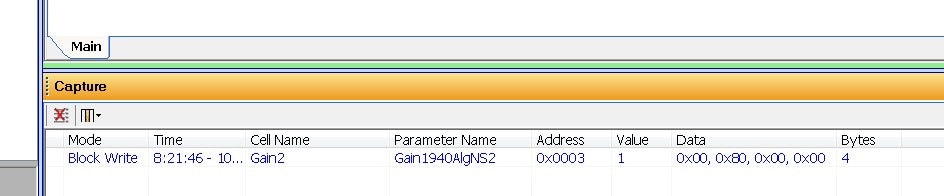
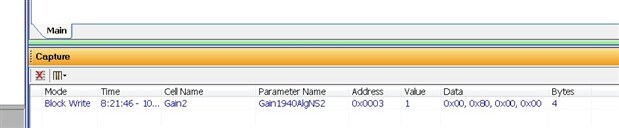
I have a feeling you are not writing to the address that you think you are writing to. The address probably ends up being where the sampling rate is stored or something similar. I compiled your project and it is using parameter RAM location 0x0003 for the gain setting. This is what SigmaStudio writes when changing the gain when I change the gain to equal 1:
Note that SigmaStudio is not using the safeload write feature to update this parameter. The reason is that it is only one parameter at one address. Where the safeload is needed is more for things like filters where you need to update all the coefficients at the same time. If you happen to only update one of them and then the DSP accesses it before you are finished then unpredictable things can happen. But, you can certainly still use the safeload procedure for this cell. This is not the issue as you have noted that you have tried a direct write.
In looking at your code. I cannot fully determine exactly the data that is being sent to the DSP. I have no way to see the value of the parameters being passed into this routine. What I suggest is to capture the data as it is being sent out by your software. The actual hex data to see if all your shifting of data and conversion of floating point numbers to fixed point is being properly done. That the address for the cell is being properly passed and sent out. This is what I do with programs I have written and have found errors. So I am guessing you will find that you are not writing to the address where you think you are writing to.
One other thing. If you have not already found this, Brett wrote a good explanation of how to use the safeload feature on this part. You can find it here: Implementing Safeload Writes on the ADAU1701
Dave T
Ow stupid me! I found the problem!
I was just adding debug output in the low-level I2C driver to check what was actually send out the I2C bus. Then I found this line of code: i2c_write(pgm_read_byte(&(pData[i]));
I was re-using a function that send the program data to the ADAU but the program data is stored in FLASH and I use pgm_read_byte to read from FLASH (AVR GCC). But my variables are stored in RAM. of course this does not work.
I have removed the pgm_read_byte MACRO and it works fine now!
Sorry Dave for the confusion and thank you for your help!
Hello Jan,
Awesome! It always seems so obvious when you find a bug like this after the fact. I have been there-done that enough times! Thanks again for your patience in letting me work through this and following along with me.
Dave T
This question has been assumed as answered either offline via email or with a multi-part answer. This question has now been closed out. If you have an inquiry related to this topic please post a new question in the applicable product forum.
Thank you,
EZ Admin
Please log in to reply.