Normalizing dynamic range of 12 bit AUX input to match 24bit codec audio
Hello Dave - or other SigmaStudio oracles
My design is built around an ADAU1452 with two AD1938 codecs for audio I/O. This part of my design works fine. I've also routed two of the AUX ports on the ADAU1452 to audio input ports. I realize these are only 12 bit in resolution, which however, is fully sufficient for some of my analog signals.
I have been struggling with getting sound from the AUX inputs, and after checking waveforms all the way up to the ADAU it suddenly dawned on me today, that I'm mixing 12bit audio with 24 bit audio. No wonder I'm seeing ~70dB attenuation on my AUX ports.
Question: How do I expand the 12 bit input to utilize the full 24 bit dynamic range and match the dynamics of my high quality audio from the codecs ???
Thank you for your support !!
Best regards,
Lars
Audio Signal Processors
adau1452
12bit to 24bit dynamic range conversion
ad1938
Integrated/Special Purpose A/D Converters
SigmaDSP Audio Processors
Audio CODECs
Show More
Hmmm, after a bit more thinking.... In the unsigned integer case this should be a simple 12 bit shift to the right. However, is the ADAU1452 using 24 bit unsigned integers - and does it make any difference (is it still simply a 12 bit shift operation) ?
Hi Lars:
In the signed integer case, simply multiply your input signal by 128 (8 bits) and then by 16 (4 more). This will make your signal (and it's noise) increase to 24 bits. Make sure you never (ever) have signals above 12 bits.
Hope this helps.
Miguel
Hello Miguel,
Thanks for your response !
Is there a difference between doing a 12 bit shift and doing the two multiplications you suggest ? Unless I'm mistaken the result is the same.
I suppose I could logically remove the LSB of my 12 bit signal before the multiplication in order to remove noise. At the expense of dynamic range of course.
Best regards,
Lars
HI Lars:
Yes, there is a difference, shifting will not preserve the sign.
Don't mask the LSB, even though it may contain noise, it also contains signal. Doing so will make things worse. You would be turning a 12 bit signal into a 11 bit signal reducing the SNR y 6dB
If you want to gate noise at low signals, use a dynamics processor and draw within the IO curve a gate.
Hope this helps
Miguel
Hello Lars,
The AUX ADCs are sitting at ground potential so you will also need to raise it up to a DC level so that it is sitting in the middle of its range with no input. So it will have to be cap coupled. As far as the DC level, unfortunately this part does no supply a common mode voltage output so you will have to generate this on your own. Just use a divider, two 10K resistors, with a .1uf and 10uf or larger cap at the center point. Then feed that into a JFET Op-Amp setup as a voltage follower and use that to float the input pins up to a DC level.
You will need series resistors to each pin from this reference voltage. It will be rather high but I am not sure without more details what values they should be. My first thought is between 10K and 20K.
I would like to try this out myself but I am not sure when I can get to this task.
Dave T
Hi Dave,
Thanks for your input.
My input amplifier is taking a balanced signal and turning it into a single-ended signal centered around 1.5V before it is fed to the ADAU 145x AUX input. I draw my 1.5V common mode voltage from one of the AD1938s I also have in my circuit. Except for a slight imbalance (3.3 divided by 2 is not exactly 1.5), which potentially causes uneven signal clipping, it works fine.
So far I have only tried using a simple 12 bit signal shift on the input, and not the x8 x4 multiplication Miguel is describing. It appears to be working, but I haven't fully tested it yet.
Best regards,
Lars
Hello Lars,
That sounds good to use the CM voltage out of the AD1938. It is still a good idea to buffer it to prevent crosstalk and prevent noise from getting into the AD1938.
You also might want to run the Aux signal through a HPF as soon as it gets into the DSP to strip out the DC component that will be there when there is a slight common mode voltage mismatch.
Dave T
Dave, really good suggestions The common mode voltage from each of my codecs are buffered before being used in my 10 input stages. It works very well, and noise floor is lower than what I can measure. I also have DC blocking filters on all my inputs in SigmaStudio.
I need to read up on signed integers to fully understand the implications of doing a simple bit shift instead of doing an arithmetic multiplication....
The power of SigmaStudio is amazing - I'm SO satisfied with the performance and simplicity.
Best regards,
Lars
Hello Lars,
I did some more investigation on how best to use the AUX ADCs as additional inputs. There are several details that anyone who wants to do this must be fully aware of. I will address one at a time:
Number format:
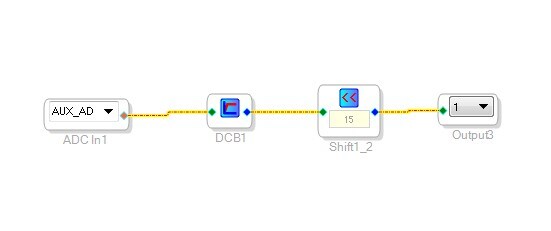
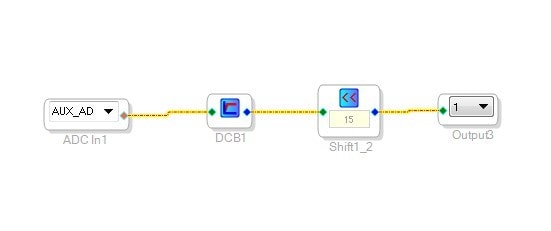
The output of the AUX ADCs are in unsigned integer format and it is a 10-bit number. The internal circuits will load that number into a 16-bit register as a right justified number. So when this is routed to the DSP core, it will be processed as a 32 bit two's compliment number. So the level will be very low and will contain the signal only as a positive going signal. If you feed a sine wave in it will be a sine wave riding on a DC level such that the signal will never go negative. The sign bit will always be a zero. So to strip off the DC and transform the signal to a proper two's compliment signal all that needs to be done is to run it through a DC blocking cell in SigmaStudio.
The next step is to "amplify" the number to normalize a full scale signal to the full scale signal level of the 1.23 format used in the DSP for signal inputs and outputs. (It is 8.24 for calculations in the core). This can certainly be done with a linear gain block but the easiest is to just shift the number left by 14 digits. In my case I was able to shift it 15 bits because the amplifier I was using external to the IC was clipping early so I optimized it for my particular situation.
The above signal flow produced a signal that worked fine. I measured -69dB of noise (which is below what the theoretical -60dB so what I was measuring was the noise floor of the analog output circuits.) The THD+N was around 0.1% with a full scale signal.
So this all seems great but using these inputs as audio inputs have other significant drawbacks. There needs to be an external buffer to bring in a signal that is centered on AVDD/2. I used the evaluation board input circuit that uses the FILTR pin of the on-board codec. The ADAU1452 does not have a common mode pin that can be used so there needs to be an external reference provided. The second thing is that there needs to be a brick-wall filter to prevent aliasing. More on that later.
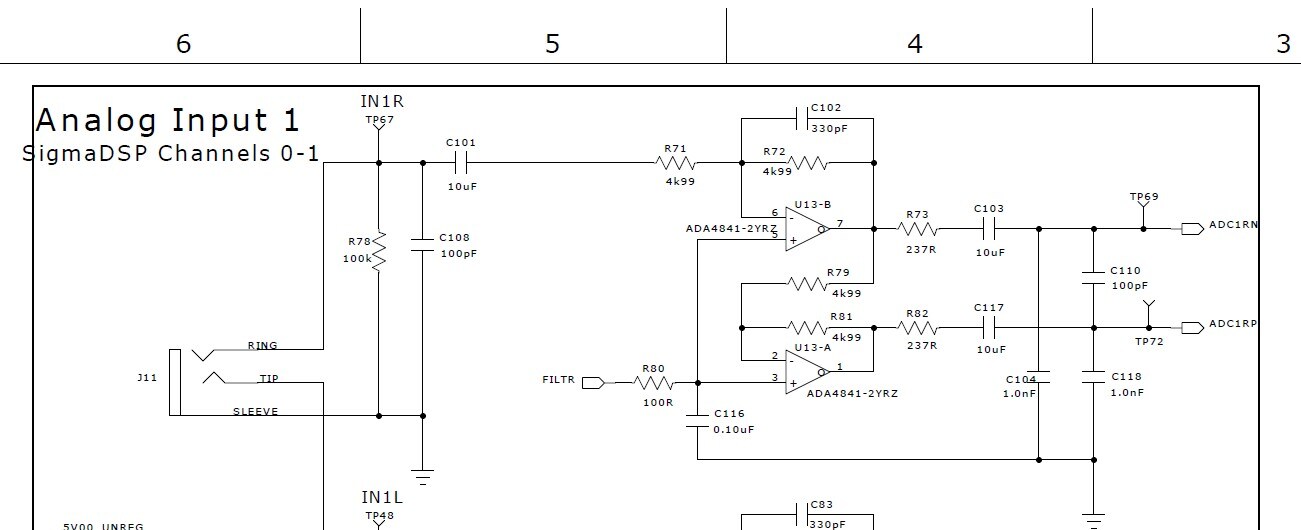
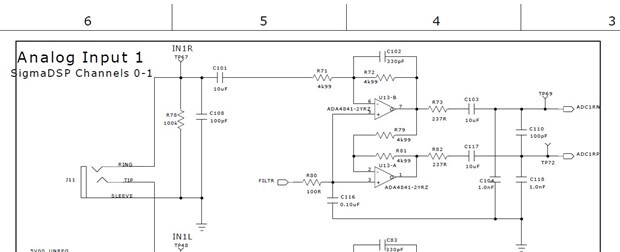
Here is the input circuit I used on the eval board.
I jumped the "N" test point over to the AUX ADC input. I did not use any other filters and I am not sure if this op-amp is capable of going rail to rail. This is probably why I was not able to get the signal to full scale. The ADC is an SAR type of converter and is setup where 0vDC is zero and AVDD is full scale. So if the external filter is also using AVDD for its power rails then it needs to be able to go rail to rail to use all 10 bits of the converter.
Sample rate Issues:
The sample rate is derived directly from the core system clock. With the default setup it would be 294.912 MHz divided by 6144. So in that case it would be 48kHz. I did confirm this by sending in 40kHz and seeing the resulting 8kHz signal coming out of the converter. Note that in the case of the ADAU1450, its core clock is running at half that rate so the sampling rate would be 24kHz. Consult the datasheet for more details in the Auxiliary ADC section.
Since this is not an oversampling ADC there needs to be a brick wall filter at the Nyquist frequency. So there needs to be significant signal conditioning before the AUX ADC inputs. In my opinion this will increase the cost, and PCB area, to a point where the use of these ports as audio inputs will not make sense. It would be cheaper to use two ADAU1372 codecs only for the ADCs and get 8 channels of inputs. Where it does make sense is for low frequency sensor inputs where the filtering can be relaxed somewhat if the bandwidth of interest is below 1kHz.
I think this is all the topics I needed to cover.
Thanks for bringing up this topic.
Dave T
Hi Dave
I am evaluating ADAU1452 with EVAL-ADAU1452MINIZ board. I need to collect below information for audio in.
1. collect THD+N, SNR, frequency response information for audio in;
2. collect level information for audio in
I hope to use SigmaStudio to configure ADAU1452miniz board. Can you help to guide me to do that? Thanks.
Hello Andreas,
You will have to use SigmaStudio to configure the board.
This is a lofty project but I think it can all be done. It depends on how accurate you want to be. Let me point you to this post by Bob. It contains a lot of the work you need to do. You can search the forum and you may be able to find examples for the other things you need to do. Here is Bob's post:
https://ez.analog.com/message/236462#236462
It originally was written for the 1701 but if you read down you will find he did a version for the 1452 eval board that you have.
Dave T
Hello Dave,
Thank you for your reply.
Can we make use of FFT to calculate the SINAD and THD?
Hello Andreas,
The FFT block processing is still under development. There is an older post that explains a little about it:
ADAU1452 FFT Library
At the moment there is not too much that can be done without a custom cell. Contact us directly using the message feature and we can discuss.
Dave T
Please log in to reply.