ADAU1442 TDM4 no data output
Hello
I try to use ADAU1442 with PCM4104 DAC with TDM4 (I2S) interface, but I have problem with serial output interface - no TDM Data on SDOUT8 pin.
ADAU config:
Xtal=24,576MHz
PLL0,2=GND
PLL1=VCC (3.3V)
CLKOUT=24.576MHz (for PCM MCLK)
CLKMODE0=GND
CLKMODE1=VCC (3.3V)
PCM4104 (Quad rate, TDM with 1 BCLK delay)
FS0=GND
FS1=VCC
FMT0,1=VCC
FMT2=GND
PCM is connected to ADAU Serial Output 8: LRCK8 (P78), BCLK8 (P74), SDOOUT8(P61)
How to configure ADAU for proper operation, my short project don't work.
Audio Signal Processors
adau1442
SigmaDSP Audio Processors
Hello Adam,
This is going to be a long reply. There are a number of issues to talk about and explain. I feel I have to explain because I do not know what your final design will be. It is clear that it is not the project you uploaded.
First issue:
You need to set the PLL pins differently.
PLL0,1 = GND
PLL2 = IOVDD (3.3V)
This is because you are using a 24.576MHz crystal. The fs,normal needs to be 48kHz so you need to divide it down by 512 or said the other way, 512 x fs,normal will be the MCLK frequency in this PLL mode. So that is 512 x 48K = 24.576MHz . Now when you set the core processing rate to the fs,quad it will be 192KHz fs.
Next issue, The automatic output assignments.
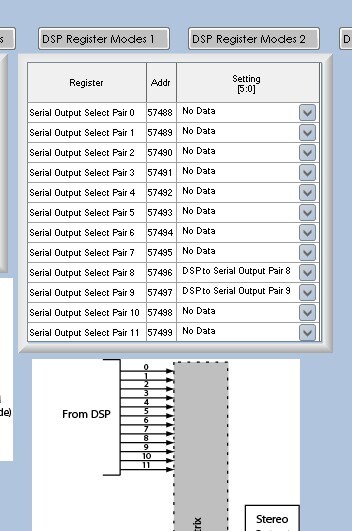
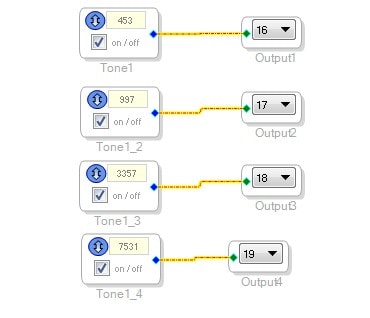
This is a confusing system. The output ports will "use up" two port numbers whether they are set for TDM2, I2S or No-data. So in your case you are using serial port 8. So starting with serial output port 0 this is how the assignments are allocated:
Serial out 0 = 0,1.
Serial out 1 = 2,3
Serial out 2 = 4,5
Serial out 3 = 6,7
Serial out 4 = 8,9
Serial out 5 = 10,11
Serial out 6 = 12,13
Serial out 7 = 14,15
Serial out 8 = 16,17.
But since you have it set for TDM4 it will pick off four assignments. So it uses 16,17,18 and 19
If there were a port after 8 then it would start at output 20.
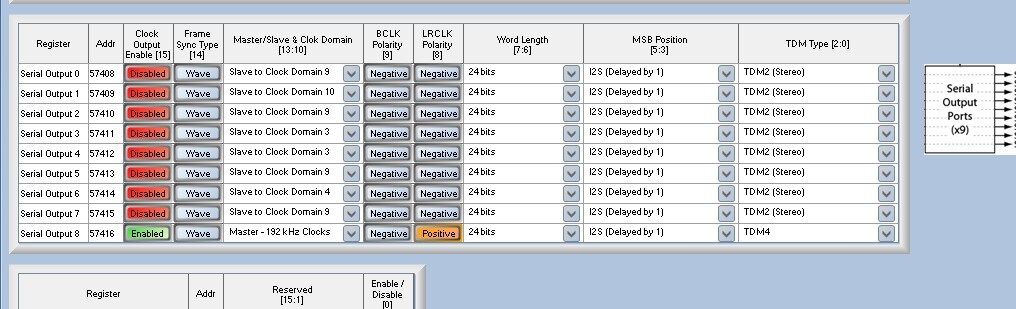
So here are the settings I used: (I actually did set this op on an eval board)
So this produced output but there was another issue you will probably run into.
I guess you can say there is a bug but there are several workarounds.
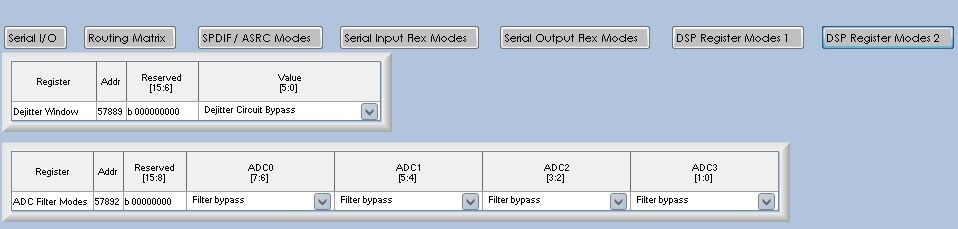
The issue is that the data output from the core is locked up. The serial port is setup as a master using the internal 192kHz rate and the DSP start pulse is also using the internal 192kHz rate. There is an internal issue with timing at this high rate when using these higher port numbers. I will assume you will have more outputs on the lower numbers so the workaround is to bypass the dejitter circuit. It is not needed in this case since you are no operating as a slave. So set this register like this:
Should you need to slave off of another clock and you are not using the ASRCs then contact me for more details.
This setup worked for 96KHz but does not work for 192KHz and so this workaround will allow it to work at the higher rate.
I think I covered everything...
Let us know how it goes.
Dave T
Hello Adam,
One other thing to report. After I wrote this I discovered a bug in SigmaStudio. The Dejitter window setting will write the default value when you link/compile/download. So every time you compile you will need to go back and change it. I have reported the bug to our programming team but until the next revision is released you will have to continue to change it back.
Sorry about that...
Dave T
Thanks for answer.
I found bug in my hardware configuration.
Currently I set:
ADAU config:
Xtal=12,288MHz
PLL0,2=GND
PLL1=VCC (3.3V)
CLKOUT=24.576MHz (for PCM MCLK)
CLKMODE0=VCC (3.3V)
CLKMODE1=VCC (3.3V)
PCM config without changes.
TDM4 working ok.
This question has been assumed as answered either offline via email or with a multi-part answer. This question has now been closed out. If you have an inquiry related to this topic please post a new question in the applicable product forum.
Thank you,
EZ Admin
Please log in to reply.