State machine
Hello,
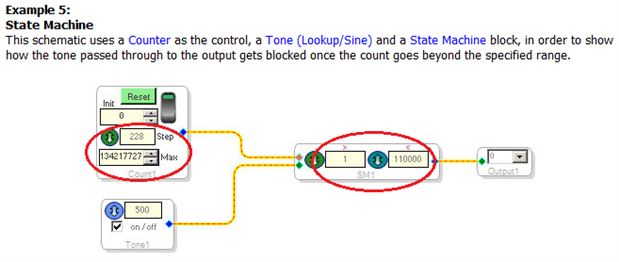
I captured and pasted a state machine example from SigmaStudio Help.
I would like to know what the units circled in red are.
Best Regards,
Mack

Hello,
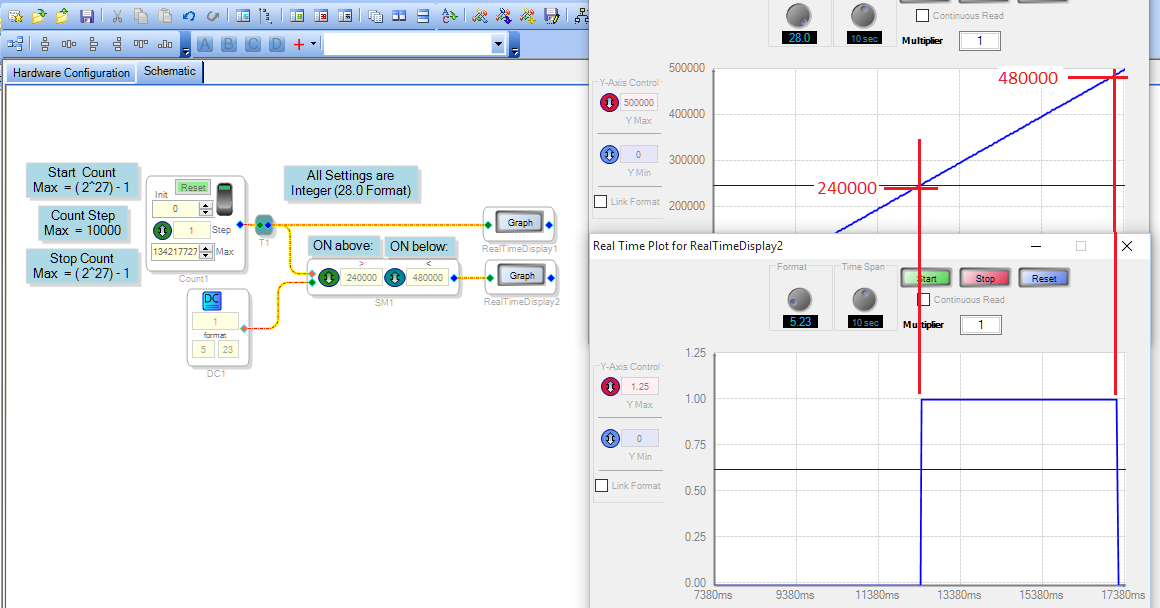
The number in each type-in box specifies an integer quantity. The example below shows how each controls the Counter and State Machine blocks:
The counter advances by the Count Step at each sample interval. Here, the Step is set to one, so the count increases by the number of sample intervals that have elapsed since the counter was switched ON. It stops counting when the Max setting is reached. This defaults to 134217727, the largest possible count. The counter's output is a rising integer (28.0 format for most SigmaDSPs), as shown on the upper RealTime Display
The State Machine block compares this integer input at its red pin with its two settings. When the input is between its Greater Than and Less Than settings, it allows the signal at its green input pin through to its blue output pin. We see the on the lower RealTime Display -- the output turns ON when the count reaches the Greater Than setting of 240000, and turns back OFF when the count passes the Less Than setting of 480000.
Best regards,
Bob
Please log in to reply.