ADAU1701 Sigmastudio Limiter questionings
Hello support,
Recently I checked several posts of the limiter and the main ones that I was looking for an information to help my customer were:
https://ez.analog.com/message/215580#215580
that has lead me to: Workaround: Creating constant-dB envelope decay using an existing linear decay algorithm
that finally has lead me to:https://ez.analog.com/message/50275#50275
They are running SigmaStudio Ver 3.12.1 and I checked the release notes on 3.12.2 and no mentioning to limiter were made.
I am having some dificulties to understand how the Decay (Release) and Attack (RMSTC) work.
What are the units should I consider? In the Software RMSTC is considered db/s but it goes from 1 to 10000. Well I find that 10000 db is so much a huge value. Should I consider it then ms?
I have found some indications to avoid overlaping that decay time constant should be greater than the attack time constant. But if they are measured by different constants, how can it be made? I saw this calculation:
Decay (in samples) = 4.4*10^6 / x
Where x = the setting in the control display.
Should it be fine or there is something new about this? Is there a formula also for RMSTC in samples time basis if it is really measured by db/s? My customer is looking for a Release time 16x greater than the Attack. Is there any graphics about the limiter provided for the ADAU1701 showing the cuttof frequency versus the recommended decay? For his case should I recomend that RMSTC has to be about 24 db higher than decay (16x faster attenuation)?
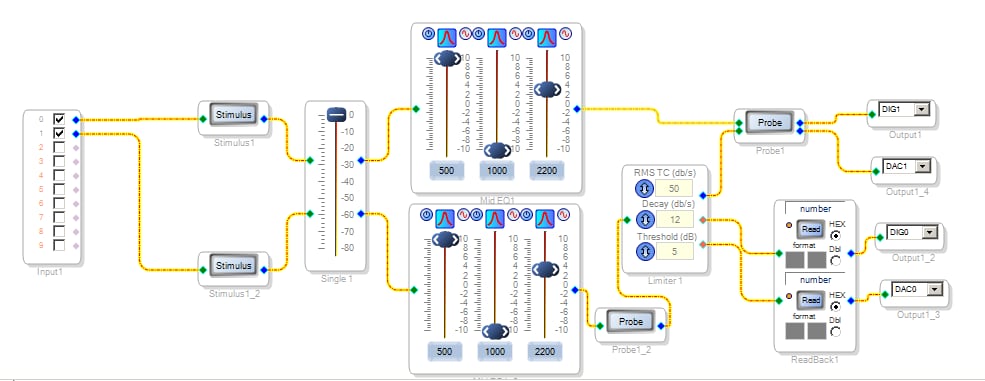
I Also tried to simulate the limiter in a basic block and was uncessfull. By pressing Stimulus 1_2 I only get the Probe1_2 response. Probe1 remains blank. I made changes in the filter parameters as well in the Eq and Volume control. I also tried the tone generator and it wont probe. How can I test the limiter?
Finally, where the bugs related to this corrected?
Thanks
Best Regards,
Juliano K. Cioffi - FAE
Latinrep South America - Analog Devices
Audio Signal Processors
sigma studio
SigmaDSP Audio Processors
adau 1701
adau1701
Hello Juliano,
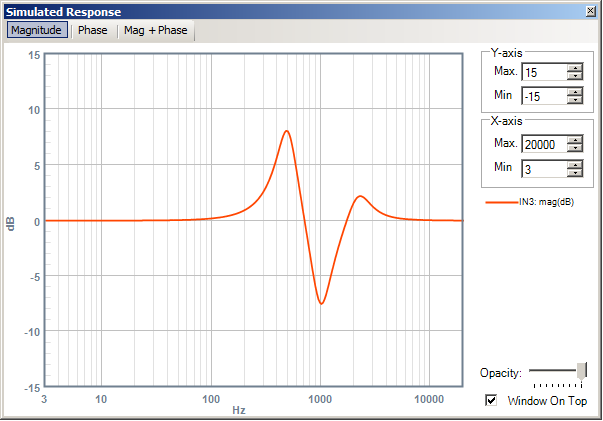
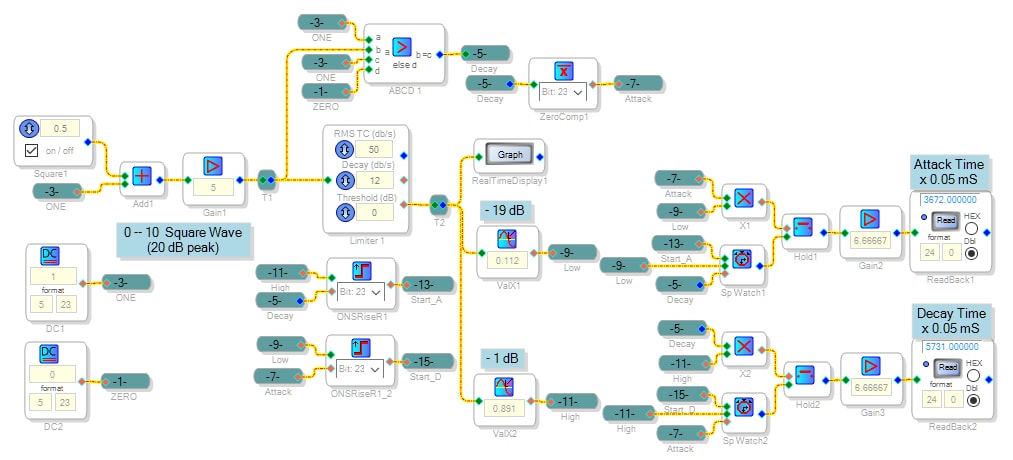
The Limiter works well but its settings do get rather cryptic. The calculations shown in its wiki entry are for computing uC loadable parameters from the GUI settings -- they don't show the relation between the GUI settings (RMS-TC and Decay) and the limiter's dynamic characteristics. Thus, as you have noted, we need to test the limiter to see how the settings work out. Unfortunately, we can't use the Stimulus - Probe tool, because it does not perform a runtime simulation of a project. Instead, it's designed to evaluate the frequency response of filter(s) in its path. For more info, please see https://ez.analog.com/message/120089#120089. We must hardware test the limiter The project shown below can help measure its response times.
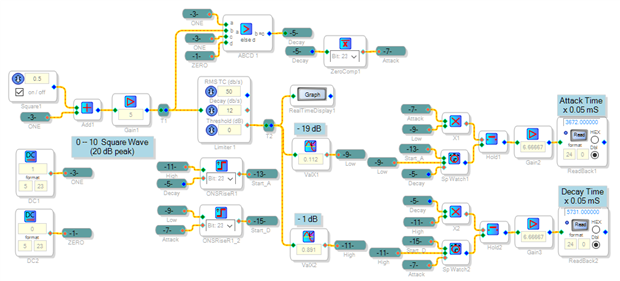
The project generates a slow square signal that alternates between 0 and +10, which is 20 dB peak over the standard value of 1.0.
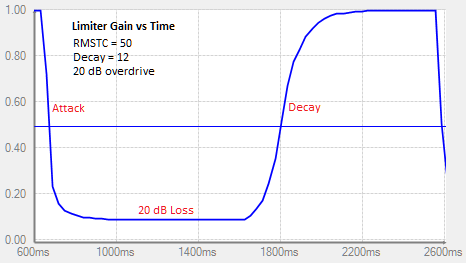
This overdrives the limiter by 20 dB, forcing it to traverse between full gain and -20dB gain each cycle. Note that the limiter responds to DC, so no modulation scheme is needed. We can see the resulting gain change at the limiter's Ratio output (incorrectly labeled Flag output):
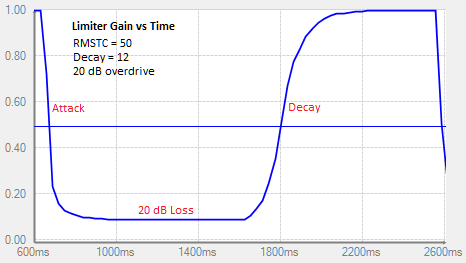
When the high input hits the limiter, it responds with reduced gain (the Attack portion of the graph). The minimum gain is -20 dB. The input's return to zero allows the limiter to settle back to unity gain (the Decay portion). We can measure the response times using stopwatch cells in the project. I have defined the Attack and Decay times as going between -1 dB gain and -19 dB gain, to remove the long tails from the results (akin to typical 10% -- 90% rise time measurements). When running these tests with different settings, it's important to keep the square wave generator frequency low enough so that the attack and decay responses don't affect each other.
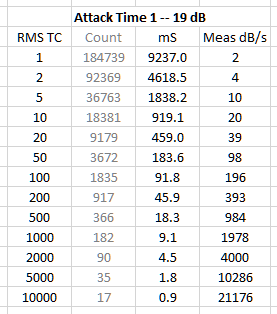
Here's the Attack time results. The attack appears to run about twice as fast as its RMS-TC setting, however this is likely because my measurement method includes only the main part of the response, not the long settling tails. 10000 dB / s sounds like a lot, but it corresponds to just 10 dB per mS -- a very fast but quite possible response.
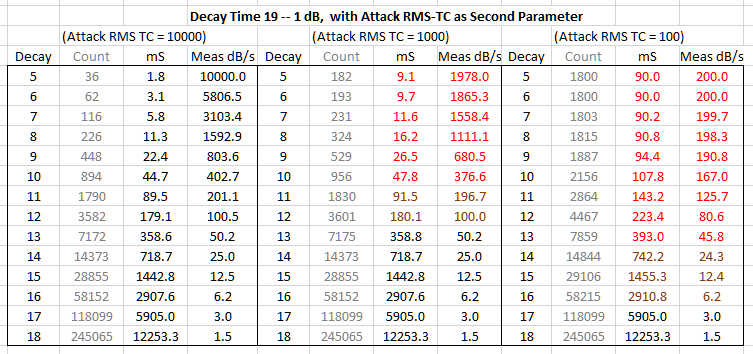
The Decay Time results indicate how both RMS-TC and Decay settings affect the recovery response. A slow Attack time (low RMS-TC setting) also slows down the measured Decay time. This is generally OK since most engineers select a fast RMS-TC and a slower Decay setting. By comparing the numbers on these charts, you can come up with the desired response. For example, a RMS-TC setting of 1000 and a Decay setting of 12 provide a decay time about 20 x longer than the attack time -- in your customers ballpark.
I have attached the project in case you wish to run additional tests.
Best regards,
Bob
I've got some approximate conversion formulas between dB/s and Decay:
From Decay to dB/s: dB/s = 10000 x [ 2 ^ (5 - Decay) ]
From dB/s to Decay: Decay = 5 - [ 1.5 x LN [ (dB/s) / 10000 ] ]
For example, your customer settles upon a RMSTC of 160 and wants a decay that's 16 times slower, which is 10 dB/s. Using the second formula, we find:
Decay = 5 - [ 1.5 x LN [ (dB/s) / 10000 ] ] = 5 - [ 1.5 x LN [ 10 / 10000 ] ] = 15.36
Use a Decay number of 15.
Bob
Hello Bob,
I am sorry for the late response. I was last week travelling with my team around the country looking for opportunities and couldn´t find time to check recent activities.
That is a great job you made here and lets clear everything we were looking for, and lets clear we were in the right path.
Thanks so much.
Att
Juliano K. Cioffi - FAE
Latinrep South America - Analog Devices
Thanks Bob for the formulas.
We will test everything and I will let you know here.
Have a great week!
Juliano
Hello Bob,
I have just received a reply from our customer and they are very satisfied with the support.
If they came with new questionings I will let you know. By the position from our local disti, they have tested the limiter as well the formulas and everything came up as expected.
Thanks a lot
Att
Juliano K. Cioffi - FAE
Latinrep South America - Analog Devices
Please log in to reply.