problem reading/writing from interface registers on ADAU1701
Hi forum,
I am having a hard time with working with the interface registers of an ADAU1701.
Trying to understand how they work, I have implemented a very simple design in SigmaStudio and using it on an 1701 evaluation board.
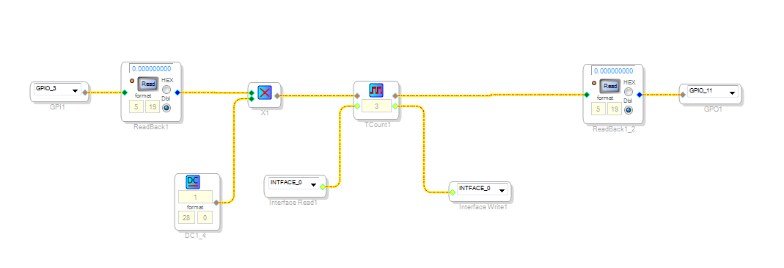
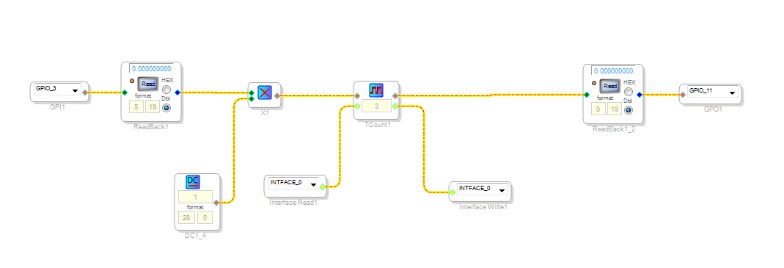
The GPIO_3 accepts a signal from a button on the evaluation board and the red LED connected to GPIO_11 turns on red when I press the button.
Using the design below I am expecting the state of the signal coming out from TCount1 to be stored in INTFACE_0 (interface register 0).
I flash my program on the evaluation board (using the "Write latest compilation to EEPROM" in the Config tab of the HW configuration page of SigmaStudio), unplug the USB cable and then plug it back in.
I can clearly see that the DSP is self-booting from the EEPROM but it won't remember the state of the led. In other words, I don't think that the DSP ever saves the state of the INTFACE_0 in the EEPROM or reads from it.
I have read this thread:
https://ez.analog.com/message/48651#48651.
I wonder if the information there is still relevant. Do I need to follow all those steps there?
The header is not included when I am writing the EEPROM with the latest compilation?
thanks
Dimitris
Audio Signal Processors
SigmaDSP Audio Processors
adau1701
Hi forum,
I just noticed that the implementation above will not work with an EVAL- 1701MINIZ because it is lacking the WBTRIG circuit.
I tried to find more information about this circuit but I have not managed.
In the product I want to use the SW in, the WB pin is grounded. Where does this pin need to be connected on the EEPROM in order to trigger a writeback of one of the interface registers?
The EEPROM has SDA, SCL, WP, VCC, A3, A2, A1 and A0 pins. Do I need to connect the WB pin of the ADAU1701 to the WP pin of the EEPROM?
thank you
Dimitris
This question has been assumed as answered either offline via email or with a multi-part answer. This question has now been closed out. If you have an inquiry related to this topic please post a new question in the applicable product forum.
Thank you,
EZ Admin
Please log in to reply.