Intel Hex or some other useable file format?
Hi,
I am trying to output the EEPROM data from SigmaStudio into some format ( ANY format ) that is recognisable by either my eeprom programmer or a file format convertor.
The .hex files output by SigmaStudio, while being human-readable do not seem to be recognised by any of the usual tools.
There *used* to be a trick of using the "display file" window in the "E2PromLoader" window of the hardware tab, you *used* to be able to display the .hex file and then copy and past the data into a hex editor, and save as "intel hex" and all was good, but, it seems you can now only select the data, but not copy it to the clipboard.
Any idead? 5 years ago there is a note that "intel hex output is on the feature request list" ... but it doesn't seem to have made it. Any ideas? Any clue if the .hex file format used is actually a recognised standard format or is it just the result of a random sprintf() statement?
Seriously, no answers?
There must be some way to get the EEPROM output into a standard useable form?
A plain old binary file would be OK ... or Intel HEX, or .. well, anything thats actually a standard format that a typical EEPROM burner can read ...
Hello Robin,
You can get the EEPROM information by going into the "WinE2PromLoader" tab from Hardware Configuration. A GUI will be prompted. Click on a button labeled "Read E2Prom to Display". It will give you all the EEPROM information stored in the DSP. You can actually select all or partial data and copy and paste it into an editor of your choice.
Regards,
Wilfrido Sierra

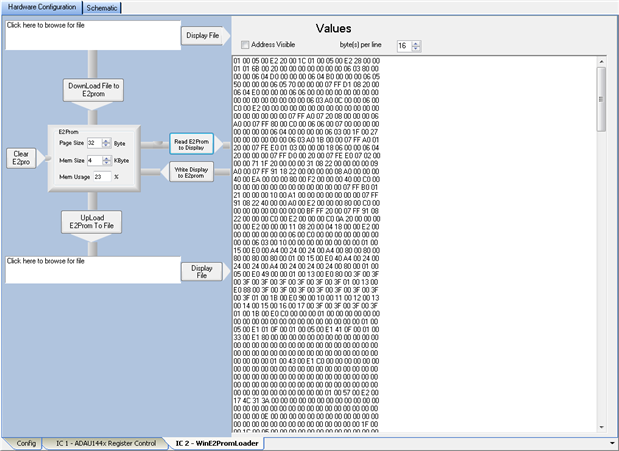
Sadly, this method no longer seems to work.
In at least 3.10 and 3.11 you can select it, but you cannot copy to the clipboard.
I did find a program to convert it in the end, just amazed there is no built in method for this.
This question has been assumed as answered either offline via email or with a multi-part answer. This question has now been closed out. If you have an inquiry related to this topic please post a new question in the applicable product forum.
Thank you,
EZ Admin
Please log in to reply.