Is there any documentation for the ADAU170x's Log Lookup Table?
Hello,
The Log-spaced Lookup Table is a welcome addition to the ADAU1701 toolbox -- it can simplify audio control or measurement where a large dynamic range is needed. Unfortunately, I cannot find any usage instructions for this block in the wiki. If anyone has found its docs, or knows its transfer function (etc.), please help.
Thanks,
Bob
Audio Signal Processors
documtation
log_table
SigmaDSP Audio Processors
adau 1701
adau1701
Show More
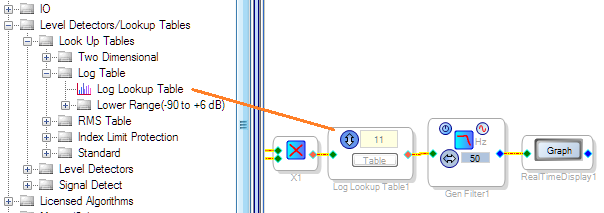
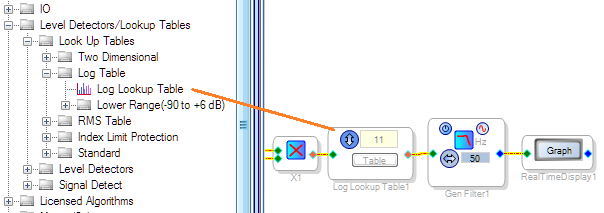
Here's what I found out so far:
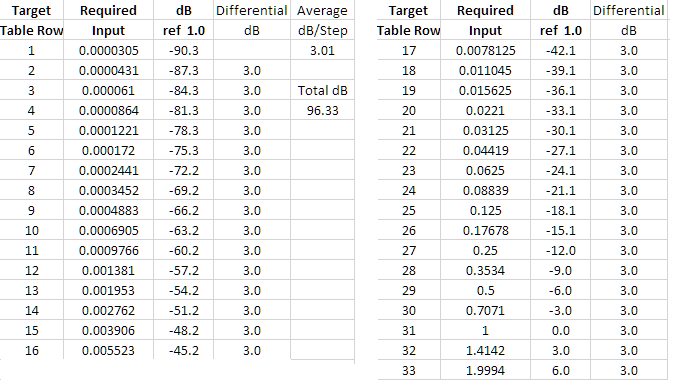
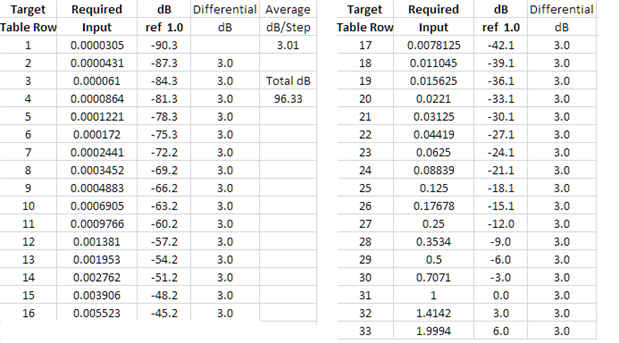
Perhaps the easiest to use Log Table is the Lower Range (-90 to +6 dB) version with its default table size of 33. This provides a beautiful 3.01 dB spacing from each row to the next, as shown below:
The Full-Range Log Lookup Table works similarly, except its full-scale input is 15.999 instead of 2.0. Both tables let you adjust the number of rows if desired.
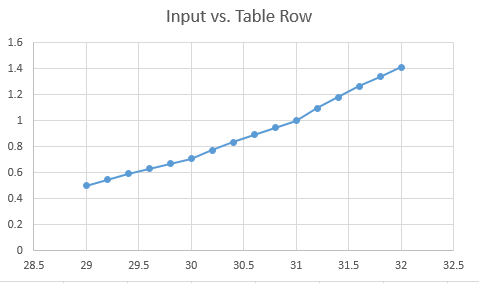
Also interesting is what happens with inputs between the tabulated intervals. These are in fact fully interpolated tables, even though they are not labeled as such nor appear like the linear interpolated tables. As this graph shows, they generate intermediate outputs for intermediate inputs:
Best regards,
Bob

Hmm. Both of these tables load up for me with just '1's with version 3.14 of sigmastudio. I assumed that they would already be populated with log values?
Also, I can't seem to find any search function for the toolbox. I'm spending an unfortunate amount of time looking for things in the hierarchy. There's got to be a search function, right?
Hello chmed,
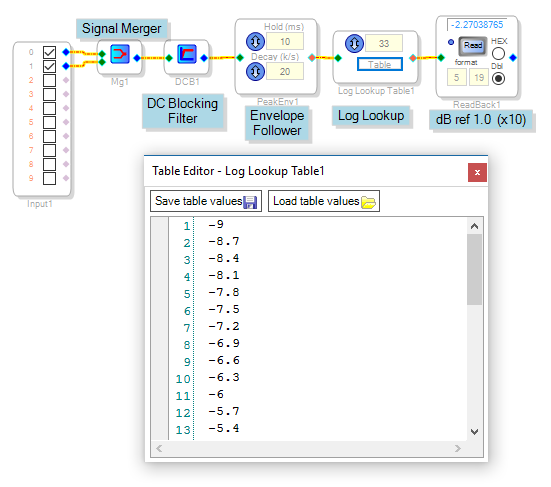
All the lookup tables come filled with ones; the designer populates them according to their application. For example, the project shown below amounts to a peak-reading level meter using the Lower Range Log Lookup Table. I filled the table to read out as (dB x 10) -- for example, -3.0 = -30 dB. This scaling allows for the limited -16.0 -- +15.999 range of the ADAU1701's 5.23 fixed point number format. The freedom to enter your own output values is what makes the lookup tables incredibly useful -- I've built some rather weird-looking ones.
If there's a Toolbox search I'm not aware of it. The good news is you'll find it gets better and faster with experience.
Best regards,
Bob

Ok, then I must be missing something. What's the difference between the Log, RMS and other tables?
And, are there some tools in Sigma to help with creating these tables? For instance, I was just working on making a sweepable mid cut filter controlled with a pot. Initially I used a state filter and drove it directly with the ADC. It swept but didn't sweep logarithmically through the frequencies AND, I wanted to limit the band it sweeps through. After realizing that I was going to have to create a table that listed the appropriate 'filter block acceptable values' for the frequencies with the log spacing that I was after, I decided to just do a simple index filter table with coarse steps and see where that got me.
I then found it somewhat tedious to create different filters in the general index selectable filter block. For some reason all filters start with boost and the "base gain" varies as well, apparently so you can see them easier when stacked on top of each other? Are there key commands for getting around? I think you have to mouse to click add and then you can tab through the values. And if you need to go back to a different filter you have to mouse to the combobox to make the selection and then back to the values. Anyway, I did it this way with only a handful of steps just to play with it. Then I realized that there doesn't appear to be a way to move a filter to a different number or insert extra filters in between already existing ones. I will have to manually adjust them all when I finally arrive at my final scheme. I guess I thought that SigmaStudio could do a lot more of the legwork with this stuff. I hate to sound like a sour puss but it almost seems like coding it the "hard way" might be better.
I also found that I had to turn the pot pretty far from the bottom before the first step would kick in (my 0 step is a straight through filter). Any suggestions on how to adjust that scaling? I'm multiplying the ADC input with a DC block set to the number of filters in the table like you've done in some of your answers on this board. My 20k linear pot might not be especially linear but there has to be a way to deal with it "in software".
Hello,
The difference between the Log Lookup table and other LUTs is not the user-defined contents of the rows, but rather, which row the table selects according to its input. Basic LUTs are integer-input. As you've noted, you can multiply the 0 -- 1.0 Aux ADC output by an integer (28.0 format) number equal to the LUT size to produce a suitable control input. Nowadays, I make the LUT one row larger than this multiple -- for a multiplier of N, use a table sized N+1 and simply duplicate its highest-numbered row. This protects against the input over-running the table. When these integer LUTs are driven over their maximum index, they pull random numbers out of parameter memory -- with naturally unpredictable results. That's why the toolbox includes Index-Limit-Protection versions, but they use many more instructions.
In contrast, the Log Lookup Table is controlled by an "analog" or decimal (5.23 format number), not an integer. Its rows are spaced at 3-dB intervals, that is, logarithmically. For inputs in between table rows it linearly interpolates its output. There's also a 5.23-format input, 5.23-format output straight interpolating table called, logically, the Linear Interpolator. This is presently missing from the ADAU1701 -- for more info on how it works, see Where's the Linear Interpolator (ADAU1701)?
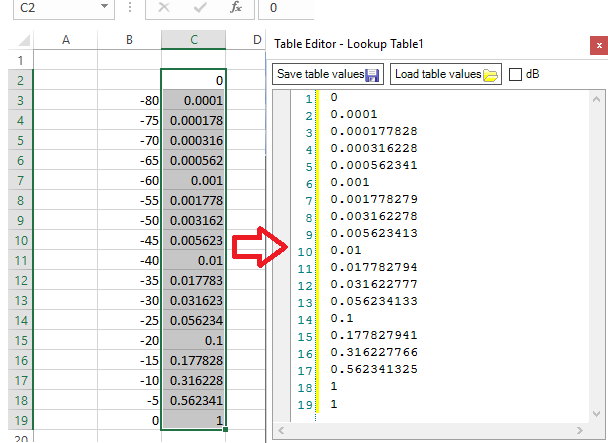
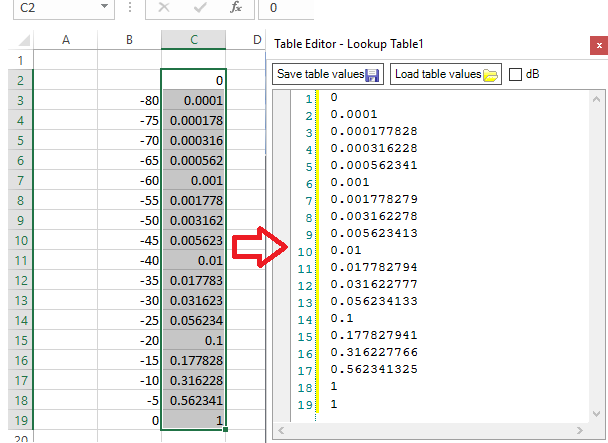
SigmaStudio does provide a "dB" checkbox which calculates "log taper" volume controls and such. In your case of controlling a State-Variable Filter, you need to calculate for both frequency vs. pot position, and then filter input vs. frequency. Your tool of choice for this is likely a spreadsheet. You can copy and paste a set of spreadsheet-calculated data directly into your LUT table, saving the trouble of typing it in:
The General Index Filter, yes, could be easier to work with than it presently is. There are a few other index filter choices --perhaps one of them may work more suitably.
Best regards,
Bob
Aha! Log LUT produces interpolated result! That's something. I wonder if it's the only LUT that does it now ("now" means 3.14 )... Well, simple index LUT is kinda not supposed to? But what about others...
This question has been assumed as answered either offline via email or with a multi-part answer. This question has now been closed out. If you have an inquiry related to this topic please post a new question in the applicable product forum.
Thank you,
EZ Admin
Please log in to reply.