How can I reset the rotary encoder position to different values ?
Hi all,
in my project I am using 2 buttons and the rotary encoder to control the parameters (Q, gain and f) of 3 filters (HP, LP and BP). I have already achieved the logic in SigmaStudio in order to do this:
1. First button allows to select among the three filters.
2. Second button allows to swap among the parameters of the selected filter.
3. Rotary Encoder allows to change the parameter (each with a different scaled Linear Interpolator).
My problem is:
for example, I select the Q parameter of one of the filters and set it to a specific value. When I press the second button to swap to the Gain parameter, the Q parameter goes automatically back to the first value of the index table, while the gain parameter automatically changes in accordance with the current position of the rotary encoder.
So I would like every parameter to stay in the value I left it when swapping to the next parameter. Also when swapping to the next parameter, this parameter should not be affected by the current position of the rotary encoder. Instead, the rotary encoder should assign the current parameter value to it's current position, so to say.
Is this a problem of the Linear Interpolators ?
I hope I've explained my problem clearly to some extent. Please find the SigmaStudio schematic attatched. The logic goes from the far left until the middle of the schematic.
David
control parameters
reset
rotary encoder
Moving to SigmaStudio forum for follow-up.
-Joe
Hello David,
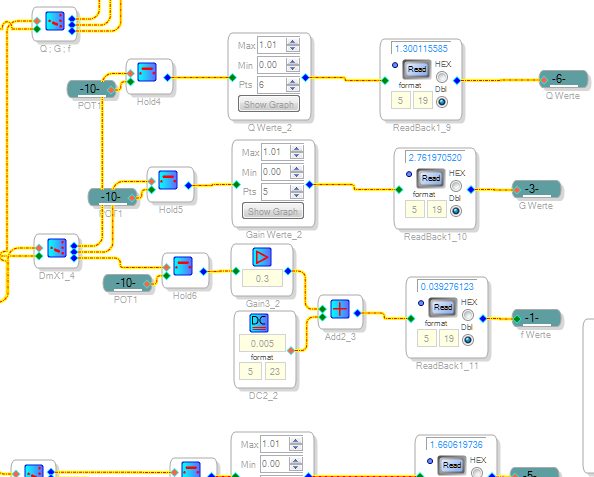
The De-Multiplexer blocks send their input signal to the selected output pin, but all other outputs go to zero without any memory. Thus, only the selected parameter is active. You can fix this to some extent by bussing the encoder output to all the interpolators through Data Hold blocks. Your selection logic then gates the encoder level through to the appropriate Linear Interpolator, but deselected parameters now retain their values (as you can see below):
The remaining problem is that all is still lost at power down, but this may not be a problem in your application. Ultimately, the best way to control multiple filters is to have a microcontroller calculate or lookup the needed filter coefficients and safeload these via I2C directly to General Second-Order Filters in your project. In the meantime, I attached a modified version of your project with the Data Holds.
Best regards,
Bob
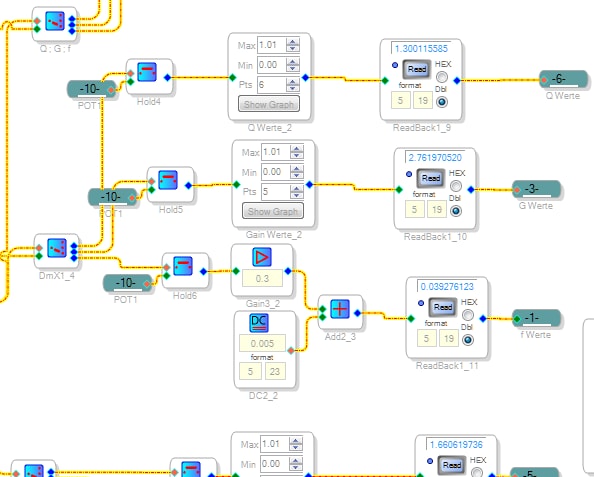
Hello Bob,
thank you very much. Your modification works in the sense of holding the parameter value once it is not selected anymore.
Nevertheless, the value of the encoder is still somehow trespassed to the next parameter. For example, if I adjust one parameter to its maximum value and then change parameters, every next parameter also sets itself automatically to its maximum. Ideally each parameter would stay where I have left it every time I select it, and not change depending on the previous parameter setting. Is there a way to achieve this ?
Best,
David
Hello David,
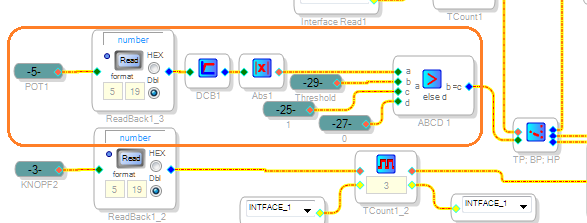
Yes I see this remaining issue now. Whenever you select a new parameter, its value jumps to the encoder position, whether you wish to change it or not. This is because the Data Hold selected by the button logic always gates ON with the "1" from the DC Source at the left end of your demultiplexer chain. One way to fix this is to replace the constant "1" with logic that only outputs the "1" when it senses that the encoder is actively being turned. This logic allows parameters to remain unchanged as you scroll through them with the buttons. When you do turn the encoder, the selected parameter jumps to the corresponding value as before. An example of this change-sensing logic is shown below:
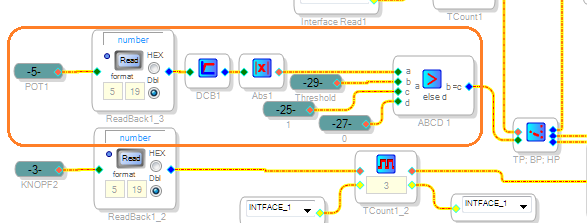
The DC Block filter allows only a changing encoder value through. If this change is greater than the threshold value (set by a DC source), comparator ABCD1 gates a "1" through to the demultiplexer chain, just as before. While the encoder is not being turned, the comparator outputs a zero -- so no parameter can be overwritten.
Since my ADAU1701MINIZ board has a pot instead of an encoder, I've been working with two versions of your project -- one of them compatible with your hardware, and the other, a parallel project set up to work with a pot for my own testing. This means that, although I tested this idea, I have not actually tested the attached encoder version. Thus, you may need to massage it until it works.
Best regards,
Bob
Hey Bob,
it works perfectly with the rotary encoder. the MIPS have risen to 1033 though, so I had to delete some objects to get it to work. It seems all the control logic is overloading the ADAU1401, so it might be a good idea to use general 2nd-order filters saving the coefficients in another micro-controller.
Thanks for your help!
David
Hi David,
Yes the microcontroller solution is best in the long run. It allows you maximum control over your user interface, room for many filters, as well as NV memory for all parameters. Setting it up can be quite intimidating if you were originally planning on a self-booting system -- but you'll find plenty of help on the forum as this has been a most popular topic. Have fun!
Bob
Please log in to reply.