Click noise reading data from DSP
Hello, how are you?
I am working on a test equipment with ADAU1442 + AD1939. Everything works good, except that when I perform any reading operation, the DSP clicks and pops. SPI is running at 500Khz. The code is very simple... Send the device address, memory address and ready back n Bytes.
I am well aware of the SAFELOAD write to avoid clicks, now I am wondering, is there a safeload read procedure? Because with USBi (in SPI mode) it reads fine, without noises. Now with the microcontroller, I get all sorts of clicks and pops. Bellow is a short video showing the click noises. on the oscilloscope.
Any help will be greatly appreciated. Thank you!
Audio Signal Processors
adau1442
Integrated/Special Purpose A/D Converters
ad1939
SigmaDSP Audio Processors
Audio CODECs
Show More
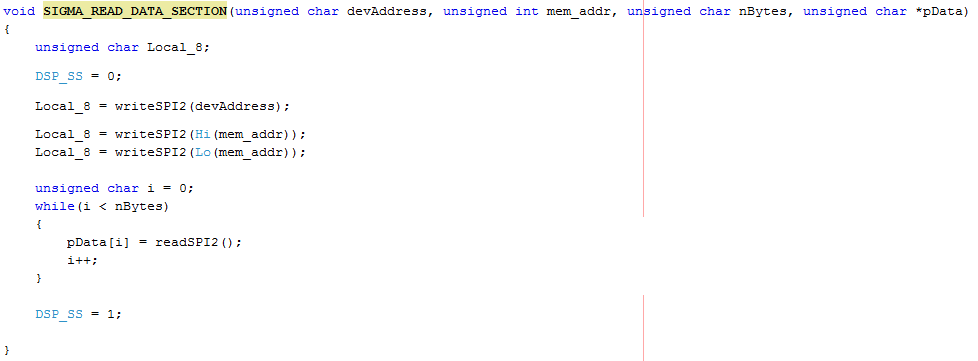
Hello Fernando,
SigmaDSPs do have a "safe read" feature, allowing you to read from the DSP core rather than from RAM. This is necessary because while the RAM is busy with I2C / SPI requests, its contents are unavailable to the core -- thus the pops and clicks. Really this is the main reason for safeload write, which forces RAM updates to handshake with the core. The stuff about needing to have all the biquad coefficients update together is also true, but really it's more fundamental than that. Even single-parameter writes to an unconnected DC source, for example, results in audible pops. As you're finding out, read requests also tie up the RAM, thus they too cause pops.
Instead of reading from RAM, use the data capture feature described on page 38 of the ADAU1701 data sheet. This accesses internal DSP core registers where you can gather the data you need. It's the method that SIgmaStudio uses to access data through the USBi for Readback and Real-Time Display functions. BrettG (I miss him!) wrote a tutorial on its use, found at Using hardware data capture (trap) registers with the DSP Readback cell (AD1940, ADAU1701)
Best regards,
Bob
Hi Bob! How are you? That is very nice, however, I am using ADAU1442 instead. In this case I found this citation on the tutorial:
SigmaDSPs with software readback, like the ADAU1761 and ADAU1442, have a much simpler readback operation - you just need to read the value from a certain address in memory.
And that is exactly what I am doing, just performing a read at a certain address. I also didn't find anything special about reading from ADAU1442 on the datasheet. I don't know what to do now
Kind Regards,
Fernando
Oops. I didn't notice you're using the -1442, sorry.
Bob
Hey, I have been doing more tests, and found out that:
- During read, output (DAC) remains perfectly stable, free from clicks
- During the read, the input (ADC) clicks.
- Changing SPI speed doesn't affect the click.
Only if I wire the ADC in to the ADC Out I am able to see the clicks on the scope. I mean:
AD1938 ADC IN ---> DSP (Meter) ---> AD1938 DAC OUT
Which means that the ADC is clicking, but the DAC is not.
I can't find a logical explanation for that. Anyone?
So here I am, Sunday, brought stuff from work home to try to solve this. I guess I found a logical explanation for the clicks:
From AD1938 datasheet:
There is also a standalone mode
available for operation without serial control that is configured
at reset using the serial control pins. All registers are set to
default, except the internal master clock enable which is set to 1,
and ADC BCLK and LRCLK master/slave is set by the COUT
pin
Ok, that makes perfect sense because the AD1938 being on the same SPI bus as the ADAU1442, when the DSP sends data to the uController, thus toggling the COUT pin, it messes up with AD1938 that was in hardware mode, messing with the ADC BCLK and LRCLK master/slave settings.
Obvious solution is to initiate AD1938 in software mode, so as long as the CLATCH is deasserted, there is no reason why AD1938 would "bother" with whatever activity is happening on the SPI bus. So that's exactly what I did,:
1) Kept AD1938 in reset while loading ADAU1442
2) After ADAU1442 is up and running, I release AD1938 from reset
3) All registers initialized to 0 (default value), except the PLL Register 0.
WRITE_BYTE_AD1938(0, 0x98); //PPL Reg 0: ADC & DAC Active, XTAL OSC disabled.
It works fine now! It does not click anymore when performing a read from the DSP.
But the measurement problem persists, it reads -6.5dB when no signal is present, and as far as the hardware is concerned, I guarantee that this number should be at least -90dB or better.
Now I suspect it might just be a very simple number conversion problem.
I am reading from "Single Level Detector" block. I am ASSUMING that my code is correct. Can anyone evaluate my conversions and see if there is any fault?
Is the Fixed Point number 5.23 format?
Am I supposed to read only 4 Bytes?
Any help will be greatly appreciated. I am really short on time
Thank you!
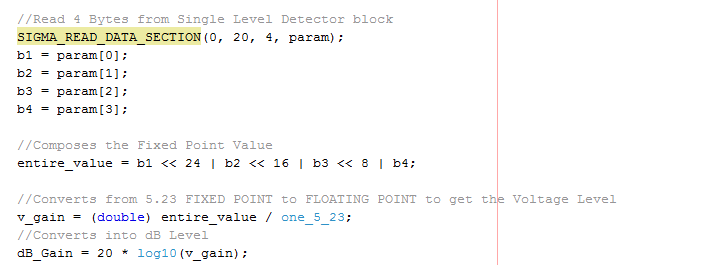
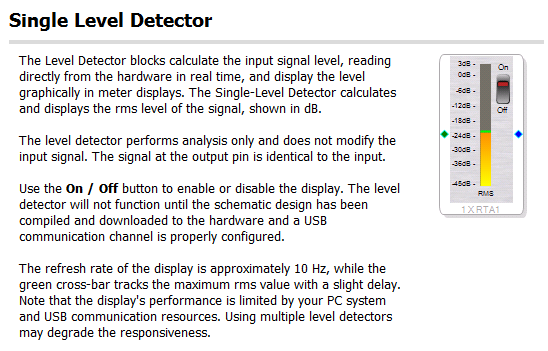
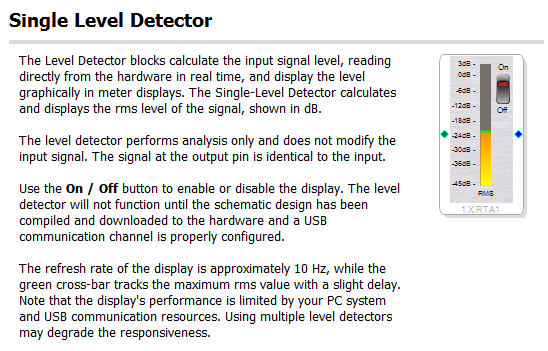
Okay, so finally I think I have it all figured out. I am getting measurements that make sense, -4B with sinewave and - 50dB without sinewave. From Sigma Studio help:
The detector output is a 5.19-format number (5 bytes are used to represent the integer portion of the value, 19 bytes for the decimal part). Depending on the algorithm you selected, one of two formulas determines the output dB value from the 5.19 value. The default formula for all level detectors is:
dB_value = 96.32959861 * (readback_value / 2^19 - 1)
So I tried that and got numbers that do not make sense. Then I remembered that ADAU144x devices have FULL 28bit readback capability, so 5.23 should be used instead. Applied the formula above replacing 2^19 with 2^23 and now it works fine.
I feel pretty frustrated that the documentation does not mention the difference between the two families.
And for the -50dB, I suppose this is an algorithm limitation, it won't go lower than that?
Thank you.
Last update!
Got the -96dB I was looking for! Just had to set a 200Hz High Pass filter and a 50Khz Low Pass Filter. Everything good now!!!
Hi Fernando,
Glad to hear you successfully worked through all the known issues with your project. You demonstrated ingenuity in designing tests that zero in on the problems as well as perseverance to see the thing through. Way to go!
Bob
When I commit to something, I take it to the end, even if I have to troubleshoot at the bit level! I just wish I had more time to do this stuff with more peace of mind... I hope I get there one day, so far it's been like fire fighting! Working crazy hours, weekends and such... One day I will have my lab on the woods with a few pets and a beautiful wife walking nude around the house hehehehe
Thanks my friend!
Kind Regards,
Fernando
Hi Fernando,
Glad you got your project working, but TMI on your future plans!
Regards,
Coleman
Fernando... Glad to see you got it working as well (Thanks for the support Bob).
Coleman, not necessarily TMI on his future plans, as long as he doesn't post pictures of it on Facebook!
"Once In A Lifetime"
Please log in to reply.