COMPILER ERROR
COMPILER ERROR
Edit Notes
Added category and text to description
[edited by: GenevaCooper at 9:54 PM (GMT -5) on 5 Jan 2023]
COMPILER ERROR
software
Hi,
I have moved this discussion from the Processors and DSP community to the SigmaDSP Processors and SigmaStudio Development Tool community. Please continue the discussion here.
Regards,
Craig.
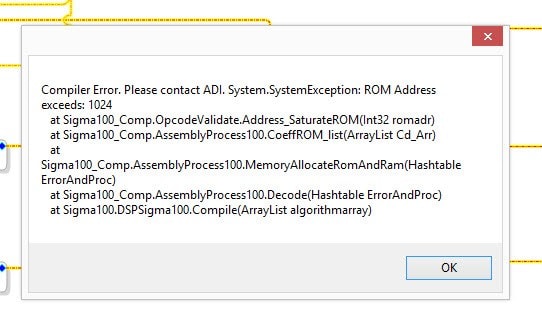
Your program is too large for the ADAU chip you are using. You need to reduce the program instructions, or select one of larger chips that can fit your program.
Hello Jon and izhmel,
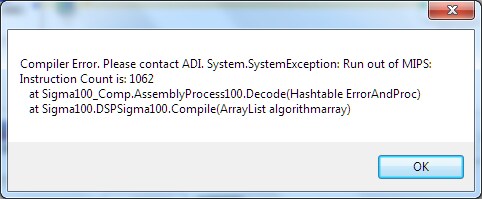
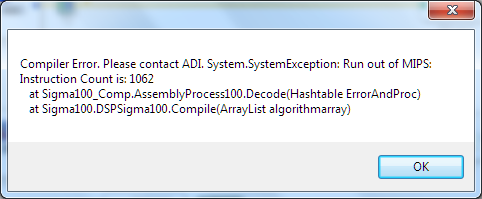
Although the error message above could mean that the program is too large for the chip, it's not the standard error for this condition -- which appears as shown below:
Unlike the first error in izhmel's post, this one is quite clear: Sigma100 refers to first-gen chips like the -1701; I had definitely run out of MIPS; and the last block to compile brought the instruction count up to 1062 -- time to quit. The different character of the first error makes me wonder if something else is going on with the compiler.
I've also seen cryptic errors like that one . Sometimes making a trivial change in the signal flow makes the error go away, yet other times a serious reduction in resource usage is needed.
Izhmel -- I suggest removing the last few block(s) added until the error disappears. Once the signal flow compiles successfully again, you can then look at the compiler_output text file which you'll find several folders deep in your project directory. This will show you if you are about out of instructions, or are in fact nowhere near the limit. If you have plenty of room left, restoring the function you have deleted, this time using another method (with different blocks), may work around the error.
Best regards,
Bob
Bob,
I think it depends on which resource is exceeded. If I make a simple program with a single FIR at 1024 taps, I get your error (1031 instructions). If I make the FIR with 1100 taps, thereby exceeding both the data RAM and instructions, I get the error above.
HI all:
I believe the error shown a the beginning o this thread means that the user is running out of data or coefficient memory (too many or too long delays) while the error that Bob shows means that the user is running out of instructions in program (MIPS).
Hope this helps
Miguel
Thanks all
Hi Miguel and Jon,
Wow I had no idea exactly what the originally posted error really meant. Thanks for clearing this up. It would be nicer if the compiler would just go ahead and say, "Run out of parameter memory / data RAM" as it does for MIPS, however that may not be trivial to accomplish.
Jon, congrats on your new status level -- you earned it by helping others, including me.
Bob
Please log in to reply.