ADAU1701 External Delay: Idle Thoughts on Boxing Day!
I've been experimenting with concepts of using the serial data outs for SPI control of other ICs, where an ADAU1701 is used in self-boot mode and there is thus no MCU. This is because my designs are so small I usually don't have space for anything but a handful of other components, and I can't fit an ADAU larger than -1701.
My applications are too specific to be of general use, but I had a concept for external delay using an SPI SRAM, as the newer ADAUs can do natively. This requires four serial data lines; BCLK, one data in & out, and CS (I think this can be a GPIO).
Some time ago KJBob helped me describe a method for using downsampling with -1701's internal delay to extend the initial delay for a reasonable reverb. See here for an example of downsampling with the internal buffer:
https://ez.analog.com/message/74499#74499
Using an extension of this technique, an external delay has the advantage of a delay time limited only by the external SRAM addresses (64K, for 16K sample delay). This is a fourfold increase!
The SigmaStudio program would involve a counter that is used to encode the memory address for the read/write commands, and transmitting that command as an audio sample, followed by several samples of actual audio data. It would have to use -1701's internal buffer to read & write a page of bytes back and forth to the SRAM--this would be a short buffer that has to multiplex & demultiplex the mono audio from the stereo data stream, using the technique in the link above.
It takes -1701 five sample periods to read or write a full page, which is eight (mono) samples of data (because -1701 only addresses 24 bits in a 32 bit word), plus another period to toggle CS between commands, so an eight sample roundtrip takes twelve sample periods. Probably easiest to downsample for six samples in that period.
Audio Signal Processors
SigmaDSP Audio Processors
adau1701
Hello Jon,
You've got a wonderful idea which (like most things digital) goes way over my head. Since you suggested a divide-by-six down-sampling, I went expanding my multiplexed delay echo project accordingly. The result is quite a cavernous effect. I have no idea if this helps any, but this is about all I could contribute to your concept.
Best regards,
Bob
Bob, you're my personal SigmaDSP hero, I'm sure we can make this work! I also need to beat digital concepts into my head!
I didn't suggest a divide-by-six, but rather divide-by-two in lieu of 2/3 (which is possible but maybe less straightforward), and once you commit to downsampling I don't think the extra few kHz matter that much, certainly not for a reverb.
In theory it would be possible to minimize downsampling even further by reading & writing more data per command (before switching between read and write functions). The trouble is it gets progressively more involved for SigmaStudio to handle multiplexing a larger amount of sample data, which would start to eat at the instruction budget. Since 1/2 downsampling is fine with me, I stopped there.
So, I have decided to read and write four downsamples in eight sample periods. That would allow a total of 16K audio samples on the SRAM, which is 32K samples after re-upsampling--I think I messed up that math in my first post, because -1701's 2K sample delay becomes 4K with downsampling, so we'd get an eightfold increase, not fourfold!
The SigmaStudio program has to do a calculation off of a counter (the counter max would determine the delay time) to generate the required memory addresses for the read/write commands, then has to buffer and send/receive the samples during the according cycle. It's really not much more than you already coded for the internal downsampling; just the memory address calculation, plus a few commands to initialize the SRAM on startup. I'm going to give a crack at writing the code later in the week, but I won't be able to test with an SRAM for a while. Maybe I'll stick an SRAM test board in my next PCB order so I can hack that into my -1701 eval kit.
One thing I realized over the weekend is the delay between the SRAM read and ADAU serial input timing may cause the data to slip a bit. I need to stare at both timing diagrams some more. I don't think that's a major hassle as 23 bits should be more than plenty, but the program may need to take that into account by truncating the output and correcting the input.
OK, I think this is the bulk of the program. Only 284 instructions!
Not coded yet is another counter to generate the memory address, that would run off of the eight sample "cycle counter" and increment according to the length of the desired delay. That number ends up as part of the read/write commands issued the to SRAM, here represented by fixed numbers. x03 x99 x99 is the read command, where the nines represent a 16-bit memory address, and x02 x99 x99 is the write command. I would also need a routine to send a couple of initialization commands to the SRAM.
The strategy is to use eight sample periods as follows:
0 send read command (on left channel, right is don't care)
1 read downsamples 1-2
2 read downsamples 3-4
3 CS high (terminates read command)
4 send write command (on left channel, right is zeros)
5 write downsamples 1-2
6 write downsamples 3-4
7 CS high (terminates write command)
To test in a loopback rather than with an SRAM, change the sample period triggers in the Reconstruct Delayed Audio module. I think that would have to be samples 6 and 7 because the digital input is delayed one sample from the output? I haven't tried that before.
Also, note that wherever I refer to "left" and "right", those are digital data channels only, not audio. This is a mono delay! Stereo could be done, at half the bandwidth of course, which probably defeats much of the stereo image.
Finally, I didn't look at BCLK settings at all yet, so don't suppose those are correct in the program.
That's enough for tonight, I'll try a loopback test in a day or so.
Here is an optimized version that includes memory address calculation. I realized it was more efficient for both memory use and instructions to go to three downsamples in six sample periods, so the function is now:
0 send read command / read downsample 1
1 read downsamples 2-3
2 CS high (terminates read command)
3 send write command / write downsample 1
4 write downsamples 2-3
5 CS high (terminates write command)
It may be a good idea to hold CS high for an initial run through the memory cycle (682ms max @ 48), and probably mute the output as it would not be reliable for the first cycle. I'll test that when I can get an SRAM hooked up to my eval kit. I don't think SRAM initialization beyond that would be necessary as the chip defaults to sequential read/write mode, which is what we want.
Another possibility for external SRAM would be storing samples, this would be easier and thus take fewer instructions, since read and write mode could be externally triggered, and just run sequentially until stopped. And it wouldn't have to be downsampled unless desired. The maximum sample storage is still 16K; since the default mode would record/playback in stereo, it might be necessary to implement the SRAM's Hold feature if full use of the 16K samples was desired for a mono signal.
Hello Jon,
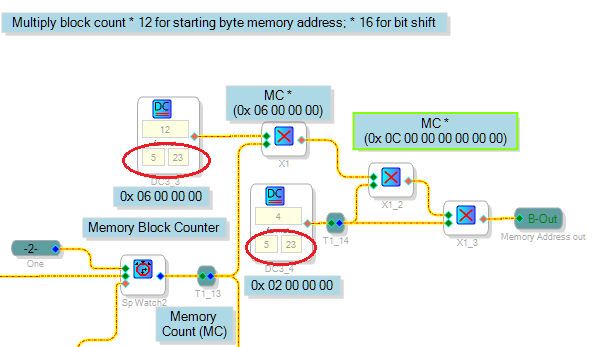
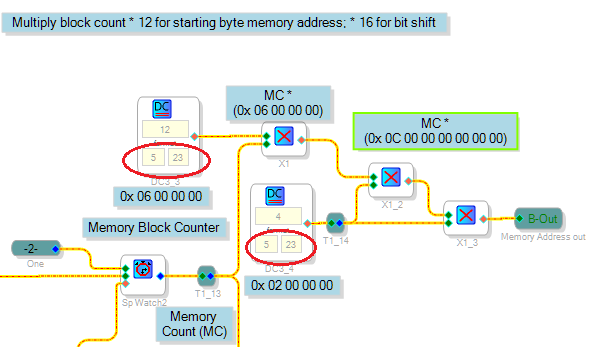
Sorry I've not been able to examine your project in detail due to being heavily involved with a prototype which finally started working late yesterday. From the looks of it though, your project appears far advanced from the "idle thoughts" stage! I'm just starting to see how your project generates the SRAM addresses and cycles the data through. The Memory Counter appears to compute some huge addresses, making me wonder if either of the "5.23" DC value(s) circled below should be "28.0":
Hope you get to experiment with your awesome idea soon.
Bob
Bob,
Every time I have to think about ADAU number formats my head explodes, then I put it back together again and try to figure it out. I think I may be getting confused by the DSP readback block, that doesn't show the LSBs in hex readout, so I added the *16 function so I could monitor the output. Probably that needs to get removed to output the correct data. I need to hook up my scope to my eval kit, but I have them in different places at the moment (home vs. office) because I do my coding at night. I really wish SigmaStudio could emulate having the eval kit attached . . .
Edit: in addition to removing the *16 instructions from the memory block, that would mean the read and write commands should also be changed to 28.0 format (from 24.4)
Jon
,
Actually it was my head that exploded. The way Sigma 100 / Sigma 200 fixed-point multiplication works, multiplying anything by 1.0 in 5.23 format leaves it the same. Thus, if your intention is to make the number larger, the 5.23 formats above are in fact correct.
In contrast, multiplying by a 28.0 format number converts a 5.23 number to a 28.0 format integer, as is often done to generate integer indexes. Of course this makes the result a lot (2^-23) smaller. I just realized this while answering another question. So sorry for my confusion.
Bob
Please log in to reply.