1452 safeload
Hi,
I use 1452 on my target board.I find something wrong with the safeload mechanism of 1452.If I use the module:Filter->Second Order->Double precision->EQ, the host can't write the parameters into 1452 through the safeload mechanism. All parameters can't be changed through safeload mechanism. If I use the module:Filter->Second Order->Single precision->EQ,the safeload mechanism is OK.Can you tell me how to solve it?
Best Regards,
Alex
Hi Alex,
Since the safeload mechanism only supports writing up to 5 x 32-bit words per audio frame, we cannot load the full five 64-bit values for a double precision filter. You would have to have to split apart the safeload transfers between 2 audio frames. I am not sure if this will have a negative side effects but should still be better than direct writes to memory.
-JT
Hi John,
The problem is not only the double precision filter but also the other modules in the project can't be safeload when I use the double precision filter module in the project. Please try it on the demo board of 1452. Even though the sigmatudio send data to change the parameter through SPI, the output of demo board won't change.All modules do so , even the gain module.
Best Regards,
Alex
Hi Alex,
Do the safeloads work with SigmaStudio connected but not your host processor? Or do they not appear to work with SigmaStudio itself?
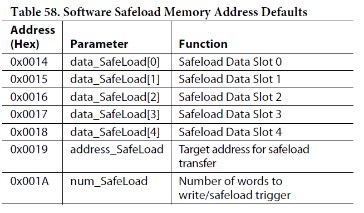
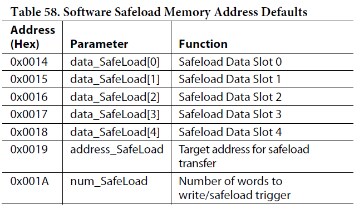
If it is not working with your host microcontroller... then can you verify that the safeload parameter memory addresses have not changed from the defaults described in the datasheet, after you add in the double-precision filters? The defaults are shown below, but depending on the size of your project the compiler may link them to different addresses. You can verify by inspecting the compiler_output.log file in your project's directory.
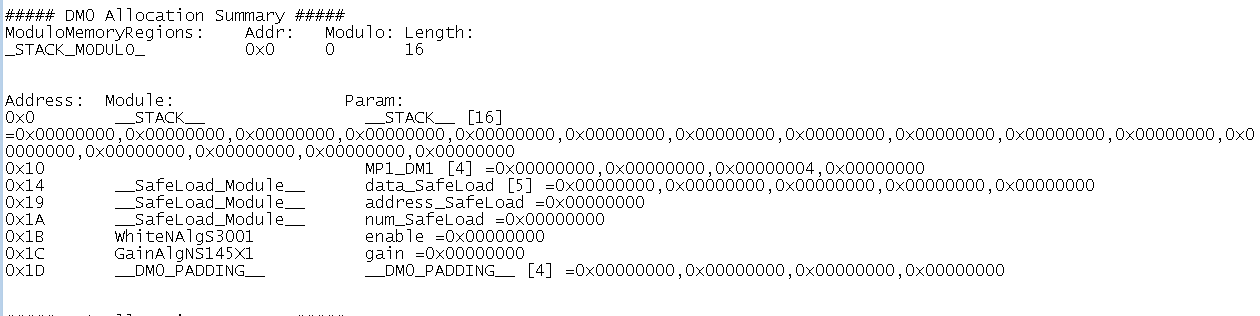
Here is the compiler_output.log file generated from a small project, where the variables were placed at the default locations described in the datasheet.
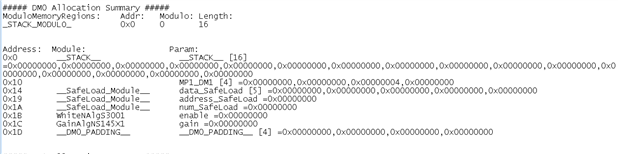
But here is an example of a larger project where the safeload variables were placed at higher addressses in DM0 space. Depending on the algorithms in your project which use DM0 space, it is more likely that the linker will move these around to other addresses due to modulo placement of other circular buffers for your filters.
Not sure if this is the cause of your issue with the part not responding to safeload SPI accesses, but that would be the one of the first things to check as you add new cells to your SigmaStudio schematic.
-JT


Please log in to reply.