Program Load
Hi Guys,
I have just gone to program some boards today with the latest version of sigma studio and its different to the older versions.
In the old version you would write to eprom from the config screen but doing this and rebooting the board the program doesn't load but if i use the link compile followed by download the board works and stores the code even after power down.
Has something changed in the correct way to program standalone modes? or am i missing something?
Graeme
Hello Graeme,
Testing the latest beta with the ADAU1701 and ADAU1452 mini eval boards, I found that the EEPROM writing works as described in the boards' user manuals (that is, the same way as with previous SigmaStudio versions). Thus it appears that the programming method has not changed.
Best regards,
Bob
Thanks Bob,
Not sure what the issue is then as this board is identical to my pre production the only thing different is i was writing to it with 3.11 and not 3.10
I need to flash some more boards this week so will drop back to 3.10 and see if the issue is the same
Hi Bob,
Well its not going well at all today i needed to refresh one of the boards to correct the code and now i can't even get it to hold anything.
I have tried 3.10 and 3.11 on my mac under virtual box and a genuine PC both XP installs and i keep seeing coms failures.
Im not sure whats causing the issue now and I'm at a loss as nothing has changed from the original handbills boards to these professionally assembled boards.
The only switch i have is the write protect on the eprom
Graeme
Thanks Bob,
yes it was a CM, i found one mistake on power up a tantalum backwards that was tripping the supply which is now sorted.
Whats odd is i have 10 speakers built and programmed all be it a little differently than before that have been playing non stop 48hrs, the one i was working on today was one of the 10 and it let me communicate for 3 hours whilst i was tweaking the crossover settings but the second i try and dump to the eprom it got all upset and started throwing errors.
Im going to let it sit over night and try clearing the eprom first rather than trying to load over the existing program.
One thing i was wondering is that if its because all my USB ports are USB3? I'm also going to go back over my programming lead incase thats the issue.
Is there a maximum length for SDA SCL transmition? my lead is about 3' and all 20awg conductors there is also a 6' length inside the speaker from the panel connector to the board
Thanks Bob,
I just noticed a typo i have 6" inside not 6' lol **** fingers not working tonight so i think the length should be fine. I did a quick google and anything up to about 6' is fine on a decent cable.
Im thinking it could be the USBi acting up but i will know for sure tomorrow when i can logically work through the issues.
Hi,
It will be interesting to see how v. 3.10 works. Do your boards have DIP switches or address jumpers that need setting?
Hello Graeme,
Sorry to hear of your difficulty with these boards. Congratulations on your product going into production, but now the associated headaches begin. By professionally assembled, do you mean by a contract manufacturer? I work in a CM's test department so I've seen what can happen with a first assembly run. Even though you have designed your schematic and perhaps the PCB layout, a lot more happens between a hand-assembled prototype and a manufactured assembly -- paste stencil, paste selection, pick-and-place programming and loading, oven profiling, etc. An error at any stage of this process can and will propagate. I suggest you go over a board or two with the proverbial fine-tooth comb. If you don't have an inspection microscope available, press the best magnifier you have into service (this may be a camera lens, for example -- any coated, achromatic lens system is far better than a typical eye loupe). Look for backwards / wrong / missing components. Check the DSP for solder bridges and loose pins. In other words, examine everything as if it were hand assembled. If you find something, don't get too angry at your CM -- because this stuff is fairly common on first articles. Consider it part of the manufacturing teething process.
Best regards,
Bob
Hi Graeme,
The USBi is known to give intermittent trouble with USB 3.0 ports. Hopefully ADI will revise it before USB 2.0 ports go bye-bye. My laptop (already with only one 2.0 port) is getting close to retirement. I wish I were.
Since I2C has passive pull-ups, the max cable length is limited by capacitance. Typical wiring capacitance runs 15pF per foot, so with a total length of 9 feet, you have roughly 150pF. With 2.2K pull-ups, the resulting time constant is 0.33 uS. To rise most of the way takes two time constants, or 0.66 uS. I'm not intimate with I2C details, but this seems like a lot of time for 400 KHz operation. Try scoping your I2C bus to see how bad it actually looks, or try a board not yet mounted in a speaker with a short cable.
Best regards,
Bob
Well i flashed 10 modules today with 3.10 and every one of them flashed like my prototype board so I'm at a total loss.
The stubborn one from yesterday i cleared the eprom and it took code straight away
Hi Bob,
Interesting I'm using the ADAU1442 so i wonder if they broke something fixing that issue on the ADAU1701
This morning i followed the following procedure to flash.
Connect the USBi
Read the eprom to window in the winepromloader window to ensure its empty
Press link compile connect followed by link compile download
Write the last config to eprom
Read the eprom to window again this time to check the code is there
Remove the USBi and power cycle the board
now when doing this the board functioned immediately after the power cycle, when i did the same under 3.11 the board wouldn't do anything until i reconnected the USBi and hit link download
Graeme,
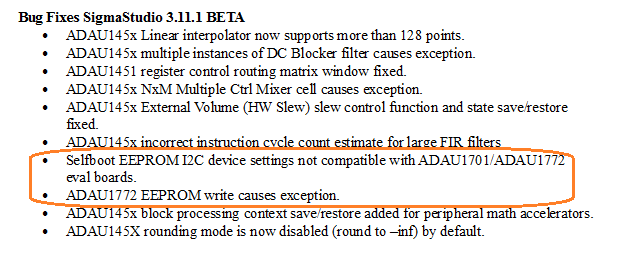
I just noticed the text below in the SigmaStudio Release Notes -- I don't understand it, since in my case it didn't matter what version I programmed with -- but it suggests that there was a change with version 3.11. Perhaps someone from ADI could shed light on this:
Bob
This question has been assumed as answered either offline via email or with a multi-part answer. This question has now been closed out. If you have an inquiry related to this topic please post a new question in the applicable product forum.
Thank you,
EZ Admin
Please log in to reply.