Creating a simple I2S path through an ADUA144X eval board
I'm really in need of some help here. I'm using the Sigma Studio s/w to create a simple digital audio path through the ADUA144X eval board.
I need to generate a tone (on my board I have a 440Hz tone) being transmitted off of the board to a target. That target is just copying the data from the I2S Rx side to the Tx side and reflecting it back to the ADAU board which is to put it out an audio jack on the board so I can verify the audio by listening to it via a set of ear phones.
I've attached my project file to this message. What I'm hoping to have happen is that the tone is sent out on the same I2S channel as is coming in. My I2S channel is configured as slave 16-bit, Stereo on channel 6 with a sample rate of 32KHz. Therefore the returned data should be heard by connecting to jack J11. I do hear the generated tone on J4 which is what I expected for the on-board setup.
My oscilloscope tells me that the data coming into my I2S channel from the ADAU board is actually clocking at 44.1KHz. Also, I have no output or rather it's just a DC output.
Cheers!!
Hello John,
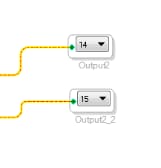
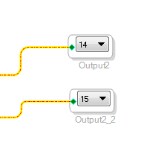
I took a look at your project, and wonder if you were transmitting to the right output channels. It looks like you are trying to write to serial port output 7 (channels 14 and 15).
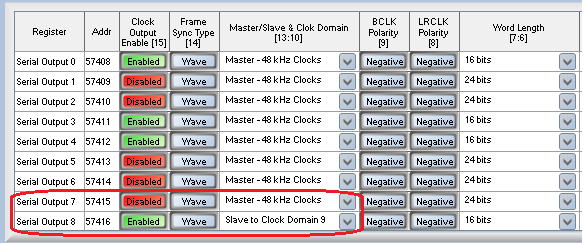
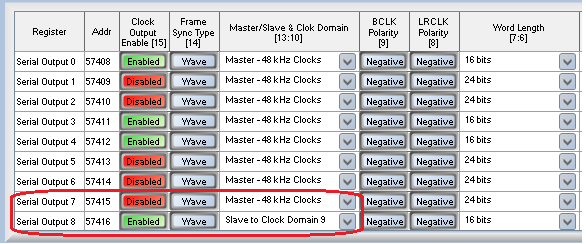
However, under the Serial I/O register window, you have Serial Port 7 disabled (which by default I2S would use channels 14 and 15) and you have Serial Port 8 enabled as a 16-bit slave (Serial Port Out 8 would use channels 16 and 17 within SigmaStudio). Does this explain why you don't hear anything on J11?
Also, I notice you set the project to 32 kHz, but assuming the use of the ADAU144x eval board the clock input source by default is 12.288 MHz, with the serial ports configured as master to run at 48 kHz I2S. Setting the sample rate in the project is for generation proper coefficient values, but this does not contol the start pulse rate for the core and serial port master clock frequencies.
Finally, I am confused how you are seeing a 44.1 kHz signal. Is this an externally master I2S clock? Or do you have a external 11.2896 MHz master clock source clocking the DSP to generate that sample rate?
-JT
This question has been assumed as answered either offline via email or with a multi-part answer. This question has now been closed out. If you have an inquiry related to this topic please post a new question in the applicable product forum.
Thank you,
EZ Admin
Please log in to reply.