Automatic Room EQ?
Dear Bob,
I have to ask another input from you again if you don't mind me asking. Seems like not so much of information about this in the forum.
I believe, I have to choose 1701 since it has the auto EQ block already in place. Do you have some experience working with Auto EQ?
The function, from which I know from previous readings, involves sending out a tone to validate microphone (used to measure the acoustic response of the room) and loudspeaker connection and levels; then proceeds to do a frequency sweep where the monitored audio response is recorded, representing the acoustical nature of the listening room. The recorded data from the mic is then used to calculate gain and frequency parameter settings in the audio signal flow.
Honestly, I have no idea how to use this block on the SigmaStudio: Automatic-EQ filter. Can you give some insights as to how this can be used correctly so as to serve the purpose of room correction? Any thoughts are welcome.
As usual, thanks in advance!
Best regards,
Dan
Hello Dan,
If I understand your application, your completed device needs to run the test tone(s), analyze the resulting mic signal for response anomalies, and calculate a set of compensating filters -- all on its own, in the end user's environment. Unfortunately, this is not what this Automatic EQ block is designed to do.
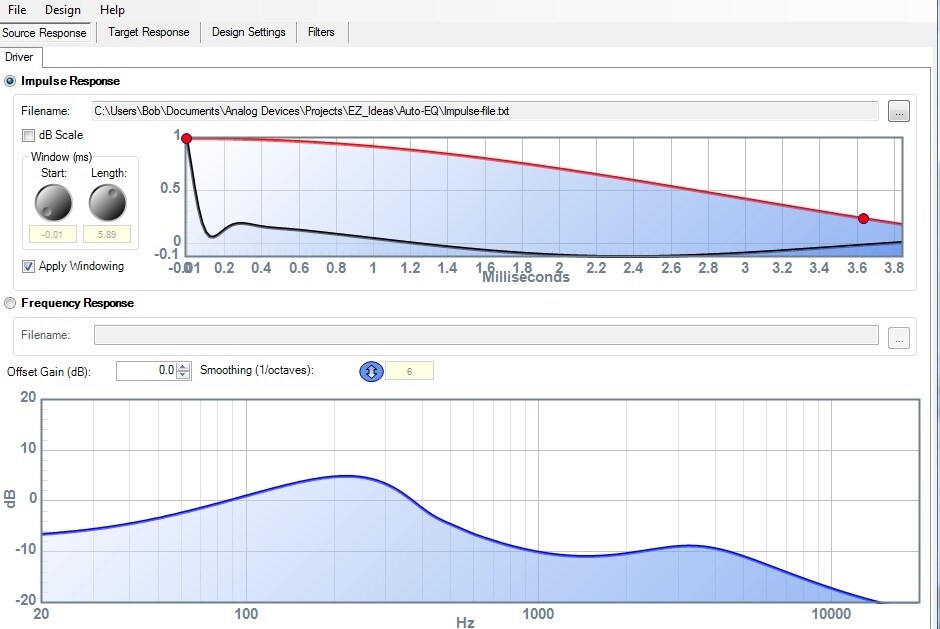
The present Automatic EQ block computes filters for individual speaker drivers (that's why there's also 2-way and 3-way versions). You need to provide an Impulse or Frequency Response from your own tests, or perhaps from the driver manufacturer. The resulting filters are calculated within SigmaStudio on the host PC, not by the DSP at run-time. Thus, it's not ART.
Although I've not had experience actually applying this algorithm, I have experimented with it using a made-up Impulse Response file (thus getting equally made-up results):
Documentation for Auto EQ is available at Automatic Speaker EQ [Analog Devices Wiki]
Best regards,
Bob
Dear Bob,
What you mentioned about my application is correct. SigmaDSP is somewhat of a post-processor not in the likes of SHARC/Blackfin that's I think capable of this feat. I guess I have to lean to a different direction and choose a more capable DSP. I guess I misunderstood the Auto-EQ application (forgive me for being naive). Thanks for the clarification and the sample illustration.
As usual, many thanks for your support!
Regards,
Dan
Please log in to reply.