Units in slew external volume control?
Hello everybody, sorry if this question has already been answered, I haven't been able to find it. Could anybody please let me know what are the units of numbers which we put in a slew block to determine slew time? Are those samples? Most probably not. Please help!
Hello Skfir,
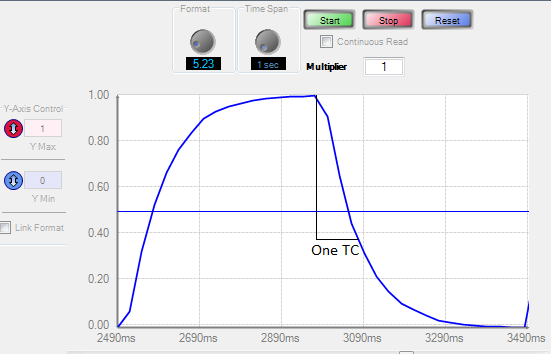
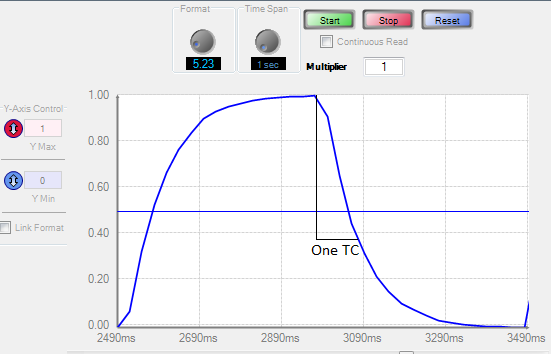
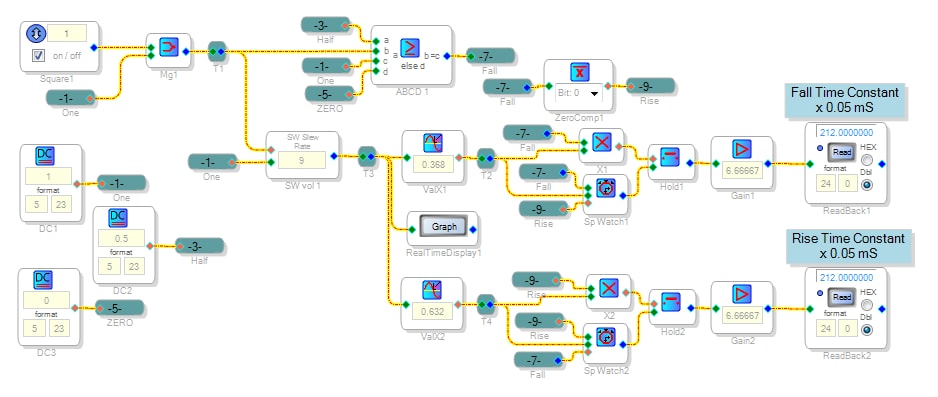
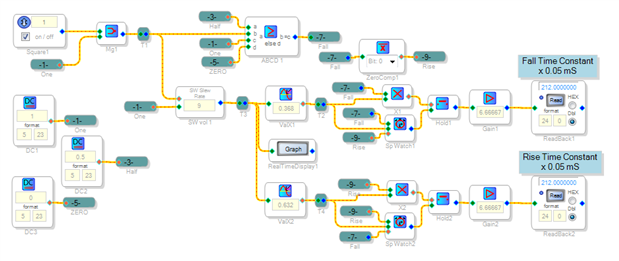
I couldn't find any slew-volume specs either, so I set out to measure it. In the circuit below, a square wave feeds the slew volume control. The result can be seen on the Real-Time Display as an exponential rise and fall, so we can model the Slew Volume control as a first-order "RC" with a time constant.
The Real-Time Display, however, is inconvenient for accurate measurements. Thus, the circuit has Stopwatch cells counting samples as the slew output rises from 0 to 0.63, and falls from 1 to 0.37 (either is one time constant). The read-back cells are scaled to show the time constant in units of 0.05 ms, considering the 48K sample rate and the read-back's four-bit truncation (divide by 16).
Here's the results expressed in time constant as well as the dB / s spec used elsewhere in SigmaStudio:
Rise and fall times were identical
Increasing the slew number by 1 doubles the slew time (a power-of-2 relationship)
The slew numbers useful in typical applications range from about 8 to 15
Best regards,
Bob
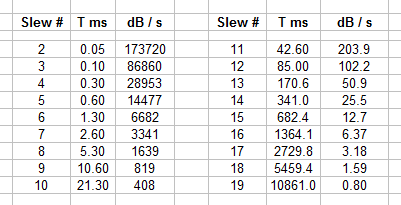
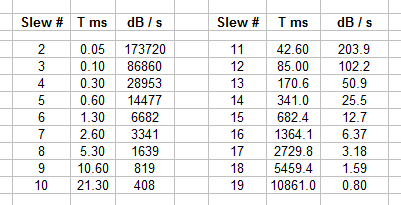
That is great as always bob! Thank you again. It would be great if the AD people added this table into the documentation - it is extremely useful. Thank you again.
Yes documentation -- what a concept. I'd put stuff like this in the Wiki except that it's not particularly user-friendly and besides, you don't get any points for doing that. "What gets done is what gets rewarded," I remember hearing at an old Fred Pryor seminar.
Best regards,
Bob
Hello. I'm trying to use this block on a ADAU1467, but the attack/decay numbers only go up to 15 i.e. about 700msec - I need to go at least 10x slower than this. Is there any way to achieve this please?
Hello dunmail,
The Hardware slew is setup in firmware and the variable that sets the slew time is a 4-bit variable. So 15 is the max. This is in firmware so there really is not a work-around to hack the HW slew. The trick would be to use a software slew block and control it from an external source. Let me think this one over.
Dave T
but what is the point of chasing any "reward"? I honestly thought the documentation is a one-stop place for users to get 100% clarity, and putting these resources might as well more efficient than having users typing in the same questions. It's been 4 years since this thread was started and I still hope that you guys can hopefully expand the doc! Cheers guys, thank you
Hello Everyone who has contributed to this post.
I had included a detailed document on how to use the HW slew on the Sigm300/350 in this post:
(+) Sigma 300 (ADAU145x) Slew Volume Rates - Discussions - SigmaDSP Processors and SigmaStudio Development Tool - EngineerZone (analog.com)
You have to read down a bit but my response is in there.
Dave T
Hello dunmail,
Sorry that I forgot to mention that the linear slew is limited to 0-15 but the RC or exponential slew settings have more choices that are longer in time. If you click on the blue squares you will see them change. Then you have more or less options when you pull down the selection box arrow.
Dave T
OK, thanks for that Dave.
I just placed the basic Slew # table shown above into the Wiki. The table is a .png image, yet I had to manually type it in as I don't have rights to upload images there (bummer!).
The above referenced wiki edit has yet to be approved after nearly three years. So much for editing the wiki instead of "chasing points."
Please log in to reply.