ADAU1701 work on 96 KHZ sampling frequency, adjust the frequency of EQ is not in the adjustment, but in regulating frequency of half of the work
ADAU1701 work on 96 KHZ sampling frequency, I found a strange phenomenon: when I adjust the EQ, I use the PEAKing EQ at 1 KHz increased 6 dB, is actually at 500 Hz increased 6 dB, I tried a lot of frequency points, but is the place in the frequency point / 2, is this why?
Audio Signal Processors
SigmaDSP Audio Processors
adau1701
Hello,
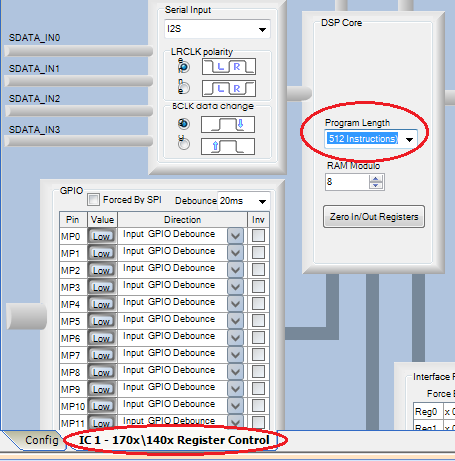
What's happening is that SigmaStudio calculated your EQ filters to run at 96KHz, but your ADAU1701 is still set to run at 48KHz -- thus filters work at half frequency. Setting the sample rate involves changing two things -- in addition to setting your 96KHz sample rate atop the Schematic window, you need to go to the HW Configuration window, then the 170x \ 140x Register Control tab, and there change the Program Size box to 512 Instructions . See FAQ: How do I change the sample rate of my SigmaStudio system?
This question has been assumed as answered either offline via email or with a multi-part answer. This question has now been closed out. If you have an inquiry related to this topic please post a new question in the applicable product forum.
Thank you,
EZ Admin
Please log in to reply.