About default program signal flow of the AD1701 ,why not output?
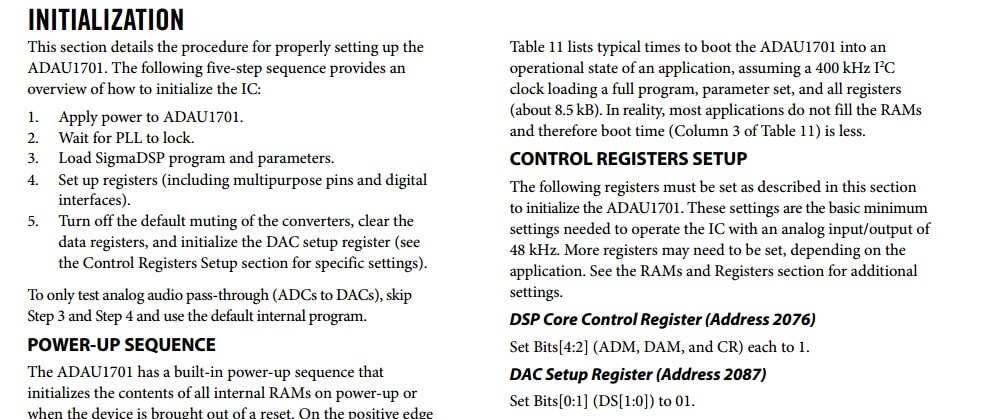
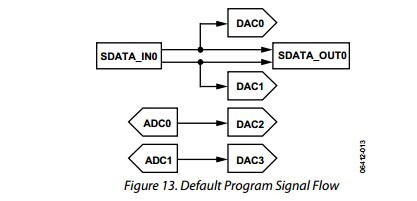
MCU and ad1701 through the I2C communication, I write the dsp core control register (0x081c):a[2]={0x00,0x1c},the dac register b[2]={0x00,0x01}。I read the dsp core control register data is 0x00,0x1c,the dac register data is 0x00,0x01.when I through adc0 and adc1 input analog signals, why the dac2 and dac3 have not output?I follow this ad1701 data manual configuration
See below:
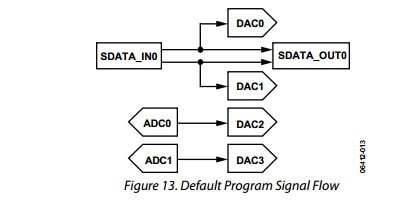
the default program signal flow
Don't I have a hardware problem?

Hello shaoqin,
You're doing well as you're able to get I2C comm to and from the ADAU1701. That's the first accomplishment needed,
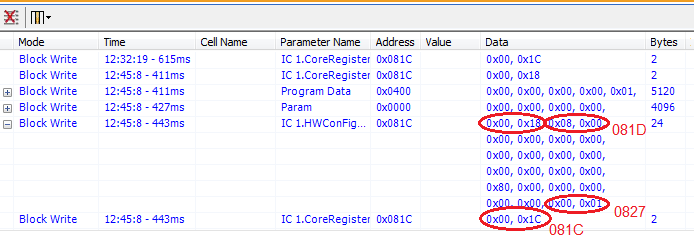
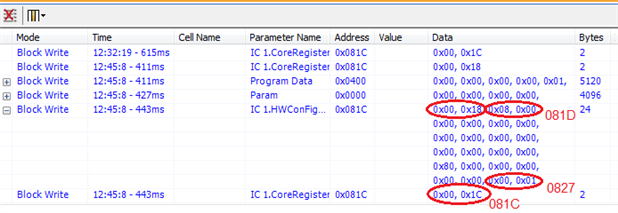
Generally the best way to get SigmaDSPs running is to do exactly what SigmaStudio does. When I Link-Compile-Download an empty project, the Capture window shows this:
The writes of 0x00, 0x1C to the core register, and 0x00, 0x01 to the DAC register, are identical to what you have written, so they are correct. SigmaStudio writes to the core register twice, however -- the first time it writes 0x00, 0x18, the second time it writes the 0x00, 0x1C. In theory this shouldn't matter since the second write overwrites the first, but I've found it best to follow what SigmaStudio does, since that works. Also we observe SigmaStudio writing 0x08, 0x00 to address 081D -- even though the -1701 data sheet calls this "reserved". Apparently this write is needed also.
Thus, perhaps you could try making the four writes circled above, in that order, to see if it starts your audio.
Best regards,
Bob
I have do,but it not audio output ,the I2C communication is ok.please help me
Sorry to hear you're still not passing sound. As you know, it's always hard to troubleshoot a prototype where both the hardware and software are unproven. It's also hard to troubleshoot remotely, but I can offer a few ideas.
Make sure the 1701's PLL is locked. There's no output pin to confirm this, but a simple check is to bring the antenna of a small FM radio near the chip -- if working, it emits some EMI at 98.3 MHz (roughly twice the MIPS frequency). I assume you have checked your schematic against a known working one (such as that of the ADAU1701MINIZ eval board). In particular, check the two PLL config pins to make sure you're running at 48KHz sample rate (divide by 256 with a 12.288 MHz crystal) -- the default signal flow assumes this. If your hardware is set up for a higher sample rate, you'll need additional I2C register writes to configure accordingly.
Best regards,
Bob
This question has been assumed as answered either offline via email or with a multi-part answer. This question has now been closed out. If you have an inquiry related to this topic please post a new question in the applicable product forum.
Thank you,
EZ Admin
Please log in to reply.