[bug report] Erroneous results from the "AB in CD out Condition" block
Hi all,
I hope you are not fed up (yet) with my bug reports. I hope that posting it here may help others. If there's a better way to pass such messages to Sigma Studio developers just let me know. Here goes the next one.
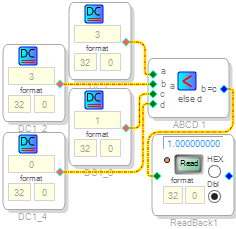
Using Sigma Studio 3.11.1 BETA with ADAU1452MINIZ I get erroneous results from the "AB in CD out Condition" block. To put things short: "<" works like "<=", "<=" works like "<", ">" works like ">=" and ">=" works like ">". So every operator gives unexpected result when a=b.
An example:
The project file is also attached.
Regards
Marek
Audio Signal Processors
adau1452
sigma studio
bug
SigmaDSP Audio Processors
Hello Marek,
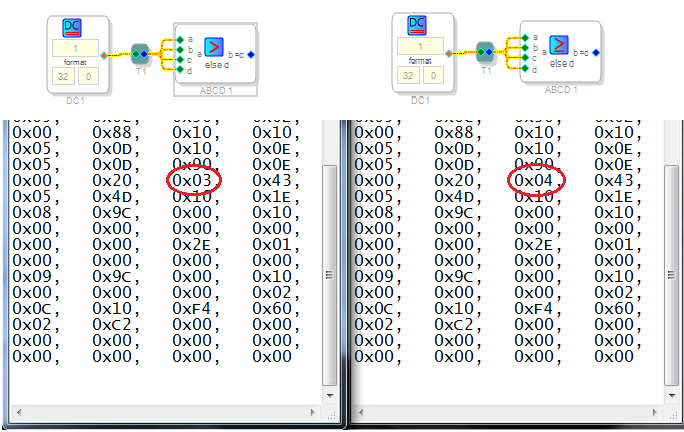
My experience is that ADI welcomes bug reports. It's good you're finding the bugs so the SigmaStudio software team can swat them. I verified the ABCD Comparator bug you described. The two cases shown below result in slightly different object code -- suggesting that the Sigma 300 compiler does recognize the > & >= conditions. However, the behavior for both remains identical.
Best regards,
Bob
Hi Marek,
I am sorry that you have encountered so many issues, but we always welcome your bug reports. This issue has been fixed and will be included in the next SigmaStudio versions. (the new scheduled update is 3.11.2 Beta) If you need to workaround this issue you can use the ">=" for ">", ">" for ">=", "<=" for "<", and "<" for "<=".
Note: To preserve backward compatibility, in an existing SigmaStudio project the current incorrect function will be preserved (for binary backward compatibility). Remove the algorithm or delete the cell and reinsert it in the design to update to the fixed code.
Best regards,
John
This question has been assumed as answered either offline via email or with a multi-part answer. This question has now been closed out. If you have an inquiry related to this topic please post a new question in the applicable product forum.
Thank you,
EZ Admin
Please log in to reply.