ADAU1452 Master Control Port
Hi there.
I want to boot a codec (AD1939) over the master SPI port of the ADAU1452.
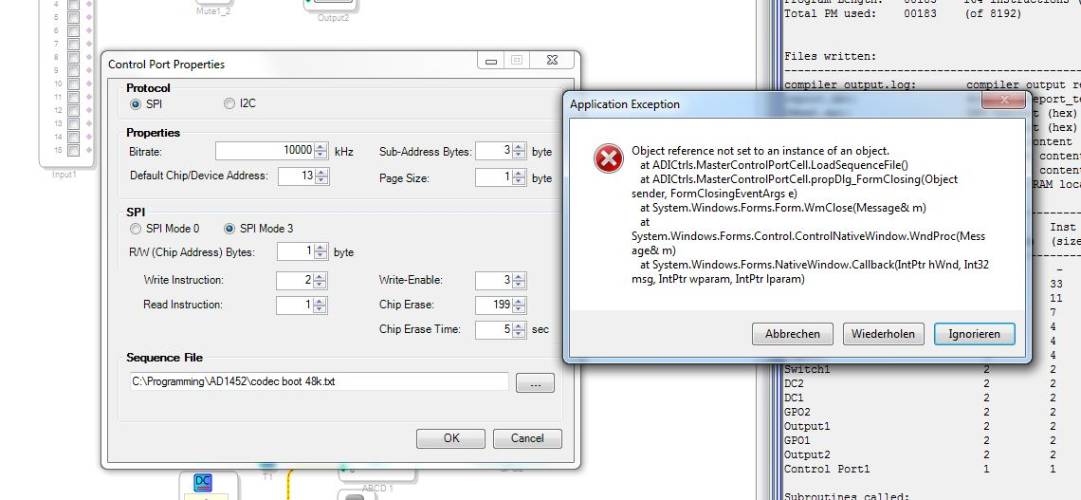
When trying to drag, drop and configure the 'Master Control Port I/O' block in Sigma Studio (3.10.4 or 3.11 beta)
I always get these errors by pressing the button OK, no matter what settings are used:
I've read about the silicon anomaly and don't want to use interrupts.
Any ideas to get around this issue?
And second: How can I link this rountine to a slave select channel number (slave select pin, e.g. MP13)?
Respectively: When configuring multiple slaves, how can I assign multiple of these 'Master Control Port I/O' blocks to individual slave select channels?
Thanks, Chris / rocket science ZRH
Hi Chris,
Any ideas to get around this issue?
A valid "sequence" file is required to use the Master Control Port I/O block. A sequence can be created using the sequence window. However, there appears to an issue parsing the 1 byte data format of the AD1939, we will investigate to fix in a future update. As a workaround you can manually edit the sequence XML file to the correct data format, so maybe an example is helpful.
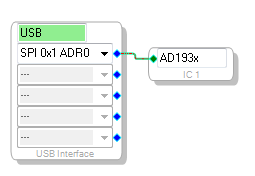
Step 1: Create a project with the AD193x processor IC and configure the registers controls as desired.
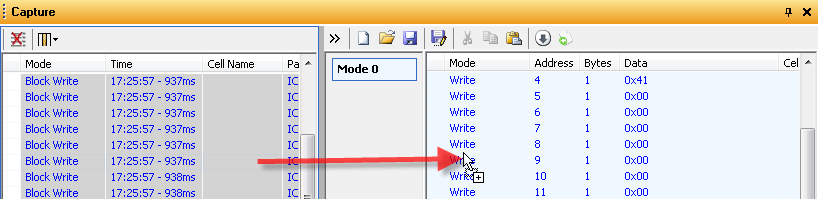
Step 2: Clear the Capture window, and then press "Link Compile Download", all of the register values will be written to the Capture window. Then open the "Sequence Window":
Step 3: Select all items in the Capture and drag and drop them into the sequence pane.
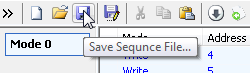
Step 4: Press the "Save Sequence File..." button to save the sequence XML file required for the Master Control Port I/O block.
Step 5: Open the XML file created in Step 4 in a text editor and in every line with an action tag replace len="1" with len="2" (len=1 is unique to the AD1939 and causing and error in the master control I/O block).
Step 6: Save the XML file, and select this file as the "Sequence File" in the Master Control Port I/O block.
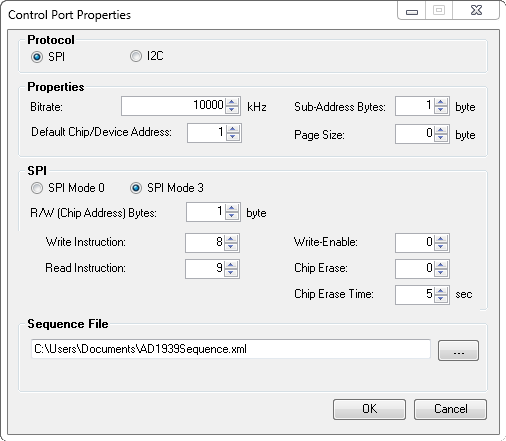
An example configuration for the AD1939 is below:
* "Device Address" selects the slave select line (see next question for more on that)
* "Sub-Address Bytes" is the number of address bytes for the device or memory (1 for AD1939)
* "R/W (Chip Address) Bytes" is 1 for the AD1939 chip address
* "Write Instruction" used for chip address for the AD1939 is 8 (chip address 0x4 left shifted 1 bit for write bit 0)
* "Read Instruction" used for chip address for the AD1939 is 9 (chip address 0x4 left shifted 1 bit for read bit 1)
* Page Size, Write-Enable, Chip Erase, and Chip Erase time are not used and don't cares
The ADAU1452 will write the registers as defined in the selected Sequence file via the master control port at DSP core start before the audio processing routine begins.
How can I link this rountine to a slave select channel number?
The "Default Chip/Device Address" field in the Control Port Properties window defines the slave select channel based on a bit mask as follows:
1==Default MP0 SS_M
2==Slave select channel 0, MP4-MP13
4==Slave select channel 1, MP4-MP13
8==Slave select channel 2, MP4-MP13
16==Slave select channel 3, MP4-MP13
32==Slave select channel 4, MP4-MP13
63==Slave select channel 5, MP4-MP13
128==Slave select channel 6, MP4-MP13
256==Slave select channel 7, MP4-MP13
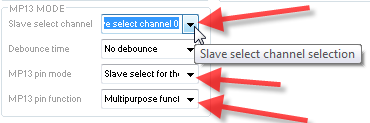
So for example to use MP13, first in the schematic design set the Default Chip/Device Address to 2 (or greater) in the Master Control Port properties window of the master control port i/o block. Then in the Register Control window, Multipurpose/AuxADC tab, set MP13 Mode to "Slave Select for the master SPI port", pin function to "multipupose function" and choose the "Slave select channel" from the dropdown which corresponds to the value set in the default chip/device address field per the table above.
When configuring multiple slaves, how can I assign multiple of these 'Master Control Port I/O' blocks to individual slave select channels?
Unfortunately this is not currently supported by the Master Control Port I/O block, it only allows for a single external device and you can only have 1 Master Control Port I/O block in the project or it will fail during Link Compile Download. This is a feature we intend to add in a future update.





This question has been assumed as answered either offline via email or with a multi-part answer. This question has now been closed out. If you have an inquiry related to this topic please post a new question in the applicable product forum.
Thank you,
EZ Admin
Please log in to reply.