ADAU1701 First Project
Hi there,
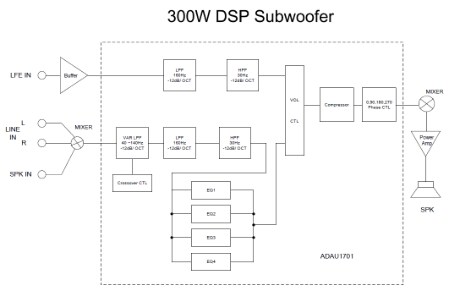
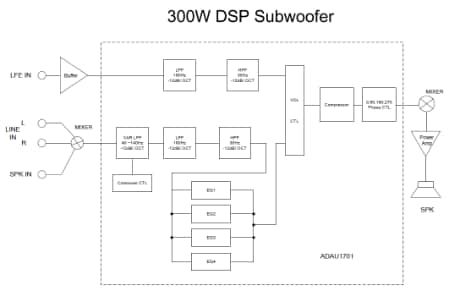
I'm new to DSP and it happened that I'm using ADAU1701 for my first project. I have the MINI board and I want to implement a 300W subwoofer system using the Sigma Studio with its rich library of DSP functions. Can somebody help me get started on what blocks I need to use? The stereo inputs are mixed by a hardware mixer and are considered as mono when it enters the DSP. The LFE part is the other input from a DVD player.
Best regards,
Michael
Audio Signal Processors
SigmaDSP Audio Processors
adau1701
Hello Michael,
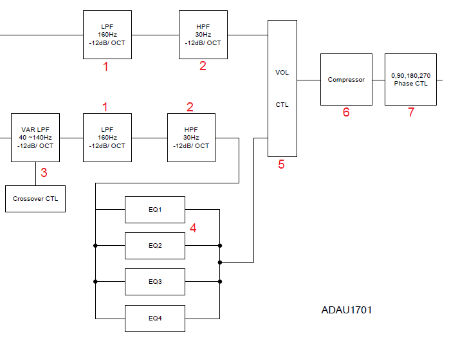
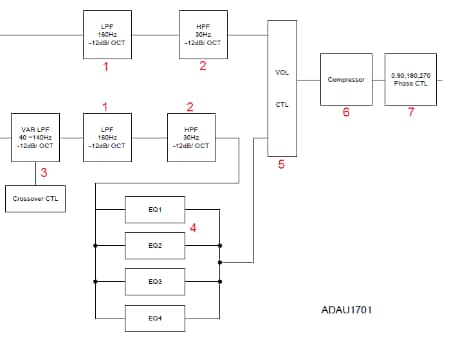
Welcome to the community. Here's just a few ideas to get you started, arranged by numbers on your diagram:
1. Fixed filters are easily implemented with the Second Order, Double-Precision General Filter blocks. You can choose between Butterworth, Bessel, and Chebyshev lowpass and highpass responses, all with 12dB / octave roll-offs. You may prefer to use the woofer output of a Crossover filter to pass your low frequencies up to 160 Hz, as this filter is specifically designed for use as a crossover.
3, 4. Most second-order DSP filters use five numerical inputs, called parameters, that work to produce their desired frequency response. When you place a filter with your specified gain, active frequency, and Q into a design, SigmaStudio calculates the needed parameters for you. The ADAU1701 lacks the capacity to calculate these parameters "live" at runtime for any filter except for the state-variable filter. Thus, you'll need to choose between several methods to provide user-adjustable filters:
a) If you plan on including a microcontroller in your sub-woofer system, you can have the user input (via keypad, encoder, etc.) the filter frequency, have the microcontroller figure the parameters, then safeload them into the -1701. Several tutorials are available on this forum for the needed tasks:
calculating parameters -- https://ez.analog.com/docs/DOC-1819
safeloading the -1701 -- https://ez.analog.com/message/61175#61175
If no microcontroller is planned, self-boot your -1701 and use its four Aux ADCs to control user functions via potentiometers (one pot is included on your eval board). Two sorts of filters are adjustable this way:
b) An Index Selectable filter where you can enter multiple response curves. SigmaStudio pre-calculates all the parameters, and at runtime an integer index selects the desired curve.
c) A State-Variable filter, which provides lowpass, bandpass and highpass responses with runtime-variable frequency and Q. For an example, see https://ez.analog.com/message/138736#138736
5. External Slew Volume control blocks allow for run-time adjustment via microcontroller or via Aux ADC.
6. Choose from a plain Limiter (only active for excessive volume), or one of several Compressors available in the Dynamics Processors toolbox section.
7. A 180 degree phase shift is of course trivial, but 90 and 270 are more involved. An all-pass filter is one method, see:
https://ez.analog.com/message/63198#63198
Best regards,
Bob
Message was edited to remove a broken link.
This question has been assumed as answered either offline via email or with a multi-part answer. This question has now been closed out. If you have an inquiry related to this topic please post a new question in the applicable product forum.
Thank you,
EZ Admin
Please log in to reply.