Sigma300 (ADAU145x) Q&A
Greetings,
Long time reader first time poster here. I was really glad to see the release of the new generation of SigmaDSP and started to work on a DSP box based on ADAU1452. However I cannot find answers by myself to a couple of questions, so I’d like to ask you guys a few things.
1) The press release states that…
“Independent slave and master I2C/SPI control ports allow the ADAU1452 not only to be programmed and configured by an external master device, but also to act as the master and directly configure external slave devices.„
…and the datasheet says…
“Boot and control external slave devices such as codecs and amplifiers. Read from and write to an external SPI RAM or flash memory.”
This all sounds great, I can see a Master Control Port block in the latest SigmaStudio version, but it cannot be dragged in to the schematic or anywhere else to.
My first question is, how is this block going to work?
And the second is, when?
2) In a previous SigmaStudio version there was an External Delay block, that looked identical to the regular Zn Delay, but it did not occupy RAM space for sample data. Was that block included in SigmaStudio by mistake or is it really going to be possible to add more external RAM (and flash memory beyond the EEPROM for self-boot) to the DSP?
3) SPDIF Input block is not available in SigmaStudio, but only Output. When can we expect the implementation of the SPDIF Input block?
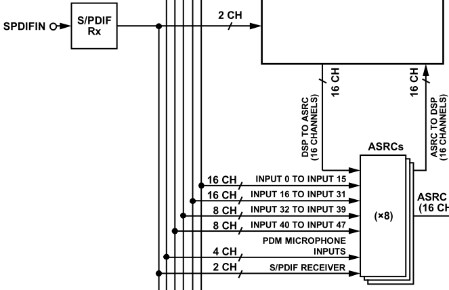
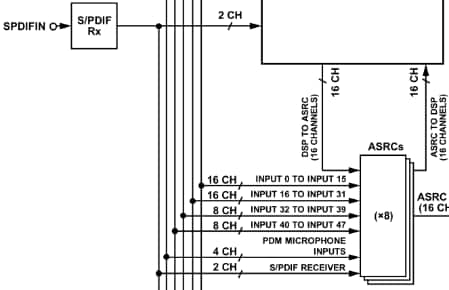
4) “In most applications, the S/PDIF receiver input is asynchronous to the DSP core, so an ASRC is typically required; in such cases, the S/PDIF input cell must not be used.”
This signal flow diagram is from the datasheet:
How is it possible to connect the SPDIF input to the ASRC?
5) Do you have a development schedule or timetable available for the implementation of upcoming Sigma300 blocks? I’m interested in it in private message too, if that’s more appropriate.
All your feedback is much appreciated.
Thank you!
Audio Signal Processors
adau1452
spdif
flash
sigmastudio_beta
SigmaDSP Audio Processors
SigmaDSP
ram
Show More
Thank you for your interest in the ADAU1452.
1) i2c/spi master control port
Due to a silicon issue affecting the master control port we removed these blocks from the current SigmaStudio release to prevent their use in production applications. This issue will be address in silicon revision D, more detail is available here:
http://www.analog.com/static/imported-files/data_sheets/ADAU1452_Anomaly.pdf
The Master Control Port cell will restored in the soon to be released SigmaStudio 3.10.4 update.
2) External Delay
This block uses an external Serial SRAM device connected to the SPI master control port as a delay buffer instead of internal RAM. (For example the 23k256) This block was removed for the same reasons explained above and will be restored in the next release. The SPI master port is limited to 20MHz clock, so the SPI RAM cannot be used as a general memory extension, but works well as a delay buffer.
3) No SPDIF Input block
Since it is usually necessary to use an ASRC to synchronize the SPDIF input, we decided to remove the raw SPDIF input block to prevent its use, a very common mistake. The evaluation board includes the label "RX (use ASRC)" to reinforce this. So instead, to your next question:
4) Connect SPDIFIN to ASRC
This is detailed on pages 45-48 or the datasheet. On the "ROUTING_MATRIX" tab of the register control window there are 7 colored rectangles labeled ASRC0 to ASRC7, click one of them, choose "From S/PDIF receiver" from the ASRC source select and set an SRC output rate, typically "Use DSP core START_PULSE rate. Then in the Schematic window use the corresponding ASRC input block.
5) We do not have a public timetable to share in this regard, but some additional blocks are forthcoming in release 3.10.4, and more to come. If you have specific requests please feel free to post them here, it will help us prioritize our efforts.
How do we read/find the Silicon Rev of the 1452?
When will Rev D be released?
Thank you,
TomC
(Response on behalf of customer "Syndicate" who is having technical problems with posting on Engine Zone)
Many thanks for your prompt and quality reply, JMcCarty!
Unfortunately I could not post in over a week due to an EZ messageboard error.
1) I2C/SPI master control port
Yes, I've seen the bulletin on Friday, this is an unfortunate issue. What can
you tell us about the expected availability of rev D for sampling and purchase?
2) External Delay
This is brilliant news! What will the largest memory be, that the
DSP/SigmaStudio will be able to address?
3+4) SPDIF
Thank you for the clarification. Makes me wonder, how I could have missed that
5) Blocks
My vote goes to Automatic Single Band Speaker EQ and Multi-Tap Voltage
Controlled Delay (with external RAM option). Someone else is also interested in
the former: https://ez.analog.com/message/138410
Also if it would be possible to implement an ADAT interface for S/PDIF TOSLINK
I/O, that would be amazing. But I'm afraid this is out of the question due to
patent rights or is it not? It seems there is a commercially available software
implementation of ADAT for XMOS:
http://www.minidsp.com/products/usb-audio-interface/usbstreamer
6) SigmaStudio
I shall start a new discussion for this topic, but I'd like to ask you here
about ADAU1962 too. When is it going to be available in SigmaStudio?
Hello Syndicate,
You can use the ADAU1966 DLL to control the ADAU1962 in SigmaStudio. The only differences in the part has to do with the number of channels. So therefore registers for channels 13-16 will do nothing because those channels do not exist. All the other registers are the same. This also applies to the ADAU1966A and the ADAU1962A. I am not sure when we will release DLLs for those specific parts.
Thanks,
Dave T
> When will Rev D be released?
I do not have that information, you can contact an Analog Devices sales representative for details. I should clarify that the master control port feature is functional on the released silicon, it is usable except in the specific use cases defined in the anomaly sheet.
What will the largest memory be, that the DSP/SigmaStudio will be able to address?
You are limited to a 24bit address max, so approximately 16MByte. However you could connect multiple devices (up to 7) for more memory.
I’ve just realized it is possible to post messages by replying to the notification email, hope this works.
Link to the schematics:
As I see, it does not require any modification on the board itself.
2 headers (f+m) and 2 resistors should be enough soldered together or on a small breadboard.
I would tend to think, that this should work.
What do you think?
Pins 8 (MOSI/ADDR1) + 9 (SS/ADDR2) to GND gives an I2C slave address of 0x38.
I just want to make sure not to kill the board right away
(Response on behalf of customer "Syndicate" who is having technical problems with posting on Engine Zone)
16MByte already sounds pretty good, that's more than enough.
I've ordered an evaluation board from a dealer and 2 samples from AD for now, looking forward to it how it goes.
I was wondering if it would be possible to program and control the DSP via I2C instead of SPI by adding 2 pull-up resistors with a header converter board while still booting from the on-board EEPROM over SPI:
Pin1 SCL -> 2k to 3.3V -> Pin7 SCLK
Pin3 SDA -> 2k to 3.3V -> Pin5 MISO
( See Figure 78 on user guide: http://www.analog.com/static/imported-files/user_guides/EVAL-ADAU1452MINIZ_User_Guide.pdf (Tried but failed to copy the figure into this post..)
It is technically possible to program/control the DSP in I2C while using SPI for the EEPROM, the master and slave control port formats are independent. But I think it would be pretty difficult (maybe not even possible) to hack the evaluation board to function that way, it was designed to only support SPI for simplicity.
J1 facing downwards, J2 upwards, J0 connected to TP1 (A_3V3)
Got the board, the DC connector was broken. It made a weird clanking noise and had contact problem.
There's a quite similar case described here from TomC. It was an SWC DC connector with lower standard of quality than found on Chinese aftermarket devices. Not cool.
I didn't bother with tech support or RMA, just replaced the connector, it is working fine with SPI now.
I2C does not work with the method described above though, I tend to think that SigmaStudio is not ready for Sigma300 on I2C. Is it possible? What am I missing here?
Thank you for all your thoughts in advance, much appreciated!
Hi Coleman,
No worries, these things happen. There might be a bad batch of these connectors. If it was hand tested, that's more troubling though. It was otherwise in perfect condition, so I'd rule out the shipping.
Wish I could take a photo, unfortunately the dumpster is emptied on Thursday mornings, so it's already far away.
However I can confirm by the looks of it, that it was RAPC722.
Any thoughts on I2C?
Hi,
The broken DC connector on the EVAL-ADAU1452MINIZ is troubling. The connector on the board is a Switchcraft RAPC722, we have used these for many years and have not had any complaints. I apologize that you had trouble, thank you for replacing it. We hand test each board before it ships, so something must have happened en route. Can you take a photograph of the connector and post it?
Regards,
Coleman
Hi Syndicate,
Based on the schematics showing your modifications, I would think I2C would be working. Have you tried resetting the board using the reset button after you have everything powered up and connected? The ADAU1452 should default to I2C mode after a reset.
In my case, it was the low quality / low cost power supply that was 'supplying' over 10 volts to the board. A shame to rely on such a low quality wallwart to power such a high-tech evaluation board.
TomC
ps: ADI, of course has finally come through with a replacement.
I'm getting very close to finishing up my project, but the limiter block has me puzzled.
The Ratio and Active Flag pin readings just don't add up.
The Active Flag output is all over the place even with a very small scale input signal too, while the Ratio output doesn't move a muscle, whatever settings are entered in the limiter.
Could any of you guys check whether it's a bug or I'm missing something?
Otherwise everything is working beautiful over SPI, the DSP is running at 100% instruction cycles with 99% DM0 & DM1 It's a truly neat little chip. I just wish the FIR filter would use 0.32 format instead of the 8.24.
Hello,
The Limiter block behaves similarly for me:
Its "Flag" output is actually the Ratio output (thus is all over the place)
Presumably, then, the "Ratio" output is the Flag -- but it's dead.
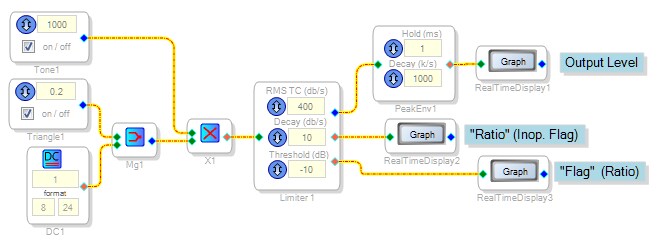
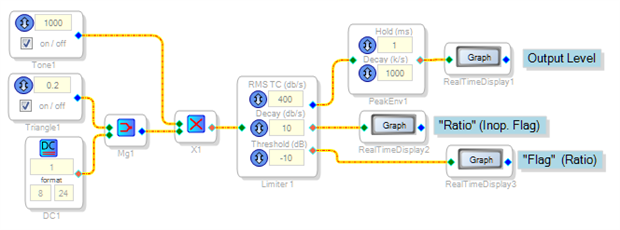
I tested the limiter by driving it with a varying level tone, as shown in this schematic::
When the input tone exceeds threshold, the limiter holds a maximum level as expected (below left)
The bottom output labeled "Flag" shows the reduced gain (Ratio) needed for limiting (below right):
I cannot find any result (not even a "1" in 32.0 format) at the middle output labeled "Ratio".
The stock FIR Filter can internally multiply two 8.24 format numbers each approaching +/- 128 without clipping. Please see the post at https://ez.analog.com/message/130085#130085 which demonstrates this..
Best regards,
Bob
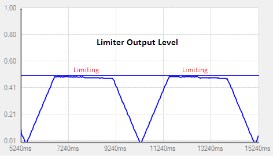
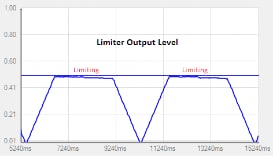
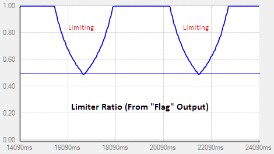
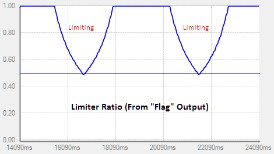
Bob, You are the best. Your test is much appreciated.
It's really strange though. Which SigmaStudio version are you using?
I'm running 3.11 Build 2, Rev 1396 (9/8/2014) and the limiter does not limit at all for me.
So basically the limiter block in the version above is completely useless.
By the way, according to your first screenshot, the output should be limited to ~0.3 (-10dB) instead of 0.5 (-6dB), so your version is not okay either.
Dear fellow AD engineers, if you are reading this, please address this issue.
A limiter is a pretty important and basic element.
FIR Filter: sure, we can use the full range. I was thinking of getting rid of the necessity of coefficient normalization (and output level adjustment), since most FIR designers calculate fixed point filters in 0.32 format.
Hello,
I'm using the same version (3.11, build 2, rev 1386, 9/8/04).
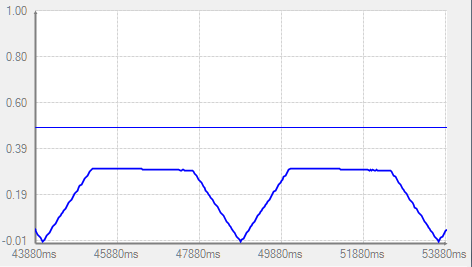
The discrepancy between the limiter's -10 dB threshold and the observed 0.5 (-6 dB) reading puzzled me as well. As it turns out, the limiter block is RMS responding, while I had used a peak-responding envelope follower in the first test above. Re-running the test with a RMS Running Average block before the output Real-Time Display shows the more accurate 0.3 (-10 dB) result:
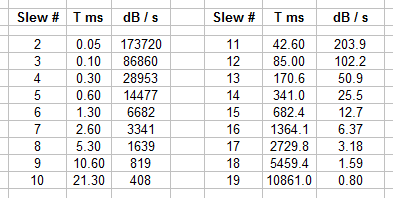
Note that the RMS Running Average block's Attack and Decay rates are both calibrated in the dB/s unit commonly used within SigmaStudio. However, the Limiter block's decay, although labeled dB/s, is actually in similar units to those previously used in Slew Volume controls. At left is a conversion table relating Slew numbers, time constants, and dB/s.
I attached the modified project in case it might help with troubleshooting the Limiter block.
Best Regards,
Bob
Just a quick note to mention that the Rev D silicon was released back in 2014, not certain the actual date. So the Master Control port features have been restored and this is no longer an issue.
Dave T
This question has been assumed as answered either offline via email or with a multi-part answer. This question has now been closed out. If you have an inquiry related to this topic please post a new question in the applicable product forum.
Thank you,
EZ Admin
Please log in to reply.