ADAU1452 - selfboot I2C EEPROM
Hello
I have another question about ADAU1452. Is my diagram correct?
Eeprom SCL -> ADAU(PIN 28)
Eeprom SDA -> ADAU(PIN 29)
I would like use EEPROM for selfboot option (SBT jumper = OPEN).
traxman
Audio Signal Processors
adau1452
SigmaDSP Audio Processors
Hi traxman,
That's correct! The self-boot function on the ADAU1452 uses the I2C and SPI pins with the "_M" suffix. So, pins 28 and 29 are the correct pins to use.
You also have correctly pulled pin 26 (SS_M) to GND, which ensures that the self-boot operation will use the I2C protocol.
Looks good to me!
Yagami
Thanks, now I can finish small ADAU1452 board.
I have strange problem with programming ADAU1452 and selfboot eeprom via USBi.
When I use pins 28/29 to program DSP, I can write EEPROM without problems, but I cant configure DSP core.
When I connect USBi to SDA/SCL 30/31 pins, I can configure DSP, but I cant write EEPROM to selfboot operation.
Adress for ADAU1452 I2C is (0x70), for EEPROM I2C is (0xA0). During programing using "Write latest Compilation trough DSP I havent any errors, but verification is failed. (Selfboot=1).
Standard option download to EEPROM didn't work.
What is correct connection DSP->Eeprom->USBi (V1.3) for I2C operation?
I think that my diagram is wrong.
Hi traxman,
It's not possible to verify the EEPROM contents when using "Write Latest Compilation Through USBi". This is because the check compilation function uses the USBi, and the USBi isn't directly connected to the EEPROM in your case, so unfortunately there's no way for it to directly access the EEPROM's contents.
However, I think it's highly unlikely that the EEPROM data would be corrupted during the "write via DSP" function.
I still have not idea to work with I2C eeprom and Selfboot mode . Anybody can help me?
I checked PCB, replace ADAU and still nothing, it must be a stupid mistake which I can not find.
I guess I'll have to go on spi eeprom.
Hi traxman,
Here are the steps to program an eeprom via SigmaStudio:
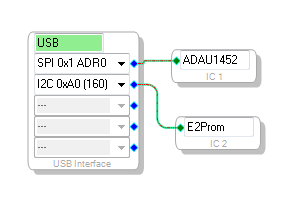
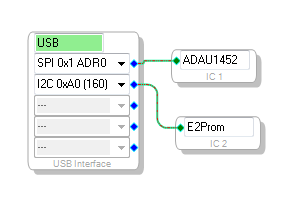
1. Insert a E2Prom block in the SigmaStudio "Hardware Configuration" window and connect it to the USB Interface block and make sure the I2C address for the eeprom is set correctly.
2. Press the "Link Compile Download" button to compile the schematic project
3. Right click on the DSP cell and choose a Self-boot Memory option. You are trying to use the "Write Latest Copmilation through DSP" option correct?
Write Latest Compilation through DSP
IMPORTANT: Self boot MUST be DISABLED during eeprom programming (this is fixed in version 3.10.4)
Use this mode is used when eeprom is connected to the master control port and there is no way to connect the USBi directly to the eeprom. Use this option for EVAL-ADAU1452MINIZ.
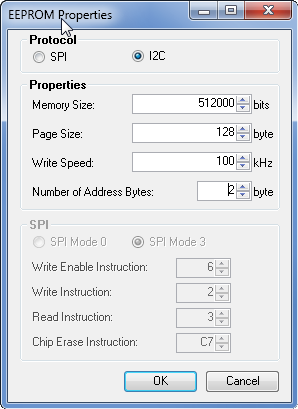
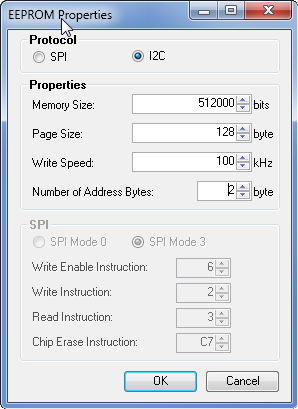
Set the EEPROM properties as required for your memory:
Note: the "number of address bytes" does not include the control byte, it is only the memory address bytes.
Press OK and wait for eeprom programming to complete.
4. Use "Check Last Compilation through DSP" to verify that the download succeeded. The programmer does not validate the program automatically.
Now re-enable selfboot and if all went well it should boot the eeprom program.
Write Latest Compilation USB
Alternatively, use this if you want to connect the USBi directly to the eeprom memory. Before you use this mode, right click on the E2Prom block and choose "Properties..." from the menu. Set this as required for your memory. Then choose Write Latest Compilation USB from the DSP right click menu.
Why should I use I2C EEprom and SPI for DSP programming?
Sorry, but Your procedure didn't work.
I will return to old 1442 DSP because I wasted too much time for 1452.
Hi traxman,
I'm sorry this is did not work for you. You can use either SPI or I2C for DSP programming. I just used SPI in my example, but the master and slave control ports can be set to either protocol, they are independent.
Hi traxman,
jmccarty's tutorial should work fine even if you're using the I2C slave port instead of the SPI slave port. Simply change the drop-down menu on the USBi (the one connecting to the ADAU1452) to I2C and select the proper address.
The EEPROM self-boot operation occurs on the master control port, while the computer communicates via the USBi to the ADAU1452 using the slave control port. The master control port and slave control port do not require the same communications protocol; each of these can independently be configured to operate in either I2C or SPI mode.
Problem solved. I changed eeprom to SPI device and ADAU1452 to D revision.
ADAU1452,28-SCL and 29-SDA to the I2C EERROM。。。。30-SDA and 31-SCL to the I2C ADI USBI,,32and 33goto GND。
When burning program,34pin(SELEBOOT)must to GND。RUN DSP ,34pin musc to VCC。
Hello xiaotiaosao,
You are correct. This original post was dated back in 2014 and it was much later when I discovered the problem some people were having programming the EEPROM thru the DSP. If there is a program already on the DSP what happens is that Sigmastudio performs a reset and then loads in the data transfer program to write to the DSP. Well, when it performs a reset the DSP starts loading in a program into memory at the same time that SigmaStudio is trying to load in the data transfer program. If the program on the EEPROM was small it would still work because SigmaStudio has a wait instruction but for any long program it would usually not work and sometimes it would. So you are correct to ground pin 34 so that the DSP will not try to boot up. Then it works every time.
Thanks,
Dave T
Please log in to reply.