EVAL - ADAU1452MINIZ
I watch the video to configure filters. I used CH0 for stereo input. GPIO as output. I downloaded the program. When I move the slider bars for amount of increase or decrease amplitude. The program locks up. "NO SOUND" I download the program and it is working. But I cant move the slider tabs?
I think I must be performing a simple error.
Regards,
Philip Nielsen
Hi Philip,
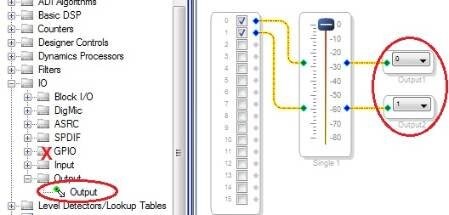
GPIO outputs refer to digital output pins used to control external LEDs and such. The audio DAC outputs are called simply outputs, as shown below:
The most frequent cause for on-screen controls not working is a zoom level not exactly 100%. Try pressing Shift-Ctrl-F6 to restore normal size, then see if your controls work -- see https://ez.analog.com/docs/DOC-1649
Best regards,
Bob
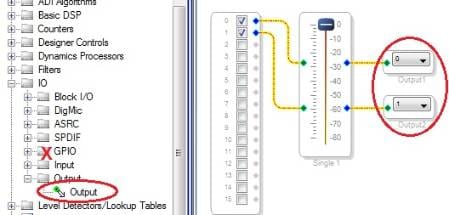
I was unable to reply to the website. I followed your directions but the controls had no effect. It seemed to work with the codex enabled. I will try again. There is the codex IC on the board. Should it be connected to the USB block under hardware. If so what address should the DSP and the codex be set to?
I am using channel 0 as the input and I tried the GPIO and the DAQ output?
Philip
Hi Philip,
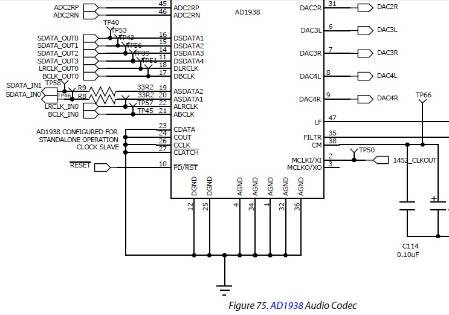
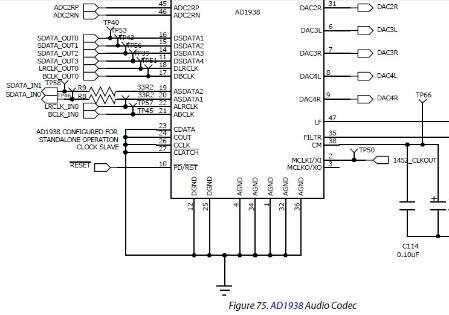
The AD1938 codec on your -1452MINIZ board comes hardwired to the ADAU1452, so you need not configure it in the Hardware Configuration window. Its config interface pins are all grounded so it wakes up in stand-alone mode as shown below. Thus the codec is ready to work out of the box, and it's not possible to configure it differently:
Full schematics are found on pages 21-29 of the EVAL-ADAU1452MINIZ User Guide. If you haven't already done so, please download this guide at
http://www.analog.com/static/imported-files/user_guides/EVAL-ADAU1452MINIZ_User_Guide.pdf
Read it through, then follow the procedure on pages 4-9 to set up your board. The -1452 eval board is more complex than the other "mini" boards such as for the ADAU1701. When I first got mine, I had assumed certain things and had to read all the instructions in order to make it work.
Best regards,
Bob
Just a thought here but does the eval board have a output amp or are you plugging into the DAC outputs? If on the DAC outputs the impedance of the headphones might be just to high for the DAC to drive. I seem to remember some one else doing this on a 1701 board a while back
I did everything in your email. But it appears that I am still not correct. I connected a stereo output from my PC "Headphone Jack". This went to CH0 - CH1. I used USBi to 1452. I connected a set of ear buds to the output. Out 1 CH0 CH1. The sound was on for less than a second then I heard a crackle then no sound. I tried a parametric equalizer. Same thing. I hit the hardware reset and the sound is working. I have no control because of the hardware reset. Is There a voltage limit on the input and output. I watched the video on the website. There was a demo using filters. I heard the sound going up and down at the different frequencies. I am using the latest version of SigmaDsp. This is a beta version.
I am stumped
Philip Nielsen
I unplugged the output earplugs and the three Green LEDS flashed quickly and stopped. This was after a download. On the input I changed the volume to very low to a point I could just hear the audio. When I did a hardware reset the audio passed through the board fine. The self boot is in the enabled mode. There are no jumpers on the board.
Is there software diagnostic to check the board. I tried the previous software. But it did not support the 1452 IC.
I rechecked the instructions. I did exactly as shown. If I could run a diagnostic software program that may help.
Philip Nielsen
Hi Philip,
Sorry you're experiencing this trouble. The good news is it looks like we can clear it up quickly.
I switched my board's self-boot switch to enable and duplicated your symptoms exactly -- it runs for one second, makes some loud "burp" noises and quits. Actually the self-boot should be disabled when running from SigmaStudio using the USBi. Only enable it when actually testing the chip's self-boot feature. With the USBi and SigmaStudio connected, the chip boots directly from SigmaStudio via the USBi -- in this case, self-boot gets in the way.
When you wish to test self-boot, first load the on-board EEPROM with your compiled project, then disconnect the USBi and power up or reset the board (with self-boot enabled now) to self-boot. See page 17 of the user's manual. On-screen controls don't work in this mode (whether the USBi is connected or not). In an actual self-boot system, your custom board would have pots or buttons connected to the chip's MP pins to control user functions.
I tried headphones on my -1452 board, it drives them OK at low volume. Amplified "computer" speakers work really well.
Hope you'll be "on the air" really soon!
Bob
Hi Bob,
I have a small addition/correction to make to your post. You can actually control the ADAU1452 from SigmaStudio after the self-boot procedure is complete, given that a few conditions are met.
Well, actually there's only one important condition. You must have the project loaded into SigmaStudio - the same exact project that was used to generate the self-boot image, that is. Then, execute the Link-Compile-Connect command from the toolbar in SigmaStudio. Note: this is not the Link-Compile-Download function that is normally used, but rather Link-Compile-Connect. This tells the compiler to compile the loaded project, which lets it figure out the exact memory locations of all of the parameters, but it will not actually download anything to your hardware, since it is not executing any download function.
At this point, you should be able to change controls in the GUI (volume controls, filters, et cetera), and SigmaStudio should send only the parameter information to the USBi to download to the hardware.
This is a good way to test if self-boot is working properly.
Note that there are some instances where you'll actually want to use the self-boot feature even in a system that contains a microcontroller. The main reason for doing this is to offload some of the memory requirements from the microcontroller to the SigmaDSP's self-boot EEPROM. It can, in some cases, allow you to buy a smaller/cheaper microcontroller that will just implement the user control aspects of the system, which the self-boot EEPROM handles the actual booting process.
Thanks!
Yagami
Hi Yagami,
Thanks for the correction! So that's what Link-Compile-Connect is for. Also interesting is working with both a boot EPROM and a microcontroller.
Best regards,
Bob
This is excellent news. I am very happy that you were able to duplicate my problem. I left my SDK at home. I was anxious to have my board running over the weekend. I will re due the circuit with the switch changed. Thank you for discoverying and relaying this to me.
Regards,
Philip Nielsen
-
KJBob <analogvm-admin@analog-vm.hosted.jivesoftware.com> wrote:
Robert Blowsky https://ez.analog.com/people/KJBob created the discussion
"Re: EVAL - ADAU1452MINIZ"
To view the discussion, visit: https://ez.analog.com/message/137192#137192
>
That did the trick. I am on line.
Thank You,
Philip Nielsen
Please log in to reply.