ADAU1452 FFT Library
Hello everybody,
I'd like to confirm regarding the ADAU1452 and the development environment "SingmaStudio".
I saw FFT Library description on the data sheet
Could you please let me know about the specification of the FFT function.
e.g. Point Number, Radix-2 or -4, Complex or Real, Data format ... and so on.
Best regards and thanks,
Audio Signal Processors
adau1452
SigmaDSP Audio Processors
The current FFT block available in SigmaStudio in a "normal" Radix-2 complex FFT. The output format of the transform is an interleaved complex data buffer (real,img,real,img...).
Hello Jmccarty,
What number of points is the FFT? Can we change its setting?
Best regards and thanks,
Hi,
Could you please let me know regarding the number of points of the FFT.
I'd like to use 256 Point FFT. Can I use this library module?
Best regards and wishes,
The size is variable and depends on the input block size. A minimum of 8 and up to a maximum of 1024 point FFT is supported. Yes, you use can use a 256 point FFT with the included library cell.
You may have noticed there are currently no frequency domain blocks included in the library, and while we may include some algorithms in a future release, you may need to work with a knowledgeable 3rd party developer if you want to use the FFT or block processing for a specific application.
Here is a quick overview of how to setup ADAU1452 block processing in SigmaStudio:
1. For block processing a block (or buffer) of data is required:
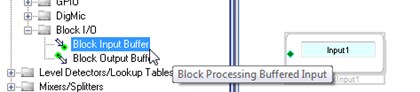
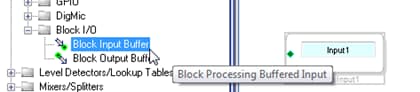
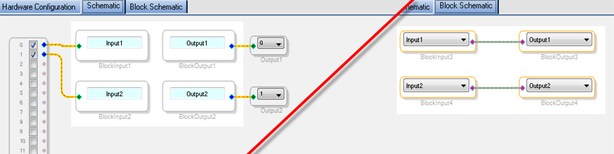
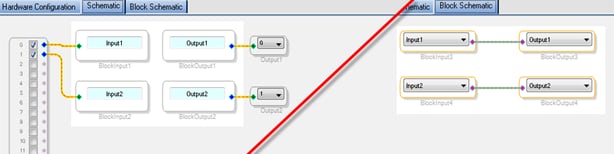
The Block Input Buffer cell is available in the SigmaStudio IO toolbox. This cell buffers a block of data in the sample thread and transfers the buffer to the block thread on each block buffer boundary.
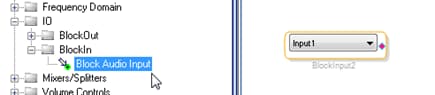
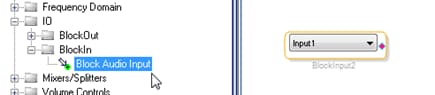
To access the input buffer in the block schematic, insert a Block Audio Input cell and choose the desired time domain input buffer from the menu. The input name can be set for each Block Input Buffer.
There is a one-to-one correspondence between the sample domain block input buffer and block domain block audio input.
2. The get block data out, use a block output:
The Block Output Buffer cell is available in the SigmaStudio IO toolbox. This cell receives a buffer of processed data from the block domain schematic and outputs one sample from the buffer on each sample frame.
In the block schematic the Block Audio Output will transfer a buffer of processed data to the schematic tab.
These Block Input Buffer, Block Output Buffer, Block Audio Input, and Block Audio Output algorithms collectively implement the framework block buffering for ADAU1452.
3. Set the block size:
The block domain inputs determine the system block size, and there is a right-click menu item for the block domain Input cell to set the block size. This block will determine the FFT size.
NOTE: currently multi-rate (i.e. multiple input block sizes) is not supported.
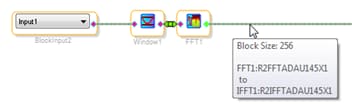
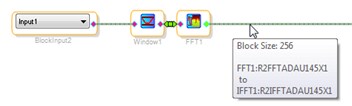
The block size at any point in the block schematic design is displayed in the wire tooltip, hover of a wire to see the block size at a particular location in the signal flow.
4.Using the FFT:
Radix-2 FFT and IFFT cell’s are provided in SigmaStudio as well as 50% overlap-add windowing blocks. A typical frequency domain algorithm can be implemented using these four cells (overlap-analysis window, FFT, IFFT, overlap-add-synthesis window).
The FFT algorithm provided in SigmaStudio has an option input normalize mode which shifts the data by 1 bit on each FFT stage to avoid saturation of the fixed point data in the transform. This mode can be enabled/disabled in the right click context menu of the FFT cell.








Hello!
In step #4, there is a magic "Custom Algorithm" block. I have a FFT based algorithm that I need to transcribe. Who at ADI can I contact about being able to develop my own algorithm. It was not clear from the available blocks what I was able to do.
Thanks!
Hello,
For the ADAU1452, i want to do a multiplication after the FFT with another input block (even to prepare an input block of coefficients it seems impossible like there is no options to do that on SigmaStudio ?). I want to know if there is any solution for having a block of input values and a to do multiply operation ?
And if we can customize an algorithm than it will be perfect but when i see this wiki FAQ: Can I write C or assembly code for SigmaDSP in SigmaStudio? i am sure we can't do anything.
Best
This question has been assumed as answered either offline via email or with a multi-part answer. This question has now been closed out. If you have an inquiry related to this topic please post a new question in the applicable product forum.
Thank you,
EZ Admin
Please log in to reply.