Huge project to fill up a ADAU1452 and make it do something
The new ADAU1452 is quite the beast among SigmaDSP processors. With about an order of magnitude more capability than the lowly (but quite useful) ADAU1701, one wonders what applications it may find. Its SigmaStudio toolbox presently belies all this power, as only basic filters and such are included. This of course will resolve in future versions. In the meantime, though, out of curiosity I built a capacity-sized project that attempts dynamic noise reduction for legacy recordings (tape, "AAD" CD's, etc). It's similar in concept to the system described at:https://ez.analog.com/message/122872#122872 except much larger -- 45 gated frequency channels at 1/5 octave intervals, placed in five messy hierarchy boards. It manages to fill up the -1452's entire instruction memory, and you can get a cup of coffee make coffee while it Link-Compile-Downloads to the -1452 eval board.
Does it work? Yes, after a fashion. You need to tweak its threshold control for the type and quality of the input audio.
Is it useful? Most legacy recordings are now long gone, or else has already been processed, so that I had trouble finding suitable material in my collection to try it on. I did find an old CD of Strauss waltzes with tape hiss -- to hear the orchestra come up from dead silence was impressive! I didn't try it with FM radio (and even that is going digital, though much more slowly than expected). For analog FM it would make more sense to separate out the L-R channel and process it alone, as that's where the noise comes from anyway.
This is by far the sloppiest project I ever made, it simply got out of hand. If nothing else it demonstrates what SigmaDSP can do right now, with even more coming in the future as advanced algorithms are developed for the -1452.
Bob
Audio Signal Processors
adau1452
SigmaDSP Audio Processors
noise_reduction
adau1701
Bob,
Thank you for sharing your work on the ADAU1452!
Best regards,
Coleman
Bob:
Thanks for sharing. I am rather new to Sigma Studio so it will take some time to understand your 'code'. Any pointers would be highly appreciated.
I have plenty of old/master tapes and broadcasts that I am anxious to try this on.
Regards,
TomC
Hello TomC,
Welcome to EngineerZone and SigmaDSPs. What goes on inside the chips is real DSP, but what you see in SigmaStudio appears wonderfully analog. Thus, you can draw up and run analog techniques you've used elsewhere or wish to learn, and try them out without heating up your soldering iron. My noise-reduction project is huge and sloppy, but its logic is straightforward. The concept originally came from page 369 of Steven W. Smith's book, The Scientist and Engineer's Guide to Digital Signal Processing -- which its author and ADI made available as a download here:
http://www.analog.com/en/content/scientist_engineers_guide/fca.html
The DNR project filters the incoming audio into about 45 bands spaced 1/5 octave apart. Each band is either allowed through if loud enough, or shut off if not. The idea is that bands containing useful sound will overcome the gate threshold and come through, while bands containing only noise won't make the threshold and thus get silenced. As notes being played change and instruments come and go, different bands open and close as necessary.
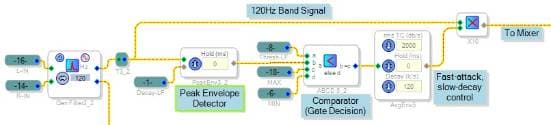
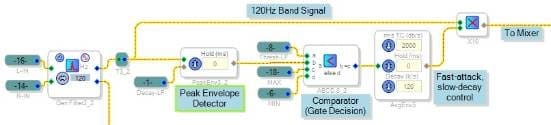
All the frequency channels are contained in five schematic pages called "hierarchy boards." Let's examine just the Left - 120Hz channel, shown below (neatened up and simplified a bit):
The general double-precision filter is set as a peaking type (click on its blue square to access the settings). The filters each have a Q of 4, chosen so that when all channels are open, they sum to a relatively flat frequency response.
The Peak Envelope Detector "rectifies" the signal. Its output is a changing positive "DC" representing the audio level. The ABCD Comparator block compares this level to a threshold set by the user threshold control on the project's main page. If the threshold (A) is less than the audio level (B), this block selects its (C) input "MAX", which is set to 1.0 with a DC Source (not shown). Otherwise, the Comparator outputs its (D) input which is zero. Now we have a logic signal that's high for channel levels above threshold (when hopefully there's music to pass).
We would like the channel to open quickly in response to sudden sound ("fast attack"), but linger a little as the sound dies down ("slow decay"). The Average Envelope block allows us to select this response. To get help on most blocks in SigmaStudio, select the block and press F1.
Finally the conditioned logic signal is ready to gate the channel, by multiplying with the channel's audio. Multiplying by zero means no audio passes, a non-zero value lets some through, according to the attack and decay characteristics already described.
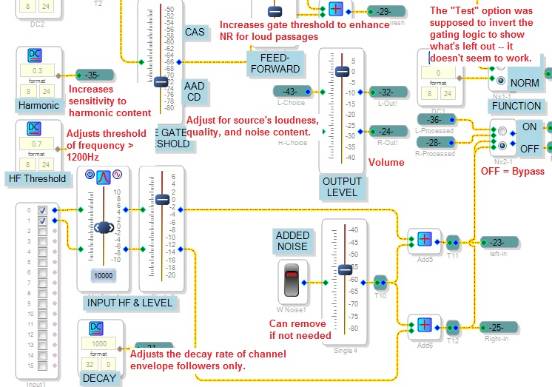
Looking at the project itself you'll recognize some additional functions not shown above -- a way for a strong sound in a given frequency band to help open up the band directly below it at twice that frequency (the "second harmonic"); also a reverse-logic feature tied to the "TEST" switch on the main page. As you gain experience with SigmaStudio, likely you'll discover improvements that could be made to this design.
Best regards,
Bob
Hello Bob:
Thank you! That helps a bit; This project is quite a Beast! Still getting my mind around it. I'll be testing/tweaking it... . ....
(Simple side/naive' question - can I scale my view of the Schematic Window so I can at least see all of the Main on one screen and not have to scroll around?)
Regards,
TomC
Hi TomC,
There used to be zoom functions in the View menu, they were removed because all the GUI controls (sliders, numeric boxes, etc.) only work when the zoom is exactly 100%. For more on this issue, as well as remaining zoom shortcuts, see https://ez.analog.com/message/117360#117360
BTW -- printing large diagrams is also problematic, but there's a workaround at
https://ez.analog.com/message/120082#120082
Bob
Hello Bob:
I've been applying this project to a number of 'noisy' sources.
I have not yet twiddled too many of the controls, but have noticed that the remaining noise seems to be in the upper frequencies ('hissy area). I wonder if more resolution in these bands will help. I hope to fiddle with it further.
Thank you again for this fascinating starting point.
Regards,
TomC
Hi TomC,
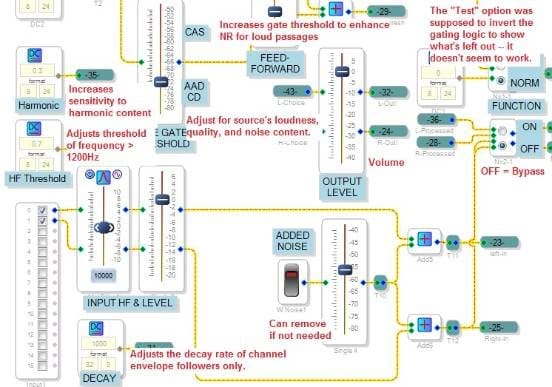
Thank you for the update! I'm happy to hear you're already having a measure of success and that you're working to make it work even better. There's various tweaks you can make, both at the "control panel" on the main page, and in the channel hierarchy boards. Below I describe the main-page controls:
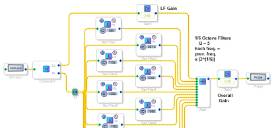
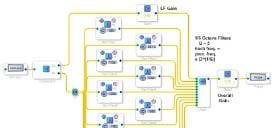
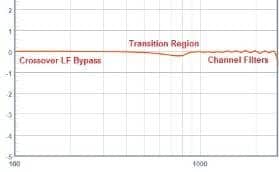
Yes, on a recent listening test I noticed some residual noise at the high end -- and additional resolution up there is a good idea. Likely you have noticed that presently, the channels cover the whole frequency spectrum. Only having channels above 1KHz would allow perhaps 12 channels per octave instead of just five. That would allow a channel for every piano note from around the A at 880 Hz upward! The channels are always spaced this way (by multiples, per octave, however you call it) -- as a result, the Q of all filters is the same. I build a test circuit like the one below to adjust Q empirically -- increase Q until you see excessive ripple, then back off. (Does anyone out there know how to predict optimum Q by math?) I also show a crossover to allow lower frequencies to bypass the noise reduction, which you'll need to make a HF-only system -- in practice, tweak everything to get a relatively flat response. Then build your channels with those parameters.
Needless to say, it will take patience to build up your new set of channels. Of course you can save some work by duplicating hierarchy boards and then changing parameters on the copies, but it still takes hours. I've built about six of these things before settling on the one first published. One had the compiler churning for a half hour before telling me I had run out of memory. Thus, if you rebuild this system and get it working at higher resolution, it will truly be your baby -- I hope you'd be willing to share the project as I would love to try it out.
The ADAU1452 is new, hopefully the next version of SigmaStudio will have new and improved algorithm blocks. For example, there may be a way to rework the channels to use fewer instructions, thus allow for more of them, given a better selection of algorithms. If I see anything like that happening, I'll suggest a new channel layout here.
Thanks for keeping this project alive and growing!
Best regards,
Bob

Hello Tom,
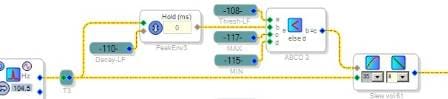
Originally this project used slew volume controls instead of the dynamics and multipliers, because I could not get the slew volume controls to work properly. They actually do work well -- see https://ez.analog.com/thread/41917
-- and substituting them simplifies the channel schematic to this:
This saves a whopping 1900 instructions on this project, making room for more channels and more resolution. The attached project has the extra room (but not the extra resolution it allows; that would have to wait for another time).
Bob
Hi Bob:
Thanks for your work; that's an incredible savings!!!
I'm been trying some subjective assessments on the original design, but will have to try this updated project!!
Regards,
TomC
Hello Tom,
Likely you found that my latest project didn't work very well. The parameters for all its Ext Slew Volume blocks were set up properly when I tested it, but SigmaStudio didn't save them with the project (see [Bug Report] 1452 Ext Volume block doesn't save its settings ). This issue has been fixed in the latest beta version 11.1, available at the usual SigmaStudio download page. With this problem fixed, we can take advantage of the Ext Slew Volume block to save on instructions.
The attached project uses six filters with a Q of 6 per octave -- the most selective version so far. Please try it out with your recorded material.
Bob
Thanks! I will check it out soon!
TomC
Hello Tom,
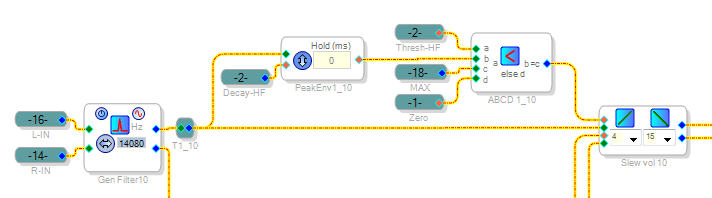
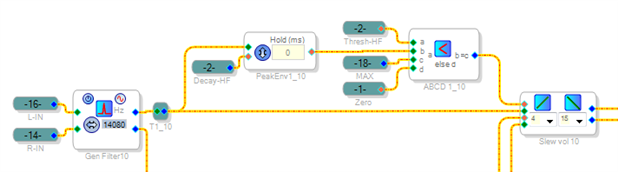
I've noticed that the one-sixth octave project, though more effective at noise reduction, unfortunately imparts some audible artifacts. This is most noticeable in quiet passages in classical music, where the string section is slowly changing in volume. I can hear some channels cutting in and out in response to this changing level. That's from the ABCD Comparators used to control the frequency channels:
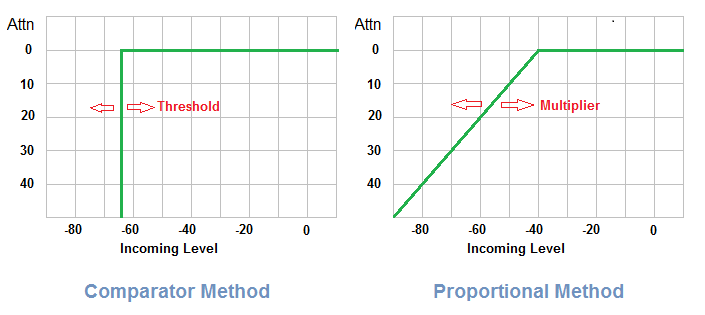
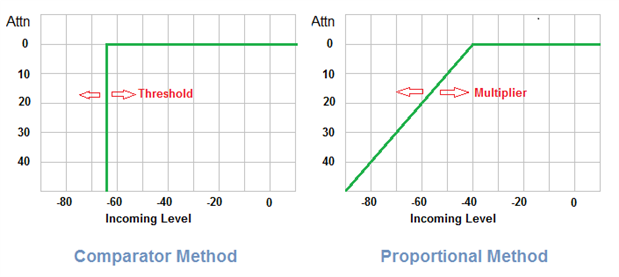
The result is the all-or-nothing decisions shown in the left graph below, resulting in the audible difficulty:
To avoid this, a proportional method can present intermediate values (not just 1 or 0) to the slew ext volume controls. This method, diagrammed below, provides the response shown above right:
The result sounds better to me. Adjustment is easier too -- instead of a dB-calibrated threshold control, there's simply a slider to adjust the proportional multiplier gain (GX). It operates opposite to the previous threshold control -- slide it higher for better-quality incoming audio.
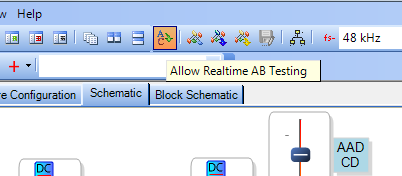
BTW, SigmaStudio has a neat feature that allows nearly instant A-B comparisons between two entirely different projects, such as the last two iterations of this one. You'll find how to use this feature in the help.
Best Regards,
Bob
Hello KJBob,
I think the synchronization of EVAL-ADAU1452MINIZ is not a problem.However , when I want to use it to record music ,I don't know how to make the input signal transfer to my PC through the EVAL-ADUSB2EBZ and USBi.There is a RAM in ADAU1452,if I put a Block Input Buffer in my Sigmastudio project,then what should I do?
Cheung
sincerely
Hi KJBob,
I implemented the first version of your DNR on a ADAU1761 with 2 octave bands. This takes up 88% on 48kHz, therefore I tried to implement the last version with the slew ext vol. Unfortunately the block for the 1761 does not have a seperate attack and decay as the block for the 1452 has. I tried several other blocks but as a whole it performed less than the first version of the DNR. Do you have any suggestions for implementing this kind of "frequency domain" filtering on a 1761 or a good substitute for the slew ext vol?
P.S: It also saves some instructions when you only use 1 peaking filter and Add Algorithm the other filters instead of using multiple separate peaking filters.
Hello Benjamin,
I like your idea of using "added" filters rather than separate ones! I'm used to the ADAU1701, whose compiler doesn't optimize filters this way.
Speaking of which, you could try this scheme for your gated channels. I could fit 16 of these for voice NR into a -1701:
3632.f5a0842b63bc52029095d9f67a9ef4eb.png
Best regards,
Bob
Hello Cheung,
The USBi communicates with the -1452 via SPI, which isn't fast enough for full-fidelity PCM audio. Instead, connect the board's I2S or SPDIF output to a commercially available I2S or SPDIF -- to -- PC interface adapter.
Best regards,
Bob
Please log in to reply.