ADAU1701 I2C communication with mcu
Hi,
i'm new to SigmaDSP devices and to DSP in general. I have the ADAU1701 evaluation board and i'd like to control parameters data through a microcontroller via I2C. As microcontroller i'm using an ATmega328 and i'm writing code in the Arduino environment to keep things simple. The board which hosts the ATmega328 is a self-made, it runs from 3.3V and i'm using a standard library named Wire http://arduino.cc/en/reference/wire#.Ux82Uc4z2YN
The problem is that i can't write anything to the ADAU1701 and actually i have no clue where to address the issue. On the hardware side i have SDA and SCL connected together on both boards at VDD level with pull-up resistors. I can see both clock and data when tracking with my oscilloscope.
The source code in Arduino is the following:
#include <Wire.h>
void setup()
{
Wire.begin();
}
void loop()
{
Wire.beginTransmission(0x68);
Wire.write(0x00);
Wire.write(0x00);
Wire.write(0x00);
Wire.write(0x00);
Wire.write(0x00);
Wire.write(0xFF);
Wire.endTransmission();
Wire.beginTransmission(0x68);
Wire.write(0x00);
Wire.write(0x00);
Wire.write(0x00);
Wire.write(0x00);
Wire.write(0x06);
Wire.write(0xD4);
Wire.endTransmission();
Wire.beginTransmission(0x68);
Wire.write(0x00);
Wire.write(0x01);
Wire.write(0x00);
Wire.write(0x00);
Wire.write(0x00);
Wire.write(0x00);
Wire.endTransmission();
}
I'm just trying to turn off a sine tone which has the following data (as exported from Sigma Studio):
Safeload Write
Time: 17:27:46 - 160ms
IC: IC 1
Cell Name: Sine Wave
Param Name: sin_lookupAlg19401mask
Param Address: 0x0000
Param Value: 255
Bytes: 4
Param Data: 0x00, 0x00, 0x00, 0xFF
Safeload Write
Time: 17:27:46 - 160ms
IC: IC 1
Cell Name: Sine Wave
Param Name: sin_lookupAlg19401increment
Param Address: 0x0001
Param Value: 0.000208377838134766
Bytes: 4
Param Data: 0x00, 0x00, 0x06, 0xD4
Safeload Write
Time: 17:27:46 - 160ms
IC: IC 1
Cell Name: Sine Wave
Param Name: sin_lookupAlg19401ison
Param Address: 0x0002
Param Value: 0
Bytes: 4
Param Data: 0x00, 0x00, 0x00, 0x00
Can you help?
Thank you!
Omar
Audio Signal Processors
SigmaDSP Audio Processors
adau1701
Hi Omar,
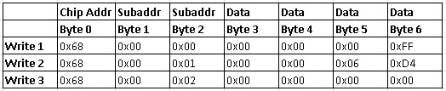
I think I found at least one bug. SigmaStudio is telling you to write this combination of addresses and data:
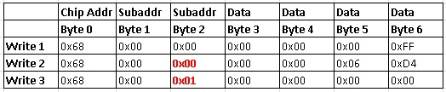
However, judging from your code, you're writing this:
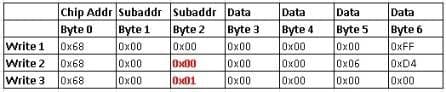
Note the discrepancy highlighted in red. It looks like you forgot to increment the subaddress (i.e. the address in parameter memory).
(You can see this in lines 21 and 30 of your pasted code)
So, the updated code should be like this:
#include <Wire.h>
void setup()
{
Wire.begin();
}
void loop()
{
Wire.beginTransmission(0x68);
Wire.write(0x00);
Wire.write(0x00);
Wire.write(0x00);
Wire.write(0x00);
Wire.write(0x00);
Wire.write(0xFF);
Wire.endTransmission();
Wire.beginTransmission(0x68);
Wire.write(0x00);
Wire.write(0x01);
Wire.write(0x00);
Wire.write(0x00);
Wire.write(0x06);
Wire.write(0xD4);
Wire.endTransmission();
Wire.beginTransmission(0x68);
Wire.write(0x00);
Wire.write(0x02);
Wire.write(0x00);
Wire.write(0x00);
Wire.write(0x00);
Wire.write(0x00);
Wire.endTransmission();
}
You can see my changes in lines 21 and 30. Hopefully that will resolve the problem.
By the way, as you move forward in your development, you might find it useful to follow this tutorial.
https://ez.analog.com/docs/DOC-1806
It explains how to use tools within SigmaStudio to generate almost all of your microcontroller code automatically. Using that approach, you won't have as much potential for bugs caused by typos.
Let me know if this resolves the issue!

Hello Yagami,
yeah, you are absolutely right about the subaddresses. However i just made a mistake while pasting the code in here and parameters addressing was right. Sorry for confusion!
Thank you for sharing the tutorial
Hi Omar,
If you're still having issues, maybe the problem lies in the I2C communication itself. If possible, could you share some high-resolution screenshots of the I2C signals (SDA and SCL) during communications? We can look at the individual bits and make sure nothing is out of place.
Yagami
Hi Yagami,
thank you for your support! I shifted the slave address from 0x68 to 0x34 and they are finally communicating. I guess it's something with Arduino Wire library cause i had to bit-shift other devices address too in order to make them work.
Hi Omar,
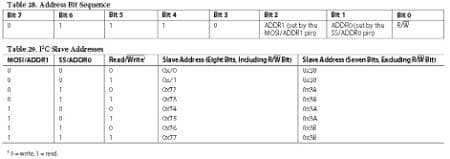
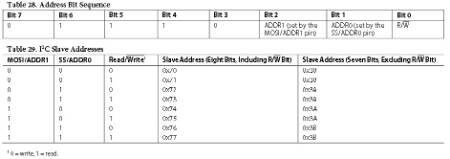
That's a common issue with I2C communications! It turns out that the I2C chip address is actually defined as a 7-bit word with a 1-bit read/write marker on the end of it. Some people take the combined 8-bit word and use that to describe the I2C address, usually in write mode. Other people, however, refer to the I2C address as a purely 7-bit word, ignoring the last bit.
The ADAU1701 refers to the chip address as an 8-bit word, which matches what SigmaStudio does as well. I guess the Arduino prefers a 7-bit format.
The newest SigmaDSP datasheet, for the ADAU1452, tries to clear any confusion by listing both 8-bit and 7-bit addresses in the corresponding section of the datasheet. You can see it on page 32: http://www.analog.com/static/imported-files/data_sheets/ADAU1452.pdf
I also copied the corresponding tables here:
Please log in to reply.