Maximum Quality Factor
Hello Bob/Brett,
Hope you don't mind if i ask another question directly from you guys.
The application that I'm working on requires extremely HIGH Quality Factor Q of at least 29, based on customer's specification of .05 - 0.5 bandwidth (octave). The woofer selects frequency range, bandwidth, and EQ level. Based on their relative position defines the filter settings. My problem is the high Q. Based on what I see on the Sigma Studio library, 16/15 is the actual maxima on all filters I've examined and tried. Is there a library/block for filters with HIGH Qs? or is there a way to improve the Q higher than 16? I'm using SigmaDSp ADAU1701 and Sigma Studio 3.9 build 2, rev1246.
Thanks a lot in advance!!!
Regards and more power,
Dan
Audio Signal Processors
dsp
q
quality
filter
factor
sigma
SigmaDSP Audio Processors
adau1701
Show More
Hello Dan,
The Q is limited not by the algorithms in the DSP itself, but by the calculations within SigmaStudio. Thus, you can get a higher Q when you bypass these calculations. I know of two ways to accomplish this:
The State Variable (Q input) Filter
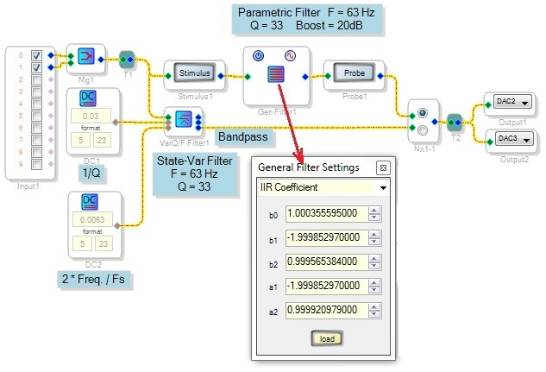
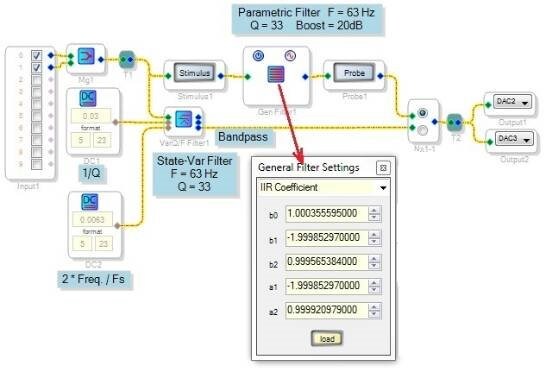
Find this filter under Miscellaneous filters. It calculates its own coefficients within the DSP in response to its variable F and Q inputs. Use DC sources (as shown below) or aux ADCs to set the frequency and Q as needed. Because the "Q" input actually responds to (1/Q), a small input here produces a high-Q filter:
Calculate Your Own IIR Coefficients
The second-order, double-precision General IIR Filter has a IIR Coefficient choice, where you type in your own IIR coefficients. Since this also bypasses SigmaStudio's calculations, you can enter coefficients that make a higher Q filter than otherwise possible. Calculate the coefficients with a spreadsheet, as described at:
https://ez.analog.com/docs/DOC-1819
If you need (for example) a peaking filter instead of a parametric filter, you can use the formulas found at:
https://wiki.analog.com/resources/tools-software/sigmastudio/toolbox/filters/general2ndorder
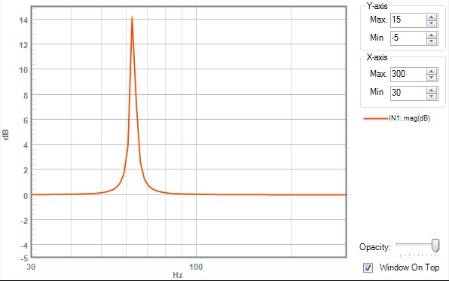
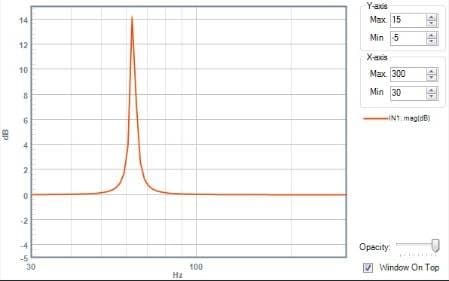
to have a spreadsheet calculate those coefficients. You could also use Matlab (that's out of reach for most of us, however). In this example I used Brett's spreadsheet (available at the above link) to calculate the coefficients for a parametric EQ filter with boost of 20dB, f = 63Hz, and Q = 33. This filter's response is shown via Stimulus/Probe below:
Note that the peak is only 14dB, not 20dB as expected. This is from an imperfection in Stimulus/Probe -- for more info, see https://ez.analog.com/message/132533#132533
Also, you cannot use Stimulus/Probe with the State-Variable filter, because this tool cannot evaluate the filter's coefficients that are figured at runtime in the DSP.
Best regards,
Bob
Message was edited by: Robert Blowsky (fixed error in schematic)
Dear Bob,
That's an awesome answer. Clear and concise, thanks a lot as usual! I'll try to both methods and decide which is best for my implementation on the MCU part. Now I have a clear picture of what needs to be done.
More power,
Dan
Dear Bob,
Good Day! I just have a quick follow up question.
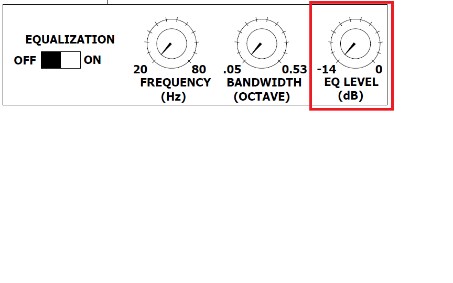
For the State Variable Q Filter, is it possible to insert a third variable to control like EQ level? Since I prefer this implementation over the General IIR filter, which is more mathematically complex in terms of MCU implementation. The State Var Q is more compact and simple in terms of changing the parameters on the fly for the three variable F, Q and EQ level. I hope I can find a way to add the EQ level function. Is this possible? Or if there is no way, then I would be forced to do the other way.
As always, thanks and regards,
Dan

Hi Dan,
When you have your microcontroller calculate all five coefficients for the parametric EQ filter, you get precise control of center frequency, Q, and boost (the amount of peak or dip in the response). Thus, I recommend this method although it is more complex to implement. The State-Variable filter's coefficient calculations are simple enough for the ADAU1701 to calculate at runtime, which makes it a clear choice where you need to control it from within the running DSP program -- for example, you can make a really good Wah-Wah pedal with it. However, its parameters are difficult to harness in a manner that resembles the refined controls of a parametric EQ. For example, when you increase Q to reduce the filter's bandwidth, the amplitude of its peak goes up (in other words, the filter's BW and boost controls interact).
I'm testing a way to make the State-Variable filter behave closer to a parametric EQ, but it needs more work.
Best regards,
Bob
Hello Dan,
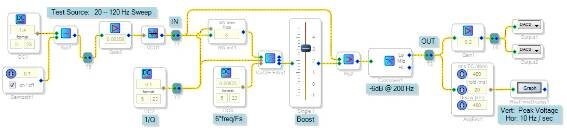
Judging by the controls shown in your drawing, you would like your filter to work as a Parametric EQ -- that is, one can adjust the filter's center frequency, bandwidth (~1/Q), and boost or cut. As I suggested above, the best way to precisely control these parameters is to do the heavy math with log and trig functions in an external microcontroller, then safeload the resulting coefficients into your -1701. However, you may not need such precision, for example if users set up your system with control knobs by ear (as I do with my DJ woofer). In this case, tweaking the State-Variable Filter may work out fine.
The attached project attempts to control the State-Variable Filter as if it were a Parametric EQ filter. It allows you to boost or cut an adjustable frequency band with the usual three parametric controls -- Freq, BW, and Boost. The External Volume Control shown compensates for the State-Variable Filter's tendency to boost output with higher Q settings -- thus taming the beast. The filter's output is added or subtracted from the input audio to allow for boost and cut at the filter frequency, while providing a flat baseline elsewhere.
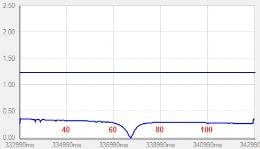
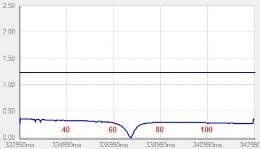
Normally, external measurements are needed to evaluate a filter like this. I included a simple sweep generator to show the filter's frequency response on a Real-Time Display instead. Below are examples of dip and peak responses at about 70 Hz. Note: I had previously assumed that the State-Variable Filter's frequency input has the same Vin * Fs / 2 response as the VCO, but it appears that it's transfer function is closer to F = Vin * Fs / 6.
Best regards,
Bob

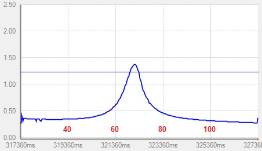
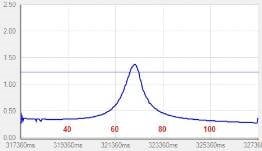
Hi Dan,
You may have noticed my separate post asking if the State-Variable Filter is single or double-precision. I'm hoping it's implemented in double-precision -- because you're operating at low frequency and high Q, where double precision improves noise performance.
Bob
Dear Bob,
Your AWESOME! That's one clever design!
I have run the project and at higher Qs (>20), the Q control seems to take a lot of influence on the EQ boost level, which I need to increase every time I change the Q(>20) to maintain the level that I want. Below such Q values, everything works fine. Also, at high Qs, the falling edge seems a little too steep compared to the near perfect rising edge. All these are expected imperfections from trying to make the filter perform like a parametric, I believe.
Tried to put a stereo input and bass seems good, but haven't tried to test it externally in my actual target board, since the hardware is not yet finished. I hope the response would be ok at an acceptable level.
As usual thanks a lot for the immense help! More power,
Dan
Hi Dan,
You can compensate to some extent for the remaining variation of boost with Q, by adding a constant term to the volume control -- this is a small "zero compensation" that adds more gain at high Q (that is, near zero values of 1/Q), but has little effect when Q is lower and 1/Q is higher. To do this, add the blocks circled below to your filter circuit and adjust the DC source to minimize any drop in boost at (for example) Q = 20.
I'm not sure what's causing the asymmetrical response shapes. Try the state-variable filter by itself to see if it's the source.
Best regards,
Bob
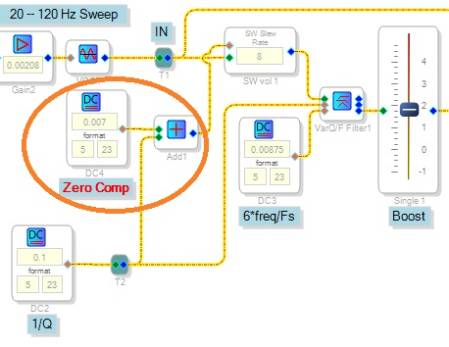
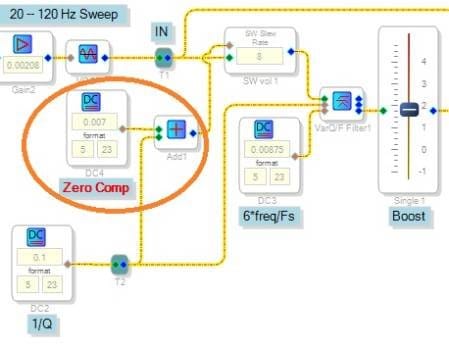
Dear Bob,
It works a lot better now. The response seems acceptable! Once again thanks for your awesome support!
Best regards,
Dan
Hi Daniel,
In the above schematic I had labeled the State-Variable Filter's frequency input according to how it appeared to behave for me, as:
Vin = 6 x f / fs
Recently a draft version of the Toolbox Wiki appeared, which provides the exact function as:
Vin = 2 * sin(pi * f / fs)
My thanks go to whoever is updating the wiki! As for these two formulas, they are actually more similar than they appear -- because for small values of x, sin(x) is approximately equal to x.
Best regards,
Bob
Dear Bob,
This is of great help. Recently, I have used 6*f/fs on my designs. Well, thanks for the update!!!
More power to you.
Best regards,
Dan
Please log in to reply.