ADAU1452 Volume control via Auxiliary ADC input does not work
I want to implement a volume control in a ADAU1452-project which shall be controlled by an Auxiliary ADC input.
In combination with a SIGMA100 and SIGMA200 DSO this is very easy, as I simply have to connect the ADC input cell to the control input of a "single slew ext vol" cell.
But with the new Sigma300 this does not work. The volume control cell expects a control signal in 8.24 format but it seems that the ADC input delivers values between 0 and 1023 in 32.0 format.
Is it now necessary to convert the ADC input signal before it can be used with the volume control cell? If so,why has this be changed?
Regards,
Robin
Audio Signal Processors
adau1452
SigmaDSP Audio Processors
Hello Robin,
Yes, the Sigma300's Aux ADC ranges from 0 to integer 1023 (32.0 format). Also the external control volume blocks expect a 8.24 format, where an input of 1.0 delivers unity gain. In integer terms, this needed input is 2^24. Thus we need to convert integers from 0 to 1023 (nearly 2^10) to the 8.24 format,where the number 1.0 (corresponding to unity gain in a volume control) equals 2^24 in the integer format. Two of the several conversion methods are described here:
Multiply method
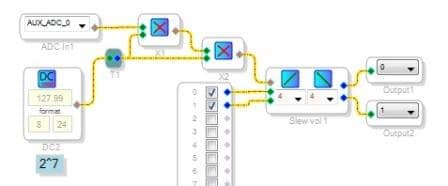
Multiplying the Aux ADC value by 2^14 (16384) brings it to the 8.24 format value of 1.0 max. This needs to be split into two multiplies of nearly 2^7 (128), as shown below:
Lookup table method:
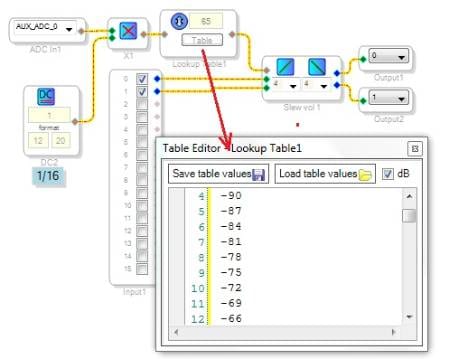
This method is more flexible, allowing for a dB-calibrated or "log taper" volume control. The Aux ADC's 0-1023 integer value is multiplied by 1/16 (for example), in this case producing an integer from 0 to 63. This drives a lookup table to provide suitable control values in the 8.24 format:
Best regards,
Bob

Perfect!!!
Many thanks for your quick reply, Bob.
Regards,
Robin
Hello KJBobk,
I have a board of EVAL-ADAU1452MINIZ ,and I want to use it to produce signal like click to output(DAC) and input signal from input (ADC) at the same time. Colud the ADC and DAC on the borad work synchronously ?What's more could sigmastudio realize my idea?
Hello zhang123,
The short answer is yes and yes, but it depends upon your timing requirements. The ADAU1452, the AD1938 codec (on the same eval board), and SigmaStudio can all simultaneously input and output disparate signals for ADC and DAC -- even though these inputs and outputs are sometimes shown as stereo pairs. "Synchronously", however, may go beyond this ability. I'll continue this discussion at your main post, I wonder if ADC and DAC that at EVAL-ADAU1452MINIZ can work synchronously ?
Best regards,
Bob
Hello Bob!
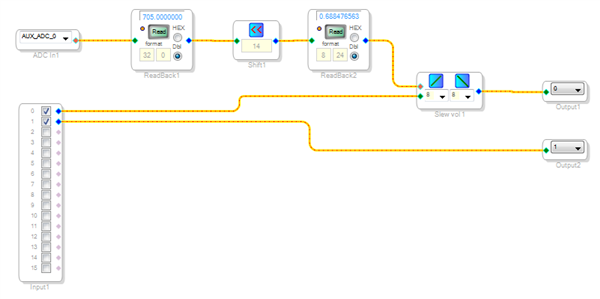
I tried to do the same (SigmaStudio 4.1, ADAU1452) using a shift register. Unfortunately the volume controlled channel keeps silent. I also tried to feed the volume control with a DC of 1.0 but the result is the same. Any idea what I did wrong?
Best regards,
Michael
Hello Michael,
What are your register settings for the serial port? Are you using an evaluation board? If so, which one?
Dave T
Also, you can try sending an oscillator to the volume control and place a meter on the output of the volume control to see if you have signals and if it is working. The problem might be the codec setup or all the serial ports.
Dave T
Hello Dave,
Thanks for your reply!
I'm using an ADAU1452-MINIZ eval board. The serial port seems fine. On the channel without volume control I get an output signal. I also get a signal on the "non-volume-controlled" channel if I interchange inputs/outputs 0 and 1.
Best regards,
Michael
Hello Dave,
Thanks for the hint with the meter. The meter indicated a signal at the output. Finally I got it working using output channels 16 and 17. I don't know what happened to output 0 but meanwhile I have a solution!
Thanks,
Michael
Please log in to reply.