Can I design a variable frequency filter for a Wah Wah effect?
Hey guys.
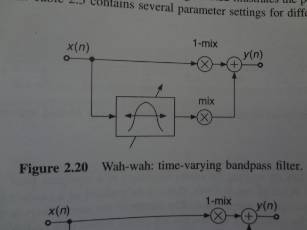
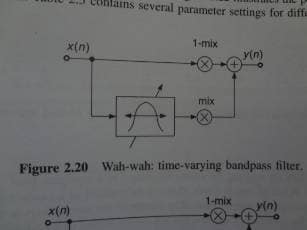
I am trying to design a Wah Wah effect for guitar using the 1701 evaluation board. The textbook I'm using shows a signal flow graph that has a time varying band pass filter with variable center frequency. A direct mix of the input signal is summed with the input going into the filter. I have tried to use the ADC 3 potentiometer and a VCO into the filter, but this doesn't change the frequency. I've tried to search for other posts, but I don't think I've found anything. So is it possible to use the potentiometer to vary a filter's frequency at all?
Thanks for any help. I can provide the graph and my program file if needed.
textbook
product
Hello CL91,
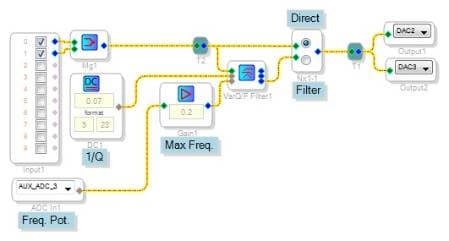
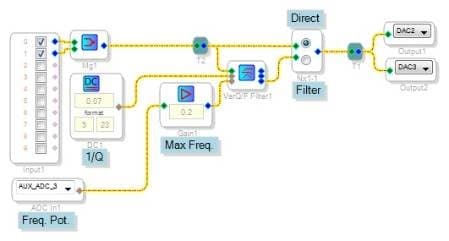
Try using a state-variable (Q/F Input) filter as shown below. You'll find it under Miscellaneous Filters. Help for this filter block is found at
https://wiki.analog.com/resources/tools-software/sigmastudio/toolbox/filters/statevariableqfinput
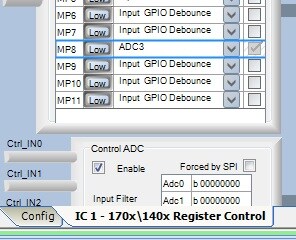
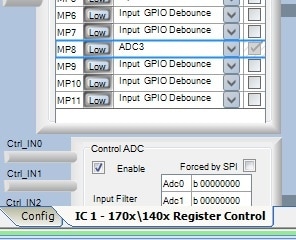
As shown here, the pot on your -1701 eval board adjusts the filter's frequency. For this to work you'll need to set MP8 in your project's Hardware Configuration / Register Control window to ADC3:
Once you have the filter working you're free to mix in the original signal and sweep the frequency with an oscillator, etc.. Have fun!
Best regards,
Bob
Thank you for the reply Bob.
I understand your design, and tried to recreate it and added a VCO. However, the potentiometer only varies the oscillator and the guitar signal does not vary or get mixed in. Here's my program file, and a graph of what I'm wanting to model. I'm not sure if I just need to add in a simple block or rearrange paths. Could you help me figure out what I'm doing wrong?
Hello,
Please try the attached project. I slowed down the VCO to sweep at a very low frequency range, and made a few other tweaks.
Bob
Thank you so much Bob!
I tried it out and it sounds pretty good with a guitar! I appreciate your help and will build around your design.
Hey! I wonder if it is possible to create Auto WAH based on this algorithm? Sincerely, Alex.
Hi Alex,
I'm not familiar with auto-Wah. A quick Google search suggests that auto-Wah responds to characteristics of the incoming sound in order to vary the Wah. Thus the Wah effect depends upon how the guitar is played. The SigmaStudio toolbox includes algorithms which you can apply to such a design. Under Dynamic Processors you'll find envelope followers with which to measure the guitar's loudness, as well as compressors to provide sustain. A cubic clipper could add fuzz. So by wiring these blocks together can achieve various effects.
Best regards,
Bob
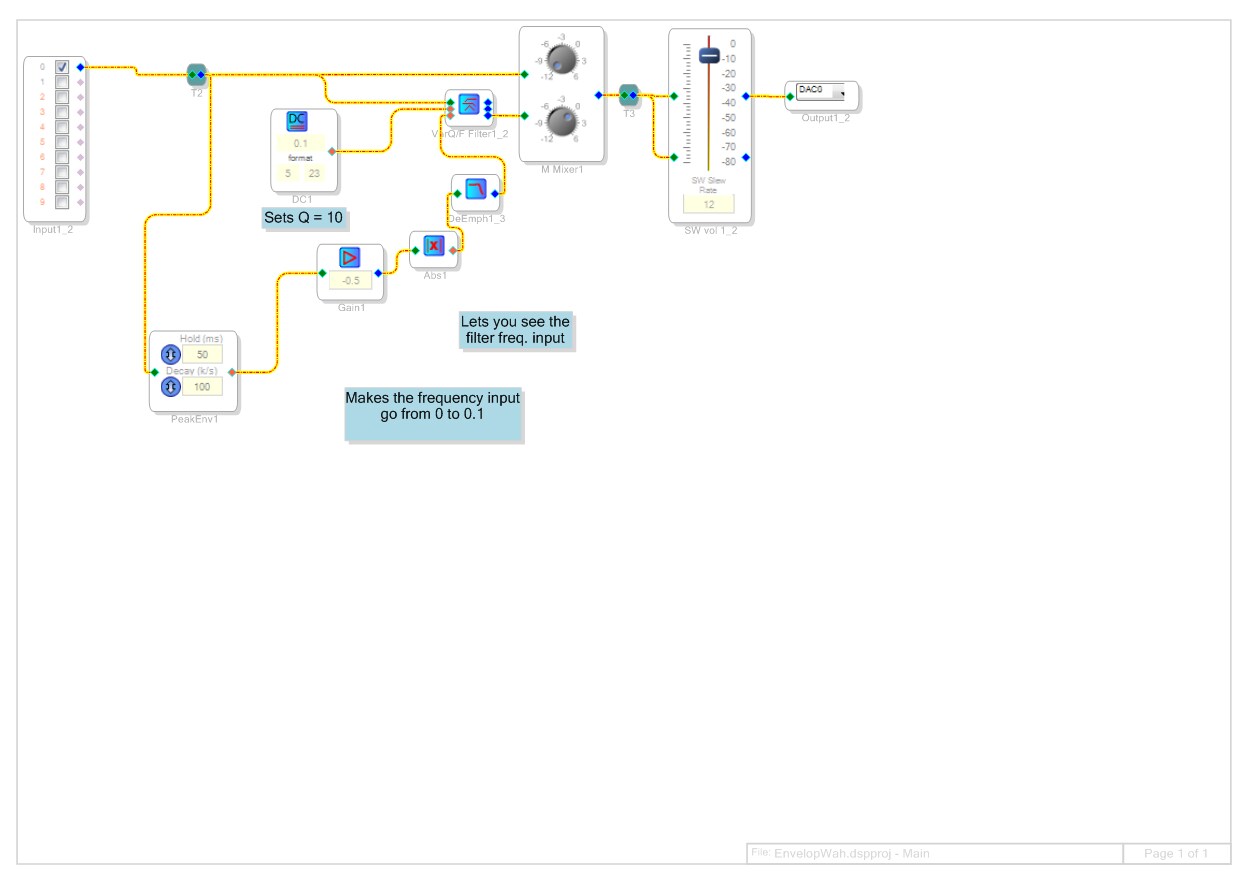
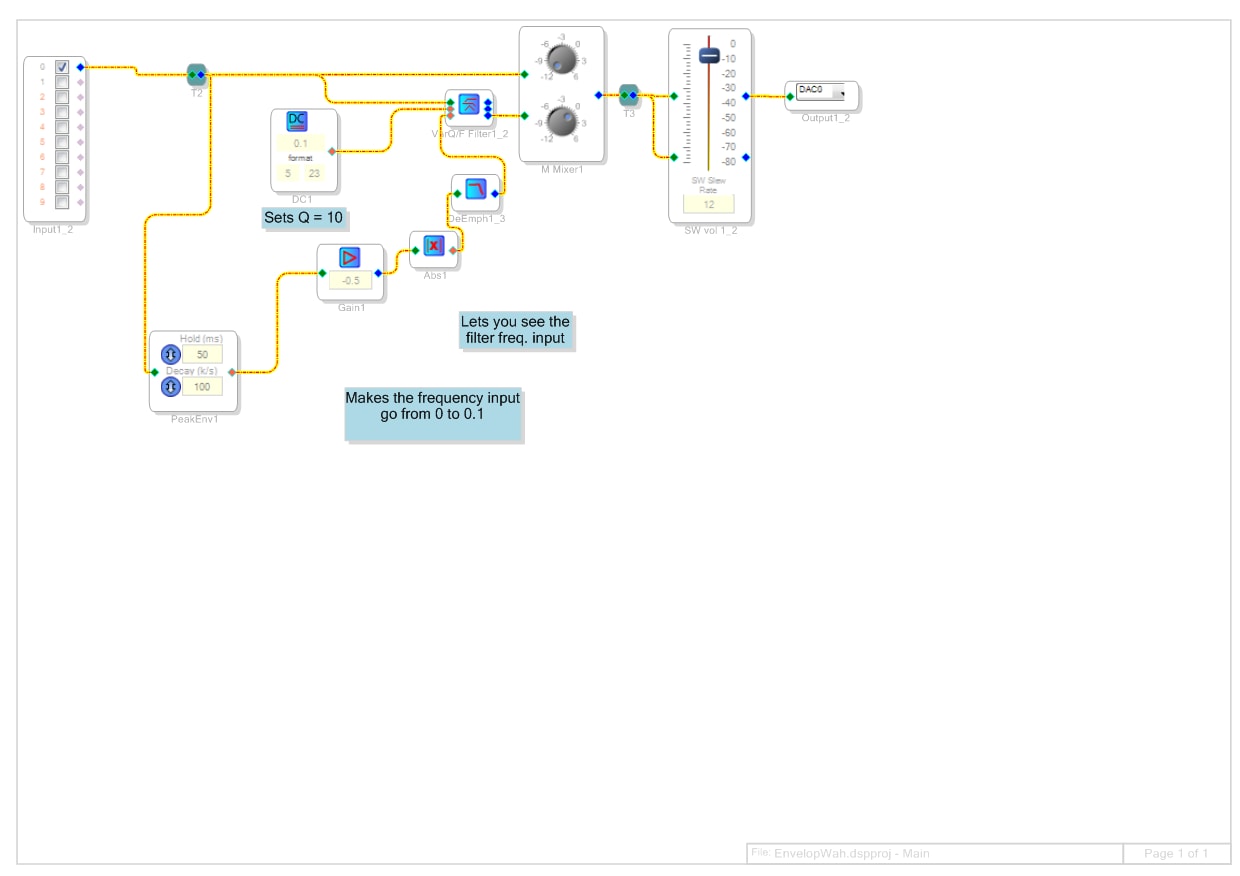
Hi Bob! I took your advice and tried various options. This is interesting for my experiences and there is some success. This works, but when fading occurs shattering. What can I do to keep the attenuation level? Adding value HOLD does not correct the problem but makes the step of the attenuation. Maybe I need to use extra filters, or something? Thank you for your advice! Sincerely, Alex!
Hello Alex,
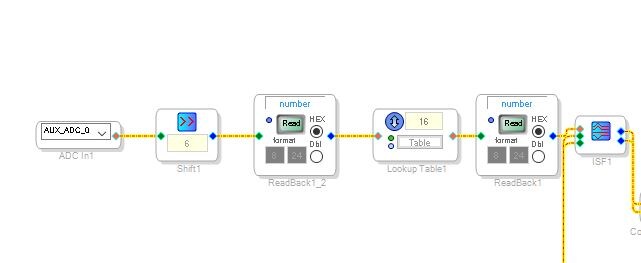
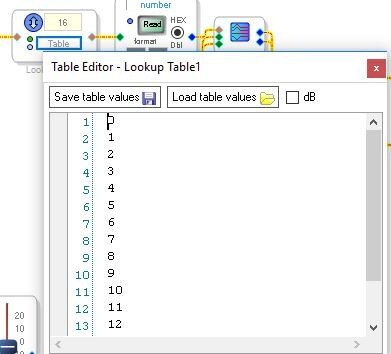
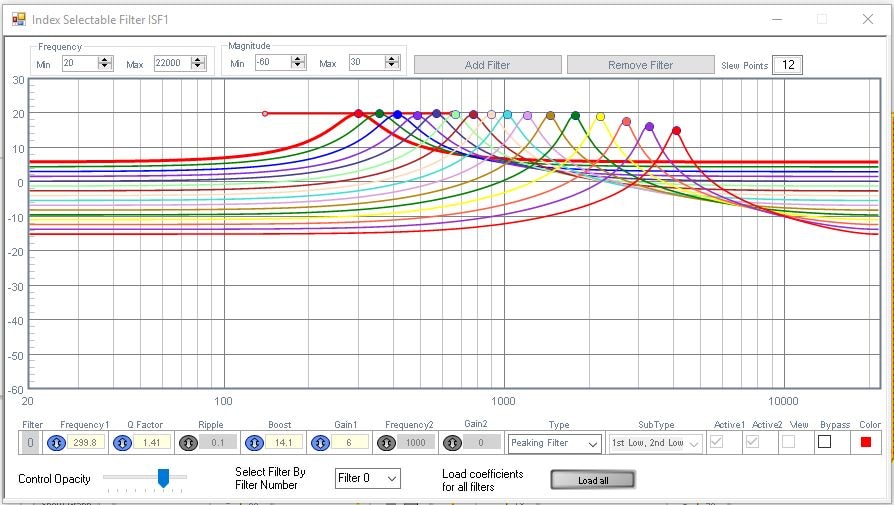
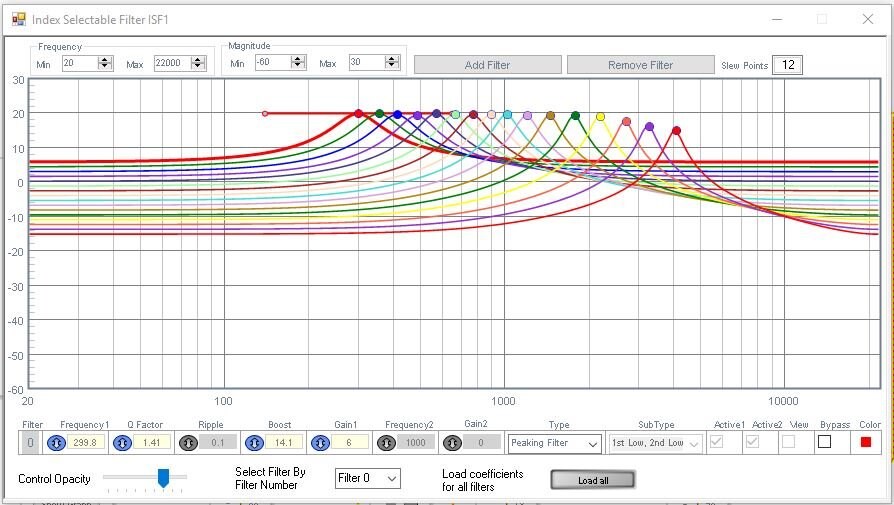
I did a pretty cool Wah program on the Sigma300 using index selectable filters. It uses the AUXADC input and scales the signal to go from 0 to 15 and goes to a table that sends out a number 0-15 based on the input. This then feeds an index selectable filter with a bunch of sharp peaks. It will interpolate the level when switching so it sounds like a continuous filter moving. It could be made to have more filters to be even smoother. Now this exact program will not work on the 1701. I would have to create a new project for that. I will do it when I get a chance.
Here are the screenshots.
The signal flow:
The table elements, well, most of them...
The filters:
Dave T
BTW: This makes a nice and relatively inexpensive replacement for the pot / AUXADC input in this application ;-)
https://www.sweetwater.com/store/detail/EP3--moog-ep-3-universal-polarity-expression-pedal
https://www.amazon.com/Moog-ACCEP003-EP3-Expression-Pedal/dp/B00GG20DJ4
Ken
Hello Alex,
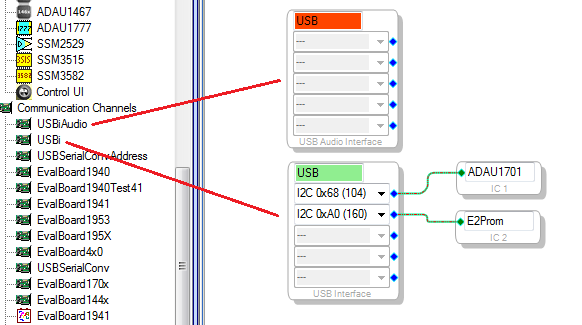
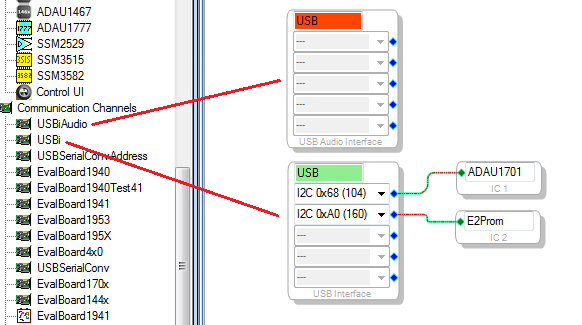
When I tried your project at first I couldn't get it to download to my ADAU1701MINIZ eval board. Eventually I found in your HW Configuration the USB Audio block (top). Once moving the IC and EPROM to the USBi block (bottom) it ran fine.
I didn't hear any "shattering" sound. Since you said it occurs when the sound fades, it could be from the filter's frequency input going too close to zero. Try adding a small DC value as shown below. The State-Variable filter oscillates with a negative frequency input, so your use of an absolute-value is excellent insurance! If you find that the sound gets too loud at times, you can add a Limiter or Compressor block.
As you can see, having no guitar handy I substituted oscillators. The De-Emphasis filter is made for EQ that reduces noise from FM radio and such -- use an adjustable filter instead. Interestingly, if you change this filter to Highpass (click its small blue box) and set its frequency to 0.1 Hz, you'll find some weird effects! The part of your project which handles the level information (between the peak Envelope block and the filter's frequency input) is often called the sidechain. What you have the sidechain do affects how the Auto-Wah responds, thus how interesting the effect becomes.
Dave T's use of an Index Filter instead of a State-Variable filter will likely result in a more-controlled effect. The Index Filters use the power of SigmaStudio to pre-calculate the complex coefficients needed to implement quality filters. By contrast, the ADAU1701 performs the simple calculations for the State-Variable Filter "on the fly," but this filter is necessarily less sophisticated. The State-Variable Filter does remind me of good old analog Wah-Wah which typically used a bridged-T filter around an amplifier. I've built several of those beasts and if the gain is too high the thing takes off and oscillates on its own.
Best regards,
Bob
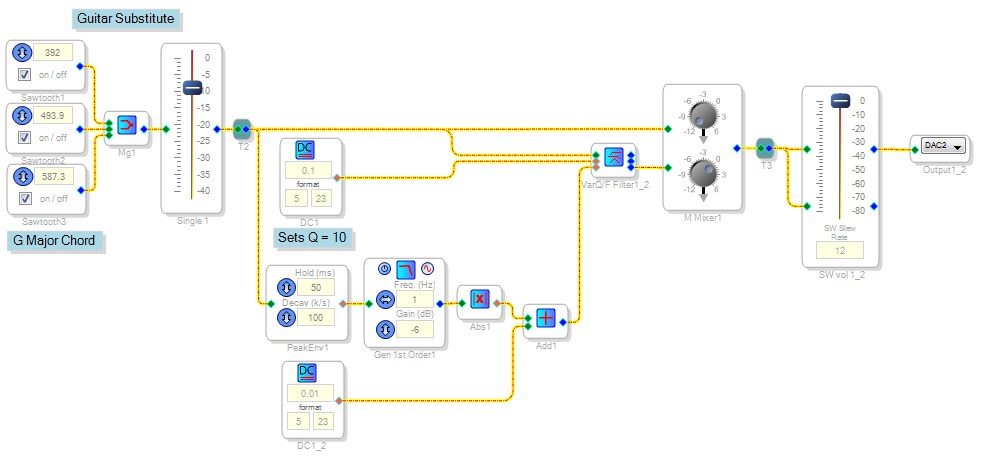
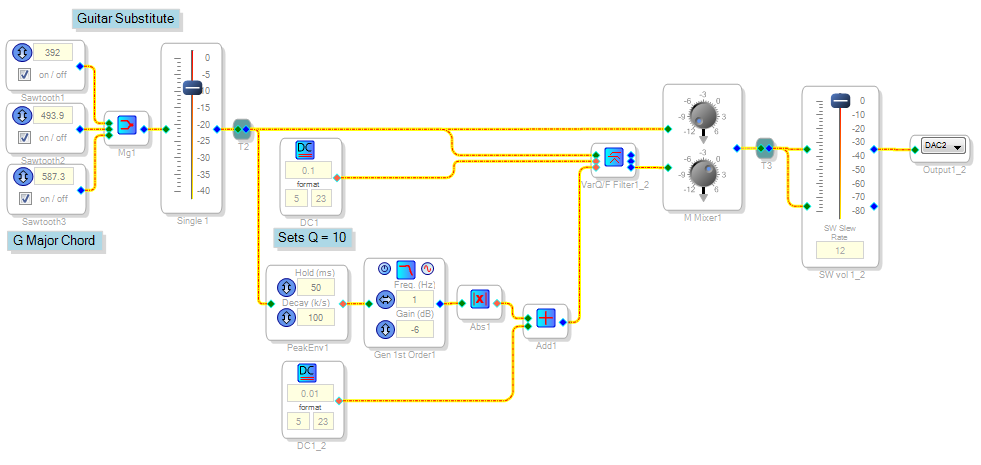
Hi, Bob! Your advice helped me a lot! I installed a filter like yours in the example, and I like the sound of that! Have a nice day! Sincerely, Alex.
Hello, KJBob! I tried to do a filter that switches in steps, but that does not work for me. Can you test my example and point out my mistake? Thank you! Sincerely, Alex.
Hello Alex,
Thank you for attaching your project so I could test it. You needed to adapt DaveThib's original project which ran on a ADAU1452, to run on the ADAU1701.
The good news: You did this correctly. Your project should work as-is.
The bad news: I can't get it (or any of many variations I've tried) to work.
The usual way to troubleshoot index filter trouble is to view its index input with a DSP Readback as shown above. Turning the pot selects integer 0 to 3, just as expected. Yet for some reason, the Index Filter remains stuck at it's zero-input curve. Note that my Aux ADC and DAC choices differ from yours only because I'm using different hardware.
I've tried rebuilding the project from scratch with two versions of SigmaStudio (3.17 and 4.1). In every case the filter didn't respond -- and in some cases, the Aux ADC remained stuck at zero as well. Sorry, at this point I'm out of ideas ... Edit: I just tried again, this time on my Windows 10 machine with SigmaStudio 4.1. The project Link-Compile-Downloads OK and passes audio. Yet the Aux ADC is unresponsive (always reads zero), and the filter as well (ignores an index input from an integer format DC source). I attached this project (set up for the ADAU1701MINIZ board) in case someone could help me troubleshoot it.
Best regards,
Bob
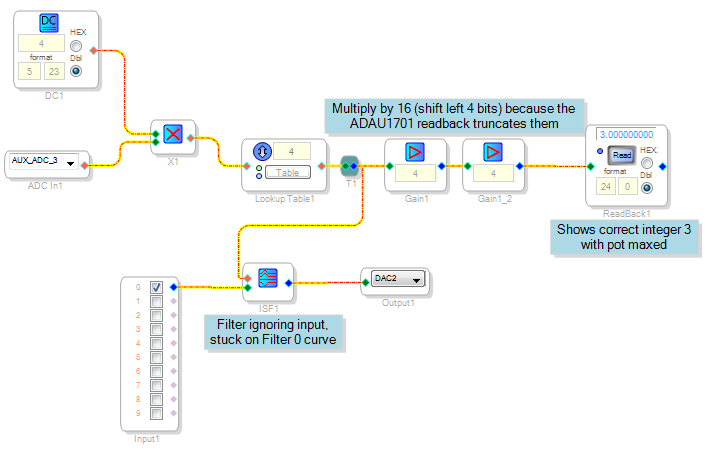
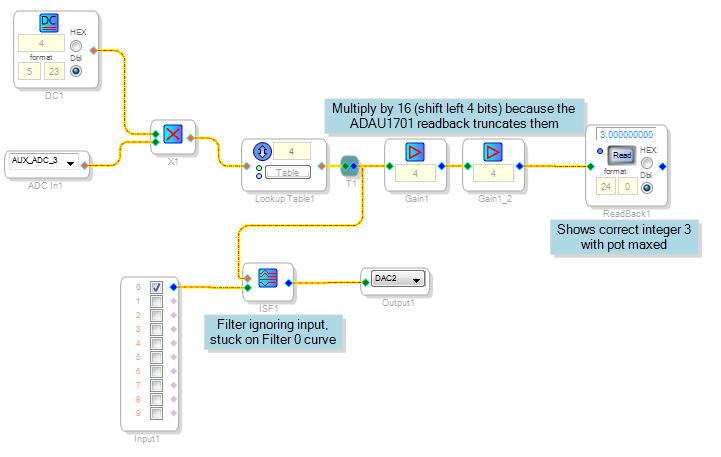
Hello Bob and Prodigy,
I looked into this and found that there is a bug in the Index Selectable filter. It is with both the single and double precision versions. The multiband version does work but it is not as elegant of a solution. I have reported the bug so it can be fixed.
Dave T
Thanks, David!
Bob
Hello KJBob and DaveTib!
You did a great job, thank you! I will wait for this error to be corrected. Sincerely, Alex!
Please log in to reply.