Level meter not showing correct levels.
Hi,
In Sigma Studio, a schematic which has an audio input,a mute block, Compressor, EQ, then a level meter.
When audio plays the level meter works correctly, but when I mute the signal it still shows -47dB which is incorrect.
Any idea why this would be so?
Thanks
Danny
Hi Danny:
What DSP are you using? Is it possible that you have some DC going through the signal chain that you are not aware of?
Also, please notice that in some our our DSP (i.e. 1940, 1701 and 1702), the lowers possible values you can read have a 5.19 format ( as opposed to a full word 5.23). In other words a couple of LSBs will be lost in the display.
Please comment.
Miguel
Hi Danny,
It's also worth noting that the earlier SigmaDSPs lacked the hardware acceleration to do a square root, and therefore the RMS level detector was not true RMS but rather an approximation. It had good accuracy at higher levels but unfortunately it had a limited range on the low end.
This FAQ shows you how to make a somewhat customizable level detector, although it will only give you a numerical display (not a bar graph): https://ez.analog.com/message/7669#7669
Hi Yagami-san:
You are almost right. In all generations of SigmaDSP we are able to get around the need to calculate a square root because we have db registers. You would recall that doing a square root on the linear domain translates into dividing by two in the log domain. For this reasons, the RMS calculation performed in our processors is indeed real RMS calculated to the log value of the signal.
Regards
Miguel
Hi Miguel,
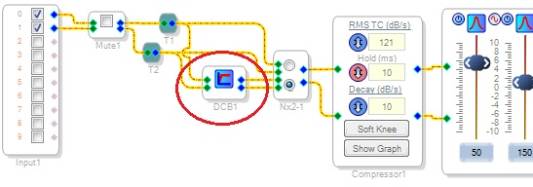
I suspect that your advice above, asking, " Is it possible that you have some DC going through the signal chain that you are not aware of?", may hold the key to a solution. After duplicating Danny's setup, I found that inserting a DC Blocking Filter (under Miscellaneous) into the signal flow drastically reduces the background readings on the Level Displays.
Thus Danny should definitely try this. After having DC-caused errors upset a voice-detecting application some years ago, I routinely include a DC Blocking Filter in any design that could use it. It appears that the DC offset originates with the ADCs, from leaky coupling caps or whatever. It can easily be amplified by following blocks (such as a compressor set to bring up low levels). It's easier to get rid of it in software than attempt to fix it in hardware.
Best regards,
Bob

Please log in to reply.