Compressors and Limiters
I've been using the limiter capability within several different Dynamics processors, along with the separate 'Limiter' block. I'm finding that they do not appear to provide a hard limit, but a soft limit. As my input signal increases higher and higher, I was expecting the be able to set the limit so that it would be impossible to pass a signal beyond the threshold I set. So far, all it appears to do is a bit of attenuation, but as my input signal continues to increase (to the point of clipping on the output) I'm never seeing hard limiting applied.
Am I missing something here about how these are supposed to work?
Hello Byron,
I've used the limiter in a telephone application where level is strictly set by FCC Part 68 standards, so the limiter is capable of an absolute limiting function. How it performs depends upon its settings and the dynamics of the signals used to test its performance.
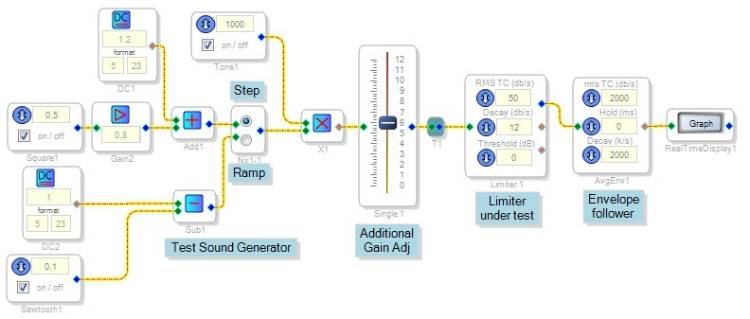
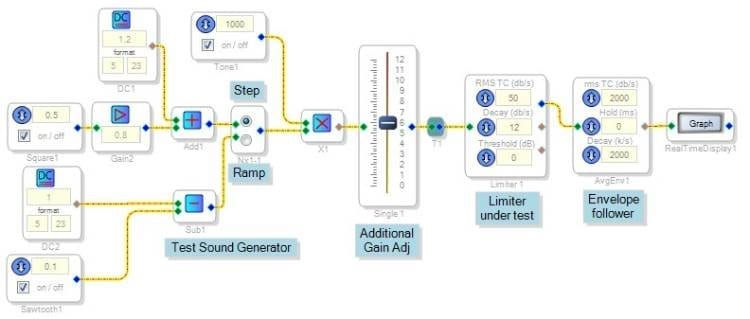
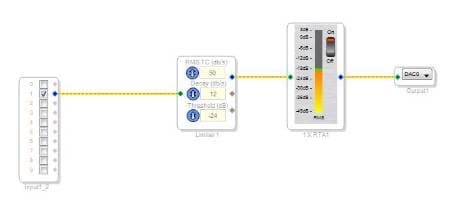
The schematic shown below tests the limiter with a slowly increasing tone, or with a suddenly changing tone level. We can explore its characteristics this way:
For the first test, the limiter has its default settings:
Threshold -- 0dB (1.0 peak amplitude)
Attack -- 50
Decay -- 12
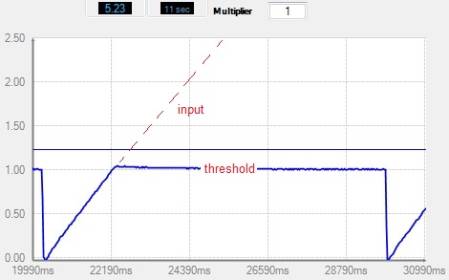
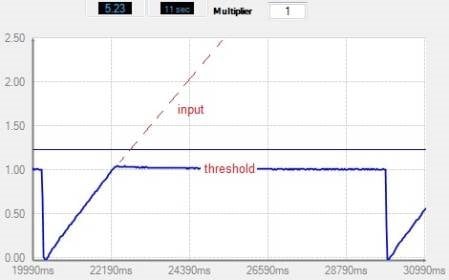
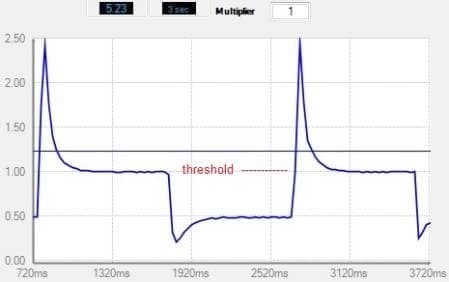
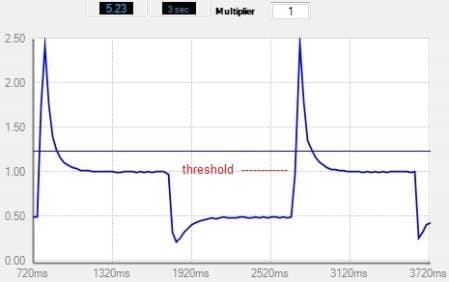
Its output follows a slowly increasing tone input until threshold is reached. Although the input increases way beyond the top of the graph, the output stays at threshold -- a hard limit is accomplished.
When the same limiter is hit with step changes in amplitude, its dynamic characteristic affect the results. For this test the input amplitude jumps to the graph's maximum range, and the limiter's output follows it until its dynamics catch up. The resulting overshoot allows peak output to exceed the set threshold (still 0dB). Thus with source material of varying level (speech or music), the limiter's output can easily exceed threshold much of the time -- providing in effect a soft limit.
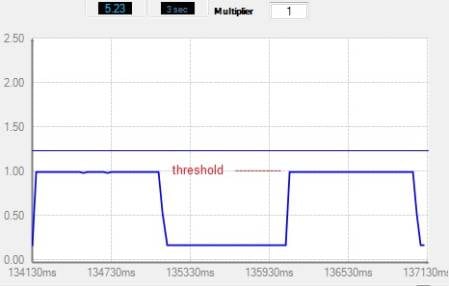
Here the limiter is set for a faster response:
Attack -- 500
Decay -- 23
Now the overshoot is gone. With these settings, a hard limit is achieved for any in-range input.
As you know, the 5.23 audio format used in all SigmaDSPs except the new 145x series allows for peak signals up to plus or minus 15.999 (24dB headroom). However, the signal going through a DAC (or a serial stream) is limited to 1.0 peak (0dB). With the limiter set to its default threshold of 0dB, the output clips at about the same level as the limiter's threshold, again making the limiter appear ineffective. To give yourself some room between the limiter's threshold and the clip threshold, set the limiter's threshold to a lower level (such as -10dB -- -20dB).
Best regards,
Bob

Thanks Bob. I realize this should be possible based on everything I've read before posting this question, I'm just not understanding why I can't seem to make it work (likely something simple I'm still missing).
I didn't utilize the method you detail above for evaluating the limiter. I was simply feeding a pure sinewave into my audio channel, putting it through a dynamics processor (RMS no gain), and then through a limiter. The only reason I added the limiter is because the 'limit' I was applying in the graph for the dynamics processor didn't seem to accomplish anything (never hit a hard limit). I was setting it at -20 dB, and still able to easily feed an input signal that could cause clipping on my output signal (viewed after one additional external pre-amp). I will look directly at the output of the 1701 tomorrow before the pre-amp to see if the 1701 is doing the clipping or not.
I think I'll need to simply things further and use nothing but the limiter in the configuration you are showing above so I can understand what it's doing.
On a related note for the same project, I'm trying to create my own AGC circuit, since the AGC in the library isn't available for the 1701. Any insight you could provide on that would also be greatly appreciated. I've been doing something very basic with the use of a crossover, and a dynamics processor as suggested by Brett in a different post, but that is proving in-adequate for the application. I have numerous different kinds of speakers which get used for not only producing a signal (only 1 at a time), but during the 'listen' portion of the half duplex conversation, the speaker acts as a microphone to pick up audio from a room. This means that the signal level coming back can be wide varying from one speaker type to the next. From everything I've seen to date about SigmaStudio, it's certainly capable of creating an AGC out of all the blocks, but my knowledge of the tool is proving insufficient so far to get it working properly.
Hello Byron,
Thank you for marking my previous answer Helpful. It appears that your settings and test conditions are fine -- with a steady signal and a threshold of -20dB, a hard limit should become apparent. Viewing the output directly at the -1701 should help. Please post what you find.
AVC is available for other SigmaDSPs but unfortunately not for the -170x. BrettG posted an easy way to achieve a similar result at https://ez.analog.com/message/42433#42433
Other ways involving an external-input compressor with various processing blocks before its control input (a side-chain) are possible.
Bob
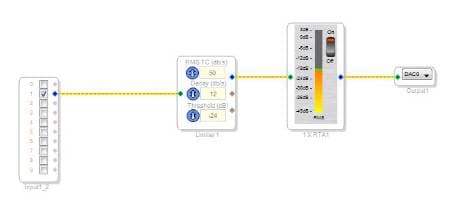
I've stripped the project back to nothing more than the following, and was still getting the same result. After taking a closer look at the hardware, I realized that an attenuation network was sitting just ahead of the 1701. I was basically never getting a signal to the 1701 that fell within range of the limiters operating range. I believe all I need to do now is balance things out more on the levels throughout my audio chain, and try and let the 1701 do more of the level control, and less with the legacy external pre-amp stages. Thanks for letting me bounce this off of you Bob.......it helped me get some perspective on the real problem.
I'll have to dig into the AVC stuff more. If you don't mind, I may still have some additional questions on that once I get through limiter stuff.
This question has been assumed as answered either offline via email or with a multi-part answer. This question has now been closed out. If you have an inquiry related to this topic please post a new question in the applicable product forum.
Thank you,
EZ Admin
Please log in to reply.