ADAU1701 0,90,180,270deg Phase Shift
Hi Bob/Brett,
My customer wants arbitrary phase, in which he can choose from, incremented at 0-90-180-270 deg values based on the ADAU1701 sigma core, implemented as part of a sub woofer system. Is there a possibility for this? How do i implement it? and how do I measure and examine the waveform in sigma studio? I know there are library features that can implement this trick with some kind of delay in between, just a thought.
Regards,
Dan
Audio Signal Processors
SigmaDSP Audio Processors
adau1701
Hi Dan,
Presently, there is no way to implement an arbitrary phase shift in SigmaDSP. You might be able to do this with an allpass filter.
Hi Dan,
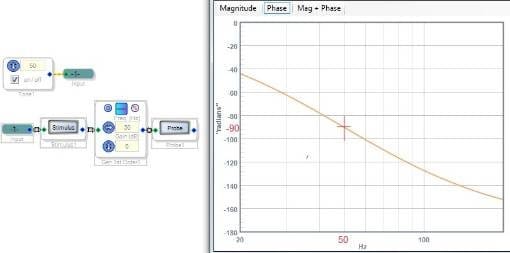
Customers always seem to want adjustable phase. Brett's suggestion of an all-pass filter is the first method to try. My DJ sub-woofer has a phase knob which likely operates as an analog all-pass filter, since there's no DSP in there. A first-order all-pass filter has a 90-degree phase shift at its set frequency, as shown below:
The phase shift changes with frequency, which may be acceptable within the sub-woofer's relatively narrow range.
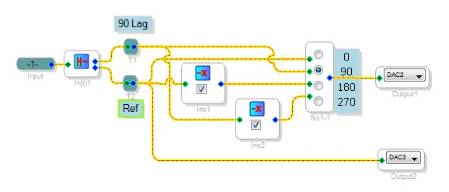
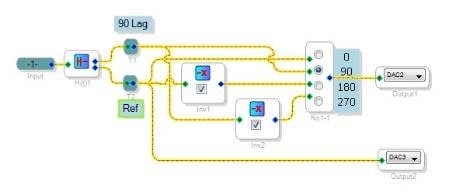
You could also experiment with the Hilbert Transform block which was recently added to the -1701 toolbox. This provides two outputs that stay 90 degrees apart over the audio frequency range. Below the Hilbert Transform and two inverters provide a selectable phase shift:
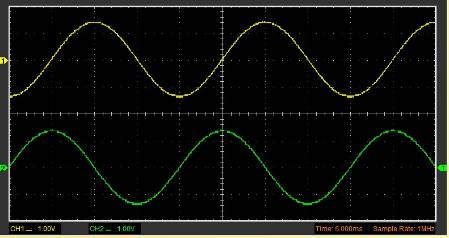
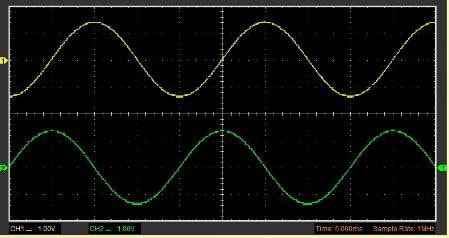
With the phase switch set to 90, the top trace shown below does indeed lags the bottom trace by 90 degrees:
Unfortunately, both Hilbert outputs are time-delayed from the input waveform, which adds its own frequency-dependent, input-referenced phase lag. I don't know the amount of delay -- if not too much, you could perhaps ignore it, or else add a compensating delay to the other channels.
Best regards,
Bob

Bob/Brett,
Thanks a lot! I guess I have to try the Hilbert method then inverting signals after, just what Bob did.
Regards,
Dan
Hi Dan,
The -1, +1 multiples for the Hilbert Transform outputs actually form a special case for just the four quadrants (0, 90, 180, 270 degrees). In the general case, sine and cosine functions can draw the entire unit circle. This allows for a beautifully continuous phase control! An implementation using lookup tables is shown at:
https://ez.analog.com/message/153588#153588
Best regards,
Bob
Hello Bob,
This is great! I'll try this method myself. Thanks a lot!
Regards,
Dan
Please log in to reply.