adau1701 gpio selected level setting
Hi all,
I will select with two gpios (in binary mode) between 4 difference volumes. How can i realize that? i tried with demuxer, but i cant get the binary bit combination...
thanks for helping
best regards, hubijo
Audio Signal Processors
SigmaDSP Audio Processors
adau1701
Hello hubijo,
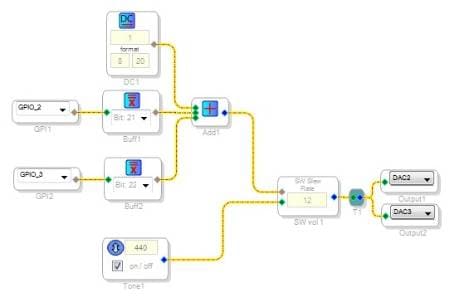
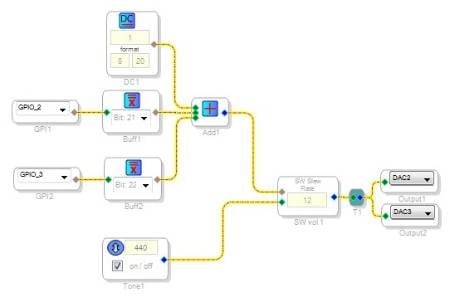
There's several ways to do it, one is shown below. Condition the GPIOs with buffer gates, each of which produce a selectable high bit output for a nonzero input. In the -1701 and similar DSPs with a 5.23 format, the bit positions 20, 21, and 22 provide a 1/8, 1/4, and 1/2 value respectively. Summing these provides the binary-coded result you desire.
Using the 1701 mini board, set your HW control for MP2 and MP3 to invert, then the volume increases when you press switches S3, S4, or both.
Bob
Hi Bob
Thanks for your answer. what do configure the DC1?
hubijo
Hi,
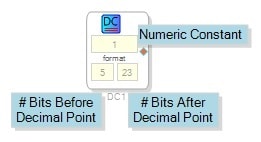
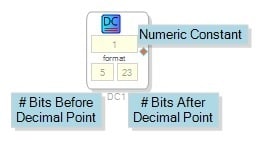
I included the DC Source DC1 to set a minimum level for when the two binary inputs are both off. Use a DC Source anywhere a constant numerical value is needed.
The DC Source block lets you choose both the numeric value of your constant and its format -- how many binary bits appear before and after the decimal point (actually the correct term here would be "binary point."). See https://ez.analog.com/docs/DOC-3168
for help with the number formats in SigmaDSP.
Bob
Please log in to reply.