ADAU1445 I2C problems
I'm wondering if anyone else has this problem...
I have an ADAU1445, and it's getting it's MCLK externally (12.288MHz). Power supplies are all OK. I'm writing to the I2C port. First I initialize it the way you're supposed to according to the data sheet, which usually works.
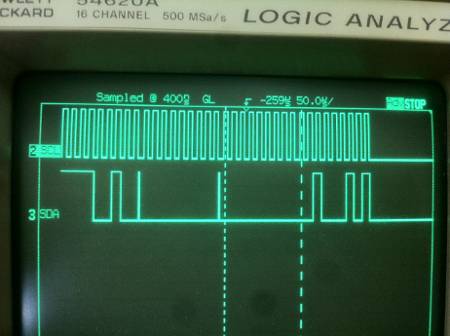
But, then I try in a loop writing the master clock register over and over (same value), and eventually the I2C bus hangs. Same with reading e.g. the run bit register. Or trying to load code. After several hundred or thousand transactions the bus hangs. Being I2C it's not clear who's doing what but it looks like the 9th clock of a transaction is actually being held low by the ADAU1445. I deduce this becaues I tried the exact same thing (looping read or write) with an ADAU1966 (DAC) and it can loop indefinitely. Both on the same board. Completely disconnected the ADAU1966 so the only thing on the I2C bus is the ADAU1445, and still has the problem. Since the same micro (Kinetis K20) is the master, and does this simple test with the DAC but the ADAU1445 fails, it looks like probably an issue with the ADAU1445.
I've tried this with I2C bus at anything from just under 100KHz down to 15KHz, and with large spaces between the accesses, makes no difference.
I'm not sure how to make a simpler test, or why the part might be doing that. Ideas?
Audio Signal Processors
Audio Products
i2c
Audio D/A Converters
adau1445
SigmaDSP Audio Processors
adau1966
Show More
Hello,
Sorry for the very late reply. I unfortunately was not able to reproduce this failure. I did a loop write to the start pulse register of the standard value (internally generated 48 kHz) and I never see the chip hang, regardless of transmission rate. May I ask why you are writing the same value over and over?
Thanks!
Brett
Hi Bret,
To answer the question, writing the value over and over is just for debugging. 'Scope loop, as it were. Can you tell me the hex value you're writing?
Thanks,
Marc
Hi Marc,
I don't have a lot of the hardware that would make it easy to perform this test, but I discovered a feature in SigmaStudio that makes it pretty easy to try this out. It's called the Sequencer.
Start by opening your project file with the right SigmaDSP and USBi enabled.
Then open the Capture Window. (Ctrl + 5 toggles visibility of this window)
Then, go to the right side of the window and click the symbol that looks like this: <<. That will open the sequencer.
There is an empty list area with labels Mode, Address, Bytes, Data. Right click below those labels and select Add Item > Write. This gives you a new blank write command.
By default, the address is in decimal notation. I prefer hex. Right click and choose Address in hex.
Then, double click on the 0 in the Address column and type in a new address. For example, you can choose the serial port 0 register, at address 0xE000.
Then double click the empty space in the data column to type in the data. This is a 16 bit register, so let's just try 0x00, 0x00. Type it in exactly like that.
Now you can click the button in the sequence window that looks like a down arrow with a circle around it. This downloads the data to the address you specified.
Now, that's only a single write. If you want to make a huge block of maybe 50 writes, then Ctrk+C (copy) and Ctrl+V (paste) can do the job!
I gave this a try and I was not able to make the I2C bus hang.
This question has been assumed as answered either offline via email or with a multi-part answer. This question has now been closed out. If you have an inquiry related to this topic please post a new question in the applicable product forum.
Thank you,
EZ Admin
Please log in to reply.