How to use the Wind Noise Suppressor module
Dear sir! Now, I focus on the Wind Noise Suppressor module of SigmaStudio, however, there are few information can be found in the help. Could you give me help regarding the following questions?
1、Some examples and information about the Wind noise module can be found in the Internet, however, we can not find this module in SigmaStudio V 3.8 and V3.10, why? On the contrary, a wind noise suppressor module can be employed in SigmaStudio, What’s the difference between these two modules?
2、There are a low pass filters bank, a detection filters bank and an enable (disable) additional LP detection filter button in the wind noise suppressor module. What’s the relationship between the LP filters bank and the detection filters? In the LP filters bank, the two LP filters are all enabled but what’s the relationship between them? What’s the meaning of all their parameters and how to configure them? Is there a literature illustrate the principle about the wind noise suppressor?
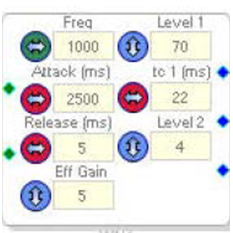
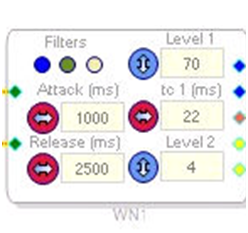
The Wind Noise documentation can be found here: https://wiki.analog.com/resources/tools-software/sigmastudio/toolbox/adialgorithms/windnoise
The Wind Noise Suppressor is an updated version of the Wind Noise algorithm. So, the Wind Noise algorithm is being removed from newer builds of SigmaStudio and replaced by the Wind Noise Suppressor algorithm.
The Wind Noise Suppressor acts like the original Wind Noise algorithm, but gives you more control over the way the algorithm behaves.
Output Pins
The two blue pins are the output pins. This outputs the filtered signal (with wind noise removed/suppressed).
The two yellow pins are the left and right outputs of the lowpass filters used to isolate the wind noise, which is then removed from the signal. You can use these outputs during debugging to determine how well the wind noise is being isolated.
The red pin outputs a signal that shows how much suppression is being applied in real-time. You can monitor this signal to see how much the algorithm is acting to suppress the noise on the input signal.
Control Buttons:
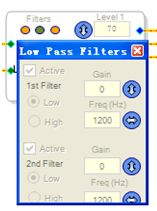
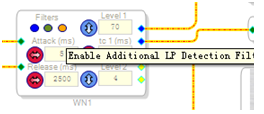
The blue button opens the low pass filters used to isolate the noise so it can be removed. You can change the cutoff frequency to tune the algorithm to the sound you prefer.
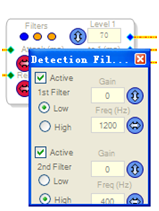
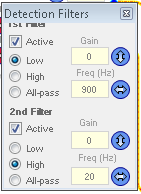
The brown/green button opens the detection filters, which are used to detect the level of the incoming noise. These should be tuned to match the approximate bandwidth of the incoming noise signal.
The cream/orange button, when clicked, will put an additional filter in the detection path to create a sharper roll-off in the filter response.
Thank you for your Reply.
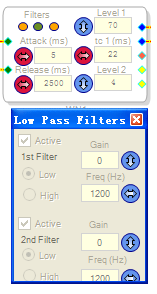
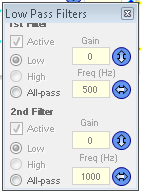
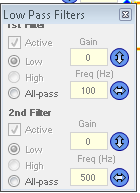
1、The LP filters bank is consisted of two filters, as shown in below, all of them are low pass filters, so what’s the relationship between them? Are they cascaded or paralleled?How to configure their frequency value?
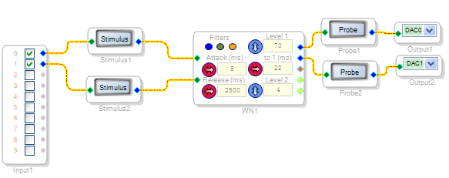
2、The magnitude-frequency response of the wind noise suppressor module is hardly to obtained in the physical experiment,so the Stimulation stimuli and Stimulation Probe are employed to simulated the magnitude-frequency response, however they are not work. Why? Is there any way to obtain the magnitude-frequency response of wind noise suppressor?
Dear
Could you reply the above questions?I am looking forward the help from you!
Hello Jingchang,
Miguel answered your second question here: https://ez.analog.com/message/125284#125284
I will respond to your first question when I am able.
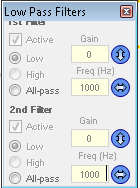
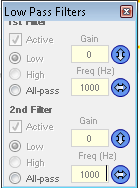
The first button "Open Low Pass Filters" is mis-labeled. It should be "Open High Pass Filters".
These filters are activated when wind noise is detected, with the goal of removing the wind noise. These filters are cascaded in series.
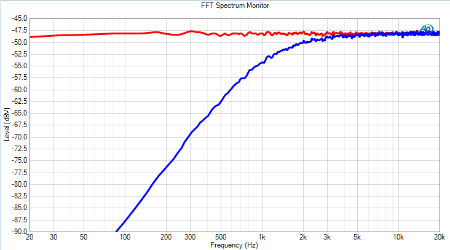
Here is an example where I have set both High Pass Filters to 1000 Hz.
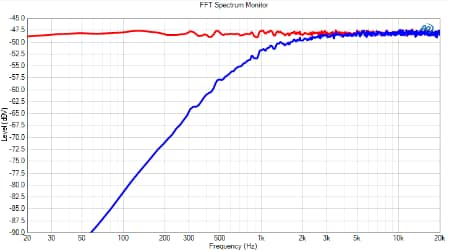
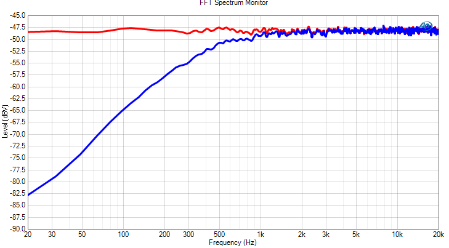
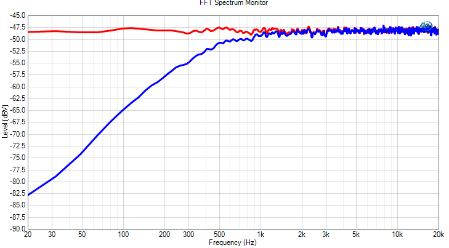
The red response is the input signal. The blue response is the output signal, which has passed through the wind noise filter. You can see that the high pass filters have been cascaded and provide 6 dB of attenuation at 1 kHz.
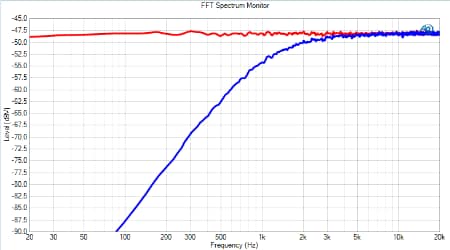
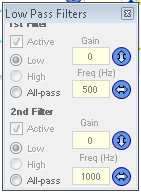
If I instead set the high pass filters to 500 Hz and 1000 Hz, here is the response I get:
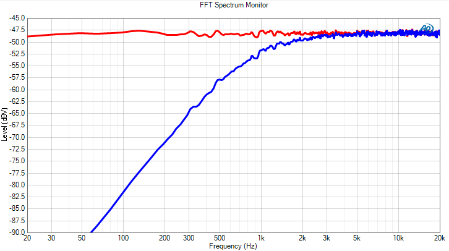
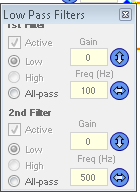
Here's a final example with the filters set to 100 Hz and 500 Hz.
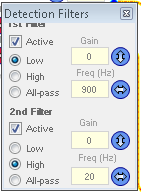
The detection filters set the bandwidth of what the algorithm considers to be "noise". By default, there is a high pass at 20 Hz and a low pass at 900 Hz, meaning that this bandwidth is considered to be the area where there is the most wind noise energy.
Clicking the "Enable additional LP detection filters" button will add a second set of detection filters cascaded in series with the same settings as the first set of detection filters.
Our software engineers will correct the mis-labeling of the first button on the user interface for this algorithm.
This question has been assumed as answered either offline via email or with a multi-part answer. This question has now been closed out. If you have an inquiry related to this topic please post a new question in the applicable product forum.
Thank you,
EZ Admin
Please log in to reply.