How ADAU1452 use DM0 RAM memory?
I use adau1452 and sigmastudio tool to development .
I find adau1452 have 2 section ram. DM0 and DM1,
And I use delay,but it's only consume DM1, not DM0,
So I want use "delay" function or others consume dm0 ram.
How do i do ?
By the way, Have another question.
The sigmastudio ADI Algorithms only have reverb . I use adau144x,
there have some more algorithms.
How can i use more algorithms?
walkercc wrote:
I use adau1452 and sigmastudio tool to development .
I find adau1452 have 2 section ram. DM0 and DM1,
And I use delay,but it's only consume DM1, not DM0,
So I want use "delay" function or others consume dm0 ram.
How do i do ?
Currently the delay function in SigmaStudio only uses DM1. We need to write a new delay algorithm that uses DM0. This will come sometime later in SigmaStudio development.
walkercc wrote:
By the way, Have another question.
The sigmastudio ADI Algorithms only have reverb . I use adau144x,
there have some more algorithms.
How can i use more algorithms?
The ADAU1452 is a very new product. It released only a few weeks ago, so the algorithm library is still limited. We will be adding more algorithms to the library over time.
Hello
could someone explain the difference between DM0 DM1 and the benefit of using one or the other ?
thank you
fabriceo
The data memory is divided into two sections. There is no difference between the two sections. For most algorithms, SigmaStudio will automatically select the proper data memory section.
Hi Brett,
Do you have any time schedule of DM0 availability for delay block? by only using DM1, it limits the total delay under 400msec, just wondering if there is any work around when more delays required.
Also the loudness algorithm is not available in ADAU1452, appreciate if you can let me know when it will available.
Thanks in advance, Guang
Hi Brett,
any news with the delay algorithm?
Thank you
Omar
Hello Omar,
DM0 delays are still not supported in SigmaStudio 3.11. In a future release we will modify the standard block to allow the user to select a memory in the GUI. However, currently we provide a temporary patch/workaround. This requires the latest 3.11 release version to be installed. The patch will not work for earlier 3.11 beta releases or 3.10 and prior production releases.
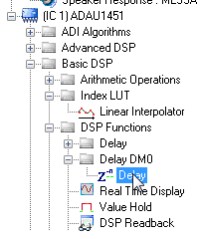
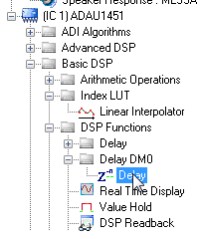
The attached zip file includes a file (DelayDM0.dll) which can be added to the SigmaStudio's executable directory (ex. C:\Program Files\Analog Devices\SigmaStudio 3.11). Use the "Tools--> Add-ins Browser" feature to add the standard "Delay DM0" cell in the Tree ToolBox. You should see the the cell added under the Basic DSP--> DSP Functions as shown below:
-JT
Hi John,
thank you very much for this, it worked great!
Omar
Please log in to reply.