Getting natural speech with a 1:2 Decompressor
I'm having a lot of difficulty getting natural sounding speech using a compressor box (peak, RMS, or combo). Attacks are too loud compared to the rest of the clip, but as I tweak the knobs, I can't level this out without raising the noise floor.
Can anyone recommend a tool and/or settings that has worked for them to achieve good decompression?
I noticed in the help section reference to a "Standard Peak/RMS Compressor" that has a lot more controls, particularly referring to control of the attack/release time. But I don't see this tool in the toolbox. (Using Ver. 3.9 Build 2)
About my setup: the input signal is compressed 2:1, and I'm comparing the audio to a reference receiver that uses an SA575 compander to perform the 1:2 decompression.
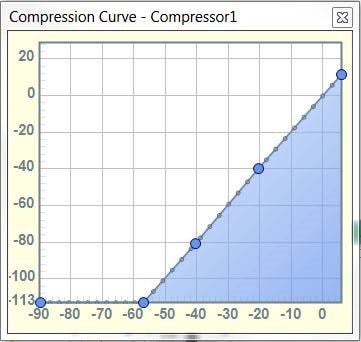
Here is the decompression curve I'm using.
Thanks for any help,
Carl
Hi Carl,
Your decompression curve was not attached to the original post. Can you try posting it again?
Thanks,
Brett
The decompression curve.

Hi Carl,
The Standard Peak/RMS Compressor was just added for the ADAU1701 and AD1940 DSPs in SigmaStudio Beta 3.10.1 -- see Brett's discussion at https://ez.analog.com/message/121823#121823
Bob
Natural Sounding Speech with Compandors is a little tricky. If the speech is part of general audio (dialogues with music), then you need to ensure that extreme presence of bass or treble does not correct/ over-correct your mid-range.
Give this a try: Give the signal as input to a three-way crossover. The outputs of the cross-over go to three compressors. This way you can control the volumes of bass, mid and treble independently. Finally you add the output of the three compressors.
I hope I interpreted your question correctly and didn't go way-off topic.
Using the RMS Detect compressor (no: gain, hold, decay) at first provided no TC value at which it sounded good. Then suddenly it glitched and started performing wonderfully with the expected low noise floor and level audio. (Found a TC of 202 was best for me.) I've had it glitch back and forth once since then, but I can't seem to find a pattern or reason for when it decides to sound good or bad. Thought you should be aware of that bug.
I have now downloaded 3.10.1 beta and am using the Standard RMS compressor. It works great, provides the knobs I was looking for, and I appreciate the visual feedback to boot. Thanks, guys!
Here's another observation, I noticed that the bass is attenuated through my decompressor. Is this an unavoidable effect, tunable in the controls, or a bug in the tool?
-Carl
Hi Carl,
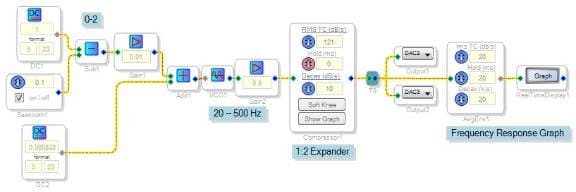
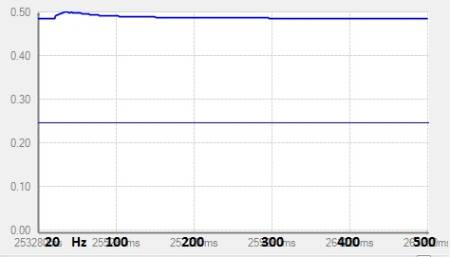
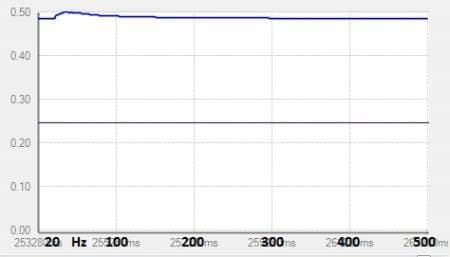
I could not duplicate the bass attenuation with the straight frequency-response test shown below. Could it be caused by the dynamics of speech?
Frequency response test circuit:
Frequency Response Results:
I'm not sure if I'm using the same compressor and its settings.
Bob
Please log in to reply.