Noise Gate not Functioning Properly
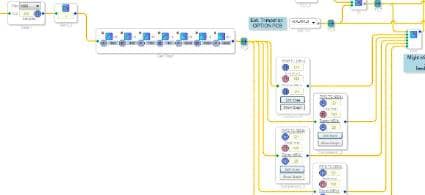
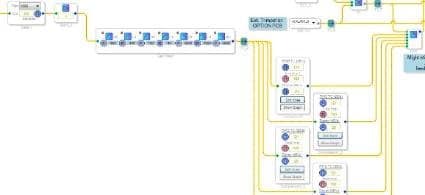
I have an application where I'm using an RMS (no Gain) Compressor (several of them) to create a noise gate, but it doesn't appear to work. I have an external POT controlling which noise gate path to select through my Index Selectable Mux.....this part is working fine. I've read several posts and understand you can "Show Graph" within the compressor and drag the handles to create one.
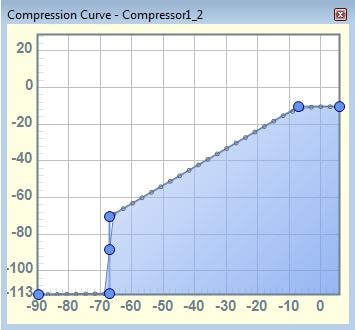
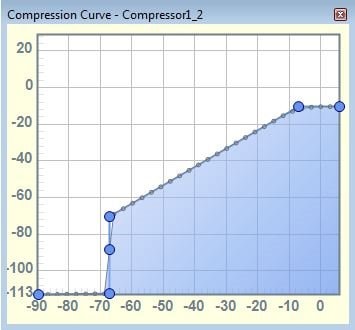
From the compressor curve below, you can see I'm trying to set my noise gate a bit below -70 dB. If I drag the handle sitting right by the -70 dB text to the right, it attenuates my noise source (pink noise) along with my real audio which is significantly louder. I expected to clearly cut out my pink noise and leave the amplitude of my real audio un-affected. As I drag the aforementioned handle right, I'm adjusting the slope of the angled line to maintain a 45 degree angle and keep the output level un-affected in this region (ie: 1:1 with input signal). I've tried using the RMS with Gain compressor to apply some post compressor gain back to my real audio, but it simply amplifies that in addition to my noise source.
My project is using an ADAU1701. Am I missing something obvious here?
Audio Signal Processors
SigmaDSP Audio Processors
adau1701
ByronS wrote:
...it attenuates my noise source (pink noise) along with my real audio which is significantly louder. I expected to clearly cut out my pink noise and leave the amplitude of my real audio un-affected.
Hi ByronS,
Unfortunately, this isn't how a noise gate works. A noise gate is a simple dynamics processor. It applies gain to the entire signal (including any noise contained within it). It does not have the capability to separate out noise from the signal. This is a much more complicated problem, and is well beyond the capabilities of the ADAU1701.
A noise gate is simply designed to check the level of the incoming signal and "gate" it (i.e. mute it) when it drops below a certain level. This is especially useful, for example, in instrument amplification systems. Think about a guitar amplifier. When the guitarist isn't actively playing the guitar, there is still some residual noise and hum coming through the pickups. Without a noise gate, that noise will be amplified. The noise gate simply acts to remove residual noise when the guitarist is not playing the guitar. The noise gate will de-activate once the guitarist starts playing, and the amplifier will amplify both the guitar signal and the noise, but the signal is much louder than the noise and it effectively wins out. A noise gate cannot separate the noise from the signal and remove it.
This is a great reference from a company called Rane: http://www.rane.com/note155.html
Check out the whole thing, but specifically Chapter 5, which deals with noise gates.
In order to remove noise from a signal, you need an noise removal algorithm, which, as I mentioned, requires significantly more horsepower than what the ADAU1701 can provide. Even using powerful desktop computer, noise removal is a very difficult problem to solve.
Thanks Brett. I'm not intending to remove the noise from the good audio signal if they are similiar in level, as I realize this is more complex. I'm looking to take background noise which is significantly lower in amplitude from my good audio, and cut it out using the noise gate. This example sounds like it fits exactly with your guitar example because my un-wanted audio is much lower in level from my good audio. Even with this being the case, I'm not seeing it behaving this way. This is the same project I've discussed with you a whle back where the ADAU1701 is replacing the TAS3002 from TI. That part can do this function perfectly, and I was assuming from everything I read that the ADI part could do the same.
Hi Byron,
Perhaps there's a misunderstanding here. May I ask, what is your signal of interest in this system? Is it a voice? Are there times when it is active and other times when it is inactive?
If you want to remove the noise when your signal of interest is inactive, then this is exactly what a noise gate does. You just need to set the level of the gate appropriately so it triggers at the right time.
Unfortunately, if you want to remove the noise while the signal of interest is active, then the noise gate won't help. Once the signals are already mixed (noise + signal of interest), there is no way to un-mix them. At least, there's no way to do that without significant processing power and some degradation of the original signal quality.
The guitar example I gave before works so that the gate is always in one of two states:
Guitarist is not playing. Signal level is lower than the gate threshold. Noise gate on: The signal (including noise) is muted.
Guitarist is playing. Signal level exceeds the gate threshold. Noise gate off: Both the signal and the noise pass through unchanged.
So, the question really is, how do you set the threshold to get this functionality? Basically, you need to the gate to be active when there is just noise and no guitar. Then, when the guitar kicks in, that should exceed the gate threshold and the gate should close. That means in order to set the gate threshold correctly, you need to measure the level of the noise (with no signal active) and set the gate threshold to a value just above that level.
I checked the TAS3002 datasheet and it looks like they have a dynamics processor (DRCE) but no noise removal function. This means the ADAU1701 should be capable of the exact same operation. If you want to get the same behavior with the ADAU1701 as with the TAS3002, then I'm guessing it's just a question of setting the gate threshold appropriately.
Thanks!
Brett
With the TAS3002, I've been using the DRCE function just like you determined. It's great for taking a very echo rich environment, and eliminating that effect so you can pull the real voice audio from it (along with some low end filtering). I have a prison application where that works perfectly. My application obviously has nothing to do with a guitar, but it seemed analogous for the sake of discussion.
Is there any other tool for the 1701 where I can always severly attenuate the audio level below a threshold? I realize it's already mixed with the good audio at this point, but the amplitude is significantly lower that the real speach I want to keep, so I want to treat it like the noise floor and attenuate it. My application demands that I have this capability so there has to be something the 1701 can do to address this(?).
Please advise as I'm getting desparate on this with an urgent need to address a customer issue.
Hi Byron,
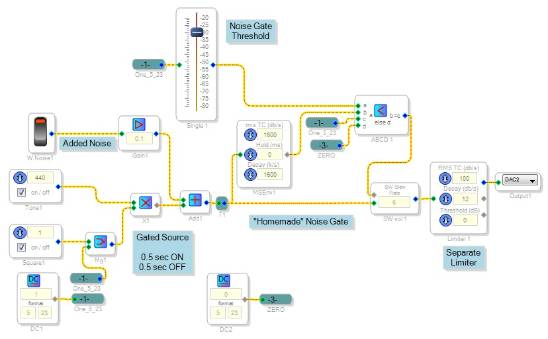
One way to evaluate the performance of a dynamics processor is to build a test circuit like the left side of the schematic below, which makes an intermittent tone with noise added. Then look at the compressor's output with a scope. You can gauge attack and decay times as well as noise gate operation.
The compressors in your project may be doing too much work, because their limiters and noise gates are at opposite ends of the sound level scale. If their time constants and decays are made slow enough for the compressors to work well, the noise gates will be too slow to function. We can split these functions into a standard limiter block and a separate noise gate home-made from a comparator and volume control -- see below.
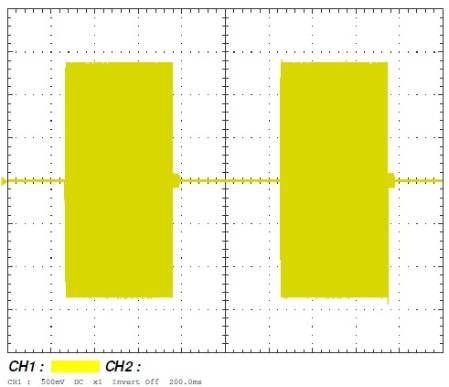
The envelope follower is set to operate very fast. When its output exceeds the threshold set by the slider, the ABCD comparator sends a "1" to gate open the volume control. Noise below the threshold doesn't open the gate. The result is shown below:
You can see the noise disappear shortly after the signal ends each time. The fast response shouldn't cut off the beginning of speech -- if it does, however, you can add a short look-ahead delay. Other advantages: You can easily change the threshold without editing any graph, and you can externally adjust the threshold with a pot or I2S, without multiple compressors.
Best regards,
Bob
Thanks for your input, Bob!
As usual Bob, good advice..........greatly appreciated! I wish true noise floor reduction was possible even in some pseudo method, but it doesn't look like that will be possible with the 1701.
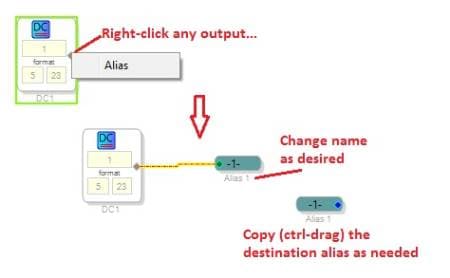
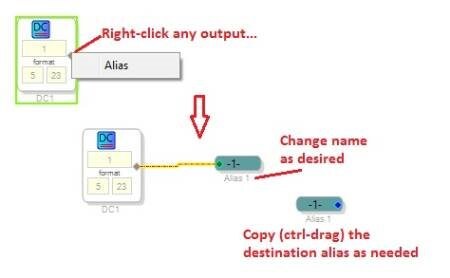
On a simpler note, how do you add the labels from your DC source going to multiple input pins? I've never seen that before and can't find it in SigmaStudio version 3.8 that I'm running.
Hi Byron,
To make an alias, right-click any output and select, "Alias". You can rename aliases and make as many copies of the destination aliases as you need to hook up your inputs. Aliases can really help clean up complex schematics.
BTW -- if your application involves speech, my post here:
http://ez.analog.com/thread/13507
describes a Voice Activity Detector, which is essentially a noise gate optimized for speech. It uses a non-linear method to adapt to various levels of speech and background noise.
As Brett noted, there's no true noise-reduction algorithm for the ADAU1701. There is one for the third-generation SigmaDSPs (ADAU144x), although it's limited to a sample rate of 16KHz. I wouldn't be surprised if the latest SigmaDSP, the ADAU145x, becomes more capable as ADI continues to write algorithms for it.
Bob
I tried using the idea discussed above, but the speech is chopped up to much and I end up loosing to much of the good audio. I played with the threshold adjustment, but un-fortunately it didn't work to well for the application.
Not to drag this out too much, but I desperately need some opinion on incorporating something like Bob mentioned in this post:
https://ez.analog.com/thread/20959
If you bin a large # of frequencies and then apply noise gating on each bin independently, you should be able to get the effect of eliminating noise energy below a threshold within each bin. If the energy in the bin or band is above threshold then you assume it's real speech and you let it through. Any reason why this concept can't be utilized on the 1701? I've been trying it by utilizing the project file from the 20959 thread of yours Bob, but with limited results (almost no audio getting through). I realize the 20959 thread was dealing with noise levels that where quite high, but my thinking was that the same principles should apply.
Trying to understand why this approach doesn't work.
Byron,
The level loss may come from the 1:2 expansion the circuit provides in its present form. Perhaps it can be adapted to more "normal' signal and noise levels. I might play with it over the weekend, and if I come up with anything that appears useful, I'll share it.
Bob
Hi Byron,
Some 40 years ago, my filters professor remarked, "Noise is the Enemy." It still is today. As we're finding out, it ain't easy to achieve audible noise reduction, even with DSP tools. The new ADAU145x family is nearly an order of magnitude more powerful than a -1701, offering the hope of more sophisticated noise reduction algorithms in the future.
In the meantime, I tried your idea of frequency-selective gating with a multiple filter arrangement and found it effective. I used 16 filters at third-octave intervals. First I set up a few of these filters without gating, to see how they behave summed together. Turns out that setting each for a "Q" of 2.5 provides a relatively flat frequency response.
The gating logic, shown below, is responsive yet minimizes switching noise as the bands cut in and out:
The 16 circuits are identical (did anyone say, "Hierarchy Board?"), except for these differences: the filters are double-precision at and below 1200Hz and single-precision above. Thresholds above 1200Hz are reduced by 6dB since speech levels are normally lower up there. Unfortunately this beast uses about 860 instructions.
I tested the circuit with its built-in noise added to a voice podcast. With the Threshold adjustment set all the way down, the circuit lets everything in its bandwidth through, including the noise. As you increase the threshold, it begins acting like a noise gate. Higher thresholds progressively reduce the audible noise. An excessive threshold setting chops up the speech, yet it's still quite intelligible. I included the on-screen level meter to help keep the input level between 0 and -12, where everything works best, although level is not especially critical.
Best regards,
Bob
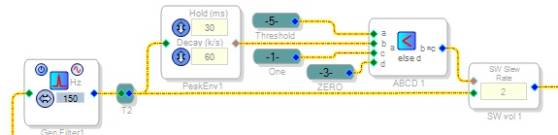
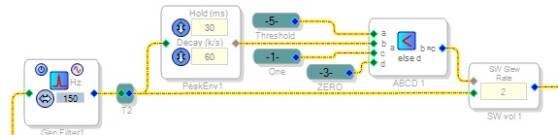
That produces some pretty amazing results Bob! The intelligibility of the audio is several orders of magnitude better than what I was experiencing before. From here I'll simply need to adjust threshold for the environment, ideally putting this under the control of an external POT, but worst case simply keeping it fixed for what works best.
Once again I can't thank-you enough for your effort and insight.........greatly appreciated!
Please log in to reply.