ADAU1772 decimation response
I am using the ADAU1772 as a low-power quad ADC (DSP disabled) and it is working perfectly. However, the ideal passband for this application is very similar to the "Total Decimation Response" graph shown in Figure 60 of the Rev. B datasheet. Would it be possible to get more information on how I can replicate this response curve in my application?
Thanks!
adau1772
Integrated/Special Purpose A/D Converters
Audio CODECs
Hi jammerl,
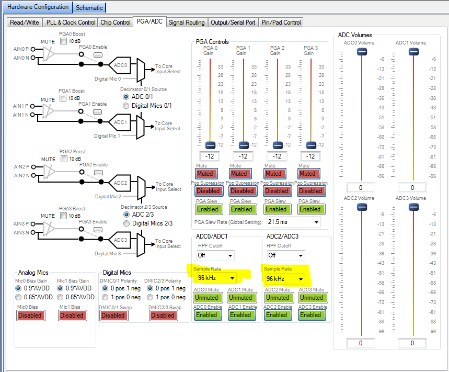
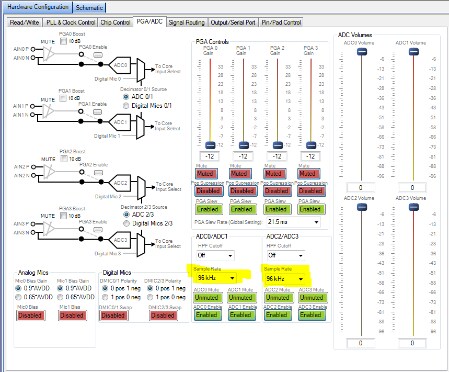
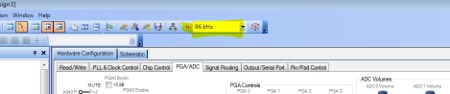
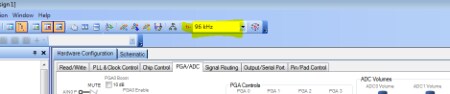
Figure 60 in the ADAU1772 data sheet shows the response plot for the decimation filters when the ADC is decimating down to 96 kHz. All you need to do is change the ADC sampling rate to 96 kHz in the PGA/ADC tab in SigmaStudio. If you plan on routing the signal to the core you will also need to change the core sampling frequency to 96 kHz by changing the 'system sample rate' at the top of the SigmaStudio window and clicking the 'set system sample rate' button directly to the left of it to set the sample rate of all of the cells in the schematic to 96 kHz as well. See pictures below.
ADC sample rate control
System Sample Rate
Let me know if this helps.
Regards,
-BillJ
BillJ,
Thanks for your response. The configuration you describe matches the current configuration in my test ADAU1772, but I see a broad bandpass response similar to Fig. 24 in the datasheet. The signal path shown in the figure (AIN0 to ASRC to ADC_SDATA0) is also identical to my configured signal routing. Do I need to route the signal through the core?
Thanks!
Hi jammerl,
You don't have to route through the core.
Could you let me know what sampling frequency you are usig for the ADCs, core, and serial port? Are you using the PGAs? I'll set this up in my lab and take some measurements to try and duplicate what you are measuring.
Regards,
-Bill
The ADC, core, and serial port frequencies are all 96 KHz. I've also tried increasing the ADC sample rate to 192KHz to force ASRC decimation. I am not using the PGAs.
The SigmaDSP project with my test settings is attached.
Thanks again for your help!
Hi jammerl,
After some investigation, it seems that the broad frequency response you are measuring is correct. The plot you were referring to in the datasheet (Figure 60) that shows a corner frequency at 24 kHz is for decimation down to 96 kHz with routing through the core and then to the serial port with a 48 kHz fs. I'm going to updat the datasheet to add clarity to some of these plots
When routing audio straight from the ADCs to the serial port, the filter response is always going to have a corner frequency at fs/2. The shape of the filter will change based on the decimation rate. Lower fs on the serial port will result in a higher order rolloff. If you want the filter response shown in figure 60 all you need to do is change the serial port rate to 48 kHz.
If you need to have the serial port operating at 96 kHz fs you could consider routing the audio through the core and filter the audio for the desired response there.
Regards,
-BillJ
Fantastic, thanks!
Please log in to reply.