ADAU1461 TDM problem
Hi. I have a custom prototype PCB with ADAU1461. Running in slave 8ch TDM
However I cannout get an output on the TDM SDO pin. Its always HIGH for bits 32-8 and LOW for 7-0 in the TDM slot.
See attached DSP.JPG
my MCLK is 12.288mhz So I am using the PLL x4.
My Project even has a Fixed DC signal on one of the TDM slots to see if the Problem is receiving or sending. and yet still no output.
Project attached.
Also attached is a DUMP of the Config registers unless I am missing something and surely I must be, They look ok to me.
I could really do with some help on this. I have run out of Ideas.
Thanks
Brett
ADAU1461
Audio Signal Processors
SigmaDSP Audio Processors
Hi Guys
I still cannot get any output on the TDM.
I readback all the Config Program Data registers and they are all correct.
I readback all the Param Ram registers 32. bytes. These are Not the same as what is Loaded at default. why is this? Do these change once DSP is running.As I am not making any changes.
I created a new project with nothing on the schematic page but 8 TDM in direct to 8 TDM out.
The same result?
help please.
Well I finall got the DSP to output some signal.
It turns Out the CHIP was defective all this time.
I repalced it and YAY some output signal..
BUT I do have one last question
It appears the DSP is Not passing the First Bit.
My Project has Nothing But ALL TDM inputs routed to ALL TDM Outputs in the DSP Schematic.
See the Attached Screen Grab of the Logic Analyser
Details
MCLK 12.288M
8ch TDM
PLL at 4x
SigmaStudio is set to
TDM8 Slave 50%
LRCK Falling
BLCK Falling
BitCLK cycles 256 per frame
Data Delay LREdge =1
REG 0x4015 = 0x04
REG 0x4016 = 0x80
is this correct for my incomming TDM Data?
Thanks
It looks like your configuration might not match the data format of your source.
Your source (SDI) appears to have left-justified data. In other words, the most significant bit is aligned with the clock edge of the LRCLK signal. This is a delay-by-zero format.
You have configured the ADAU1461 for delay-by-one, meaning that it's not expecting the most significant bit until one BCLK cycle after the LRCLK edge.
This means that the first data bit will be ignored.
To solve the problem, do one of these fixes:
Change your source format to delay the MSB by one bit... or...
Change the configuration in SigmaStudio to delay by one
Hi Brett.
If I set the Delay to 0, All that happens is the Entire SDO bit stream shifts One Bit to the Left. Still No MSB.
in fact it is impossible to have an MSB in this format as it would be truncated off.
The fact that the SDI and SDO Bit patterns MATCH in timing perfectly with "delay by one" is really ODD concidering what your saying that the format of my SDI data is "delay bit by 0".
Can you advise if the PROGRAM DATA changes once its loaded into the DSP?
If I read back this , Its does not apprear the same as what I put in. All the Configuration data is though.
Thanks
OK Update.
In regard to why my readback of the PROGRAM DATA was not the same was a readback issuse. Yes IT IS the same.
But that does not explain why my SDO data is missing MSB an other TDM comments in previous post.
?
Thannks
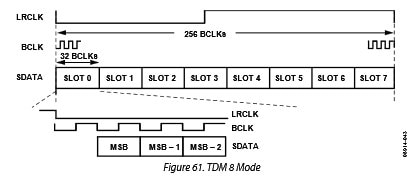
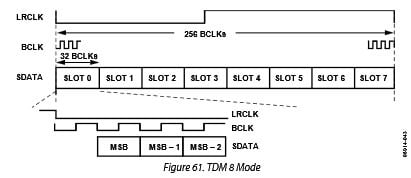
Are you able to change your data source so that there is a one bit delay between the edge of LRCLK and the start of the data? According to Figure 61 in the datasheet, it looks like a one bit delay might be necessary.
I tried duplicating your setup in the lab with an Audio Precision generating the serial data stream and clocks. It looks like TDM8 mode will work with a 1 bit delay, but it stops working when the data is left-justified (no delay). The easiest solution to the problem is to change the data source so there is a 1 bit delay, if possible.
If this isn't possible in your system, we might be able to add a capacitor on one of the signal lines to create an artificial delay in the signal and solve the problem that way.
Hi Brett.
thankfully I have an FPGA between the TDM master and the ADAU1461 SO I will have to Re format the data there. As the rest of my systen needs delay by 0 32 bit PCM data.
I think there is a BUG is Sigma Studio because all the TDM channel Numbers do not map as Per Fig 62 in the datasheet. Instead of Slots 0-7 being DIG0-7 in SS It appears to be DIG0 is Slot 0 (ie first ) and DIG1 is Slot 4
If you simply create a tone signal source and map it to DIG1 output you will see what I mean.
Thanks
Hi Brettcoupe,
Glad to hear you have an FPGA, so this doesn't break your system.
The serial port mapping is actually not a SigmaStudio bug but rather an oddity in the hardware design. The channel mappings are described in detail in these two wiki pages:
Outputs: https://wiki.analog.com/resources/tools-software/sigmastudio/toolbox/io/output#adau1761
Hi Brett.
Ok thats what I am seeing.
I am sure it would have been easier to "rename" them in Sigma Studio to a logical order rather than having this supplimentry remapping documentation.Or put this info in the datasheet. But at least now I know.
Thanks
Brett
Please log in to reply.