ADAU1772 Use 13MHz MCLK Issue
Hello,
I am use the ADAU1772 to design Bluetooth speaker. The Bluetooth chip output 13MHz mclk and use I2S interface to ADAU1772, to check that ADAU1772's PLL isn't lock frequency, I have use SG to production 13MHz clock to ADAU1772 that the result as same is not lock. Could you tell me, if I will be use 13MHz clock to ADAU1772 need to check what? Thank you.
adau1772
Integrated/Special Purpose A/D Converters
Audio CODECs
Hi paul.wu,
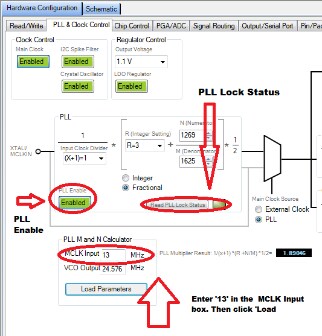
To use a 13 MHz external MCLK with the ADAU1772, you can set the PLL and check the lock status all from the PLL & Clock Control tab in the Hardware Configuration section of SigmaStudio.
The PLL section of the tab provides the controls to enable the PLL, set the PLL parameters, and check the lock status.
Also, Make sure that the Main Clock Source selector is set to PLL.
Let me know if this helps.
Regards,
-BillJ

Hi Bill
Thank you for your help. I will retry it. Thank you.
Hi, sorry to answer to this old thread, but I don't think I need a new thread to ask this question
To use an external MCLK signal in the eval ADAU1772 i have to remove R3 from the board, is that right? Can then the ADAU1772 still work as a Master?
Please log in to reply.