Printing problem on SIgma Studio
Dir sir.
I know the same kind of discussion was made on this zone in the past but I do not know if this problem has been already solved or not. I created a large project with Sigma Studio and tried to print it by adjusting parameters to fit entire schematic on a sheet, but I could not get a proper printout yet even with the latest version 3.9. Would somebody let me know the method to print ? I will attach a schematic sample. regards.
omnisounder
Hello omnisounder,
I'm afraid that the same printing limitations you've found discussed in the forum still remain. However, I found a new workaround that can help print larger schematics like yours:
Install CutePDF Writer on your PC. If you've used it before, you know it acts like any Windows printer, except instead of printing on paper, it produces a PDF file. Find the download at cutepdf.com.
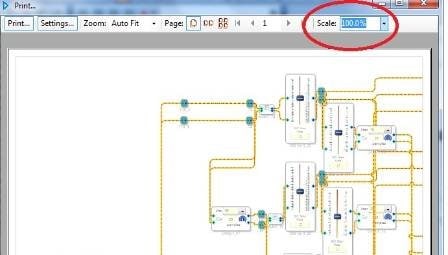
In SigmaStudio, choose File, Print to open the usual print box. Select 100% Scale since that works consistently.
Next click the Print button. Click through (ignore) the paper size warning to get to this dialog box:
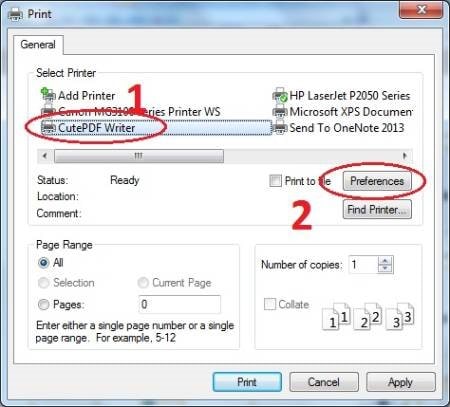
Choose CutePDF Writer as your "printer", then click the Preferences button:
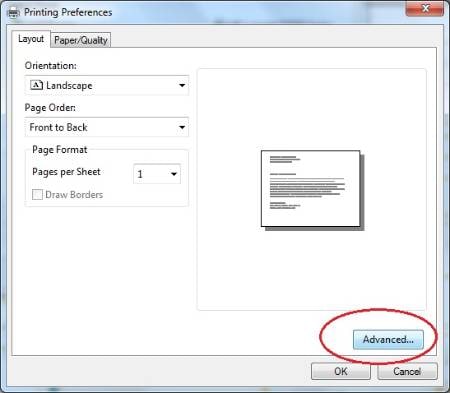
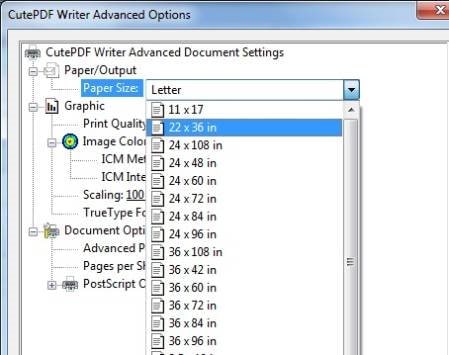
Click the Advanced button, then choose a paper size that will fit your entire diagram. CutePDF Writer gives access to huge formats to fit just about any schematic. It's well known that SigmaStudio's print utility has trouble with schematics exceeding the page size, so just use a larger page!
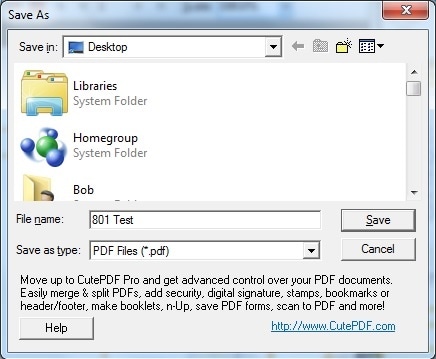
Click OK, OK, then Print. CutePDF Writer makes a PDF file of your schematic and asks where to save it:
Open your new PDF file with Acrobat or Adobe Reader, where you can view, zoom, and print as desired. I attached the PDF I made from your test schematic to show what the results appear like.
Best regards,
Bob




Hellow Bob,
Thank you very much for your valuable and detailed information.
Since I almost gave it up, your reply is a great help for me.
Thanks again!
omnisounder
Please log in to reply.