Re: resource usage?
EDIT: This was in answer to https://ez.analog.com/message/114819#114819 -- I'm not sure how it ended up as a new post. -- Bob
Hi tonyc,
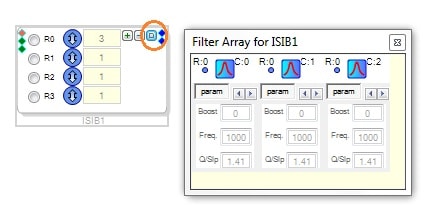
The rightmost of the three buttons you do get opens the filter window -- it just isn't red, for some reason:
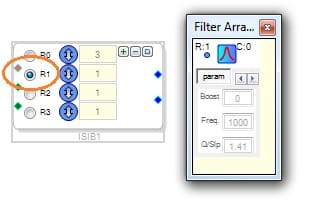
Use the filter select radio buttons at left to choose which filter to edit (they no longer show all at once):
No hardware is needed to edit the filters. If this doesn't work in version 3.6, try downloading a newer version -- see https://ez.analog.com/message/89364#89364
Best regards,
Bob
Hi Bob,
The 'reply' button wasn't working in IE for some reason, had to switch to FireFox.
Anyway, thanks for the answer, yes - I was able to get to the filter edit windows.
New question: after compiling how do you determine how much of the DSP available resources are used/available? The data displayed in the 'resources' window doesn't seem to change as I change the project. It might be that changing filter parameters doesn't effect resource usage.
Hi tonyc.
The resource window only works for certain SigmaDSP chips. If your project uses the ADAU170x, the way to find resource usage is:
Link-compile-download the project (with or without hardware)
Look in your project's folder for the folder called, IC1_project-name
Inside that folder there's another folder named net_list_out
Open the text file "compiler_output" in there, it will show the resources:
################## Summary ########################
Number of instructions used (out of a possible 1024 ) = 78
Data RAM used (out of a possible 2048 ) = 29
Parameter RAM used (out of a possible 1024 ) = 7
Best regards,
Bob
Thanks Bob, that makes it easy. Now I can capture my algorithm and see which part has enough resources and get the appropriate EVM. Many more questions between here and there I'm sure.
I'm amazed at how few resources are used for this example project (Binary_IndexSelectableFilter) !
FYI: the reply button is still now working in IE10, I think it's the 64-bit version.
Typo above 'now' => 'not'
Hi tonyc,
I just remembered that EngineerZone simply doesn't work with IE10,
see https://ez.analog.com/message/87221#87221
Bob
Please log in to reply.